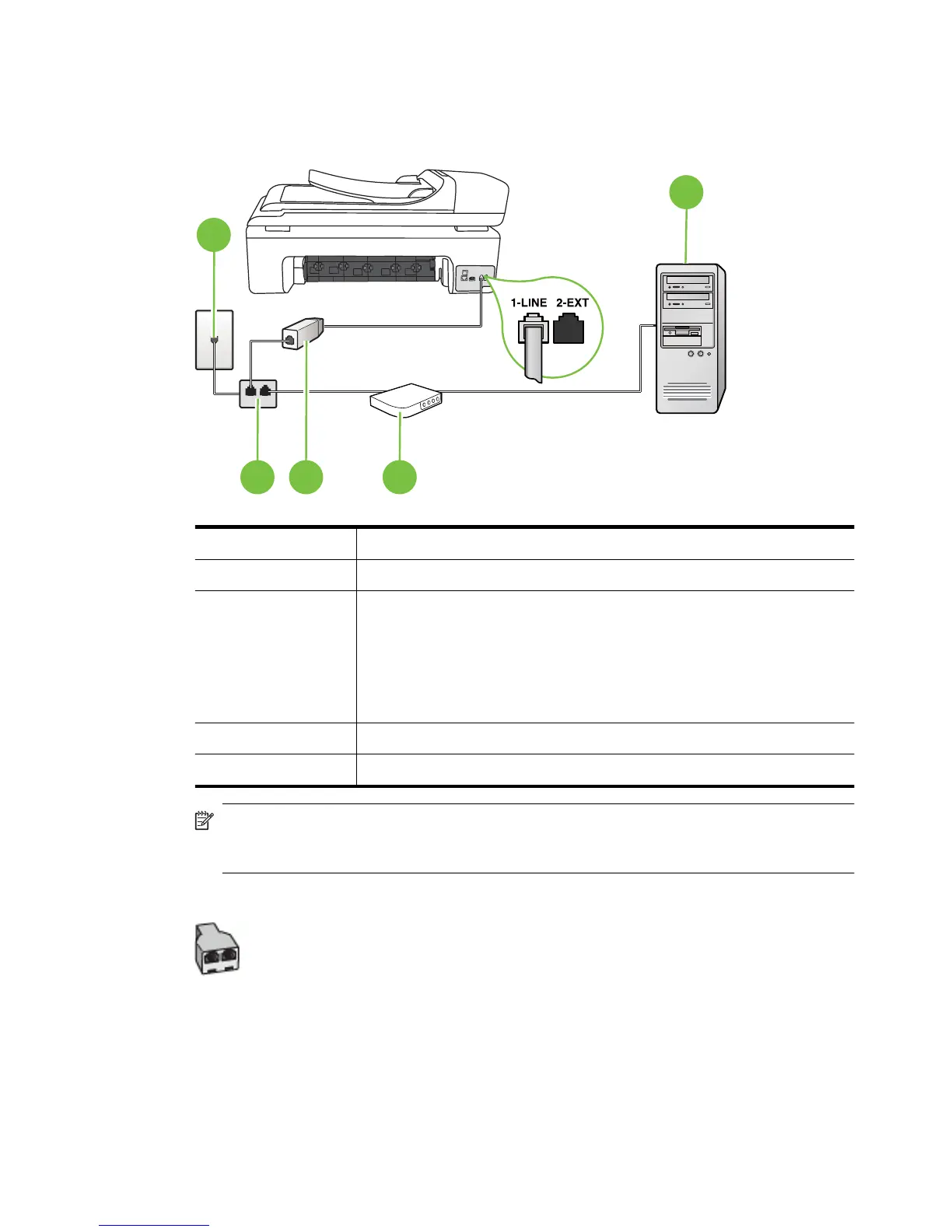
Set up the printer with a computer DSL/ADSL modem
If you have a DSL line and use that phone line to send faxes, follow these instructions to set up your
fax.
1
4
2 53
1 Telephone wall jack
2 Parallel splitter
3 DSL/ADSL filter
Connect one end of the phone jack that was supplied with the printer to
connect to the 1-LINE port on the back of the printer. Connect the other
end of the cord to the DSL/ADSL filter.
You might need to connect the supplied phone cord to the adapter
provided for your country/region.
4 Computer
5 Computer DSL/ADSL modem
NOTE: You need to purchase a parallel splitter. A parallel splitter has one RJ-11 port on the
front and two RJ-11 ports on the back. Do not use a 2–line phone splitter, a serial splitter, or a
parallel splitter which has two RJ-11 ports on the front and a plug on the back.
Example of a parallel splitter
Set up faxing (parallel phone systems) 211



 To Next Page