ENWW Printer Features 1-27
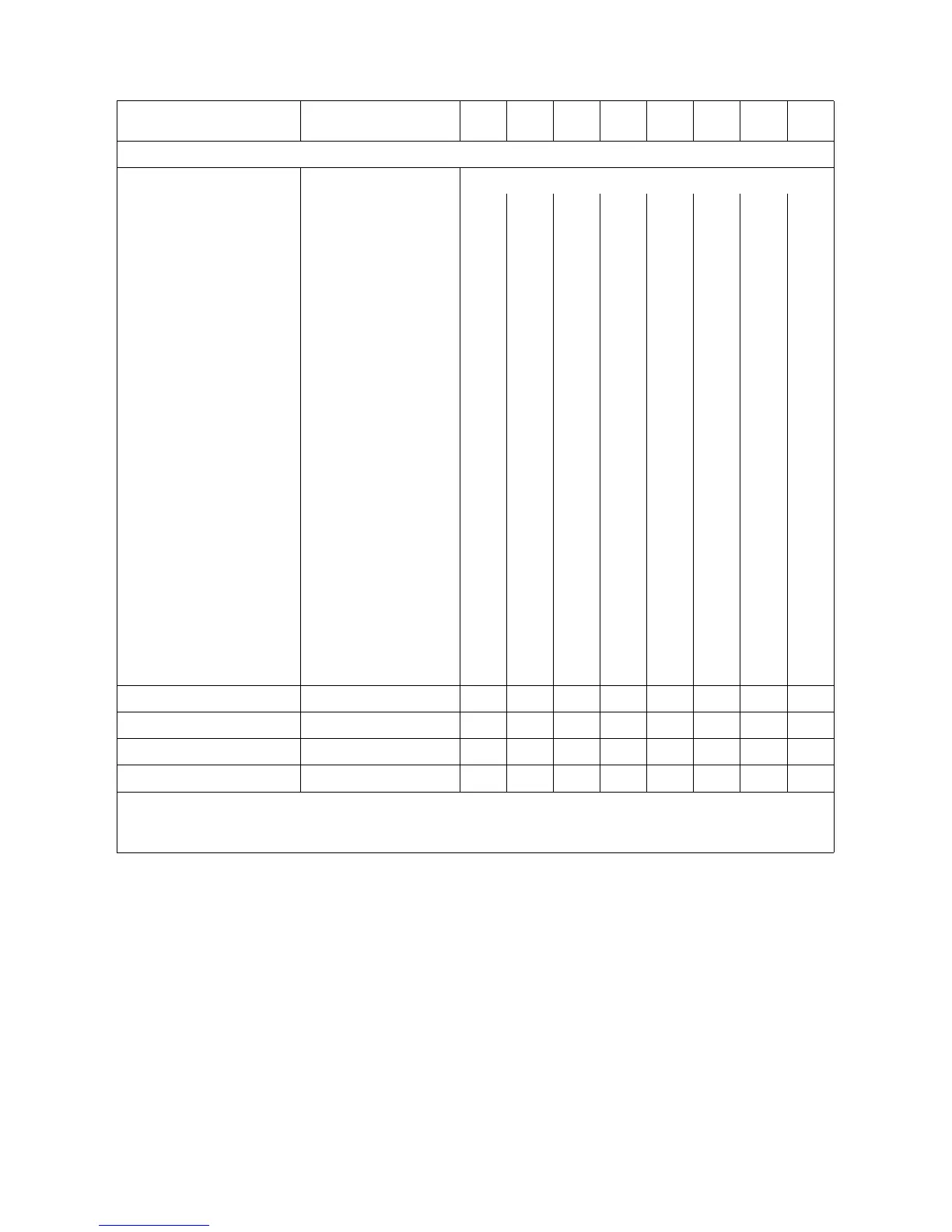
Table 1-1C. PCL 5 Feature Support Matrix (continued)
FUNCTION COMMAND
1100
Series
2100
Series
4000
Series
4500
Series
5000
Series
8000
Series
8100
Series
8500
Series
PAGE CONTROL
Page (Job) Size ?&l#A
Executive (1) ✓✓✓✓✓✓✓✓
Letter (2) ✓✓✓✓✓✓✓✓
Legal (3) ✓✓✓✓✓✓✓✓
Ledger (6) ns ns ns ns ns ns ns ✓
JISExec (Foolscap) (10) ✓
A5 (25) ✓✓✓✓✓✓✓✓
A4 (26) ✓✓✓✓✓✓✓✓
A3 (27) ns ns ns ns ns ns ns ✓
JIS B5 Paper (45) ✓✓✓✓✓✓✓✓
JIS B4 Paper (46) ns ns ns ✓✓ns ns ✓
Monarch Envelope (80) ✓✓✓✓✓✓✓✓
Com-10 Envelope (81) ✓✓✓✓✓✓✓✓
Intl. DL Envelope (90) ✓✓✓✓✓✓✓✓
Intl. C5 Envelope (91) ✓✓✓✓✓✓✓✓
Intl. B5 Envelope (100) ✓✓✓✓✓✓✓✓
Custom (101)
1
✓✓✓
1
✓✓✓✓✓
Hagaki Postcard (71) ns ✓ ns ✓ ns ns ns ns
Oufuku-Hagaki
Postcard (72)
ns ✓ ns ✓ ns ns ns ns
Orientation ?&l#O ✓✓✓✓✓✓✓✓
Page Side Selection
2
?&a#G ✓✓✓✓✓✓✓✓
Job Separation ?&l1T ns ns ns ns ns ns ns ns
Finish Mode ?&b#F ns ns ns ✓ ns ns ns ns
✓ Indicates a command is supported. ns - Indicates a command is not supported.
1
For some HP LaserJet printers, the custom size is configurable via the control panel.
2
On non-duplex printers, this command causes a conditional page eject.






 To Next Page