ENWW Printer Features 1-29
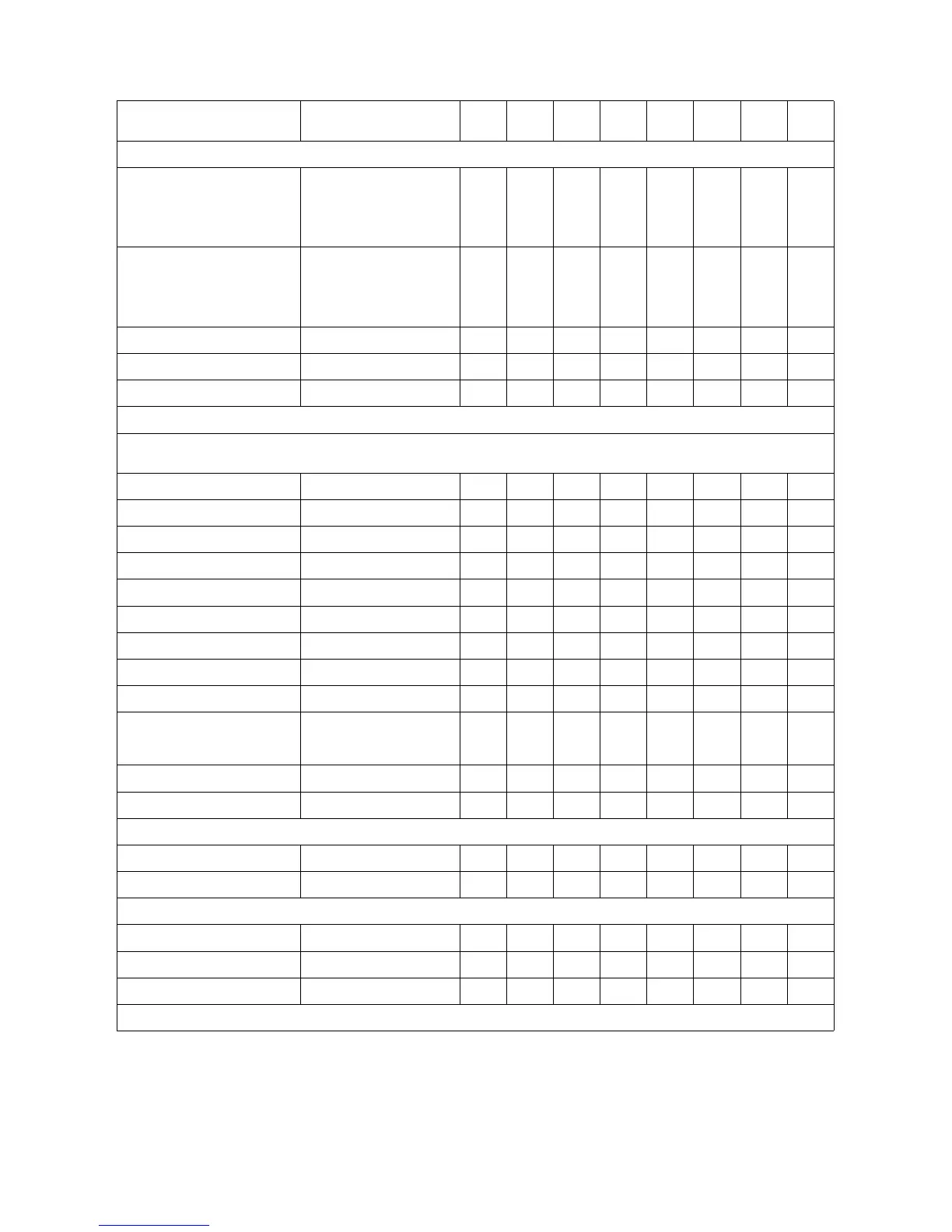
Table 1-1C. PCL 5 Feature Support Matrix (continued)
FUNCTION COMMAND
1100
Series
2100
Series
4000
Series
4500
Series
5000
Series
8000
Series
8100
Series
8500
Series
CURSOR POSITIONING
Horizontal Position ?&a#C ✓✓✓✓✓✓✓✓
?*p#X ✓✓✓✓✓✓✓✓
?&a#H ✓✓✓✓ ✓ ✓✓✓
Vertical Position ?&a#R ✓✓✓✓✓✓✓✓
?*p#Y ✓✓✓✓✓✓✓✓
?&a#V ✓✓✓✓✓ ✓✓✓
Half Line Feed ?= ✓✓✓✓✓✓✓✓
Line Termination ?&k#G ✓✓✓✓✓✓✓✓
Push/Pop Position ?&f#S ✓✓✓✓✓✓✓✓
FONT SELECTION
The Primary font commands in this table can be changed to Secondary by replacing the left parenthesis “(” in the command with a right
parenthesis “)”.
Symbol Set (Primary) ?(ID ✓✓✓✓✓✓✓✓
Spacing (Primary) ?(s#P ✓✓✓✓✓✓✓✓
Pitch (Primary) ?(s#H ✓✓✓✓✓✓✓✓
Height (Primary) ?(s#V ✓✓✓✓✓✓✓✓
Style (Primary) ?(s#S ✓✓✓✓✓✓✓✓
Stroke Weight (Primary) ?(s#B ✓✓✓✓✓✓✓✓
Typeface (Primary) ?(s#T ✓✓✓✓✓✓✓✓
Font Selection By ID # (Pri.) ?(#X ✓✓✓✓✓✓✓✓
Select Default Font (Primary) ?(3@ ✓✓✓✓✓✓✓✓
Underline ?&d#D ✓✓✓✓✓✓✓✓
?&d@ ✓✓✓✓✓✓✓✓
Transparent Print Data ?&p#X[data] ✓✓✓✓✓✓✓✓
Text Parsing Method ?&t#P ✓✓✓✓✓✓✓✓
FONT MANAGEMENT
Assign Font ID # ?*c#D ✓✓✓✓✓✓✓✓
Font Control ?*c#F ✓✓✓✓✓✓✓✓
USER-DEFINED SYMBOL SET
Symbol Set ID Code ?*c#R ✓✓✓✓✓✓✓✓
Define Symbol Set ?(f#W[data] ✓✓✓✓✓✓✓✓
Symbol Set Control ?*c#S ✓✓✓✓✓✓✓✓
✓ Indicates a command is supported. ns - Indicates a command is not supported.






 To Next Page