4-22
Planning and Implementation for the Series 5400zl Switch
Planning Your PoE Configuration
Planning and
Implementation for the
Series 5400zl Switch
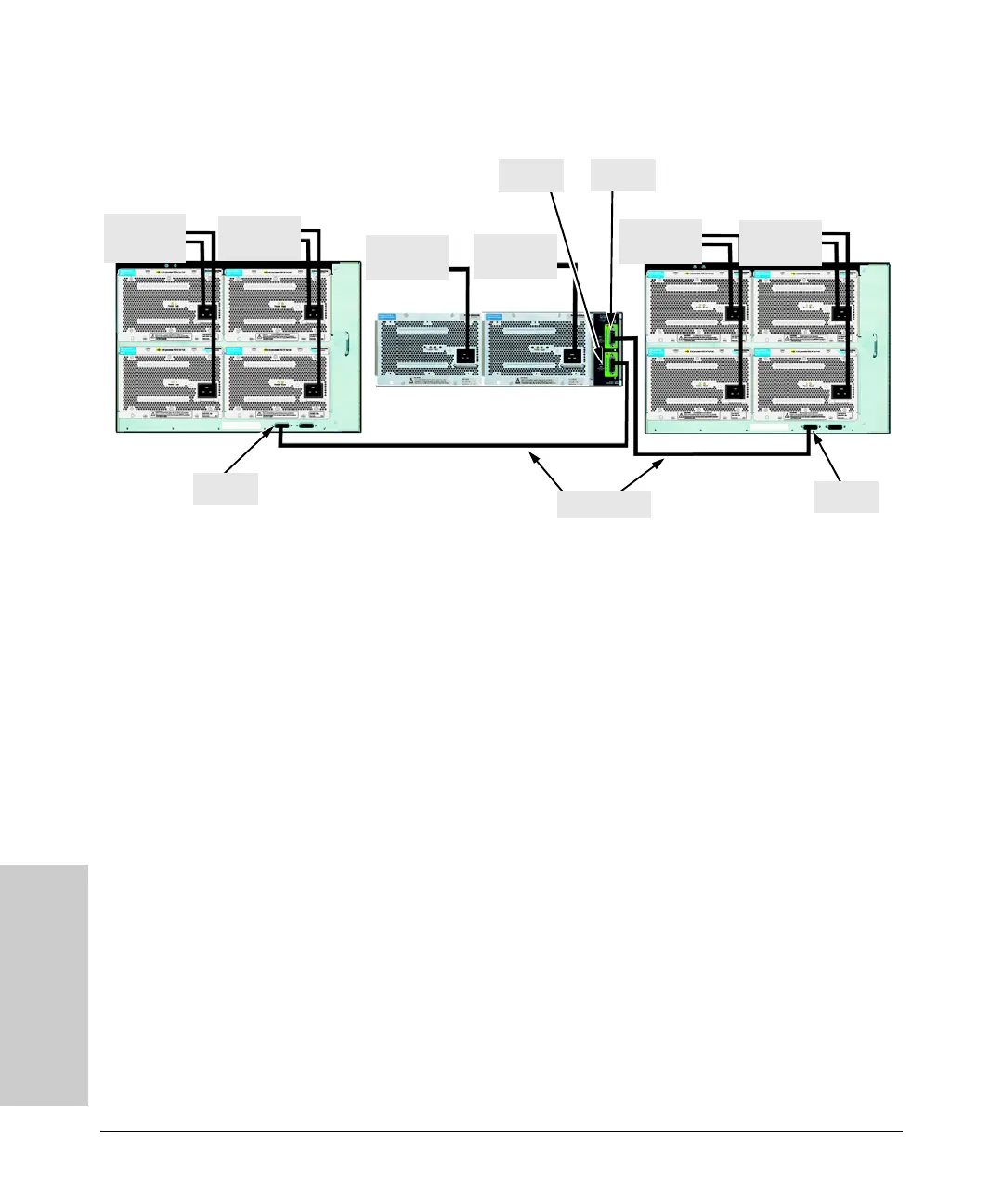
Figure 4-17. Connecting the EPS to two 5412zl switches
In this configuration EPS 2 of the Power Supply Shelf can be connected to
either EPS 1 or EPS 2 of the switch.
As shown in figures 4-16 and 4-17 the Power Supply Shelf can be connected
to the 5412zl to supply extra or redundant PoE power to the PoE modules
installed in the 5412zl.
To Po we r
Source
To P o we r
Source
To Po we r
Source
To P ow er
Source
To Po we r
Source
To Po we r
Source
EPS Cables
EPS 1
EPS 1
EPS 2
EPS 1


 To Next Page
 Loading...