57
Power supply unit installation guidelines
Installation instructions for the MicroServer standard multi-outputs power supply. To simplify the
standard power supply unit installation, the user must de-install and re-install the ODD.
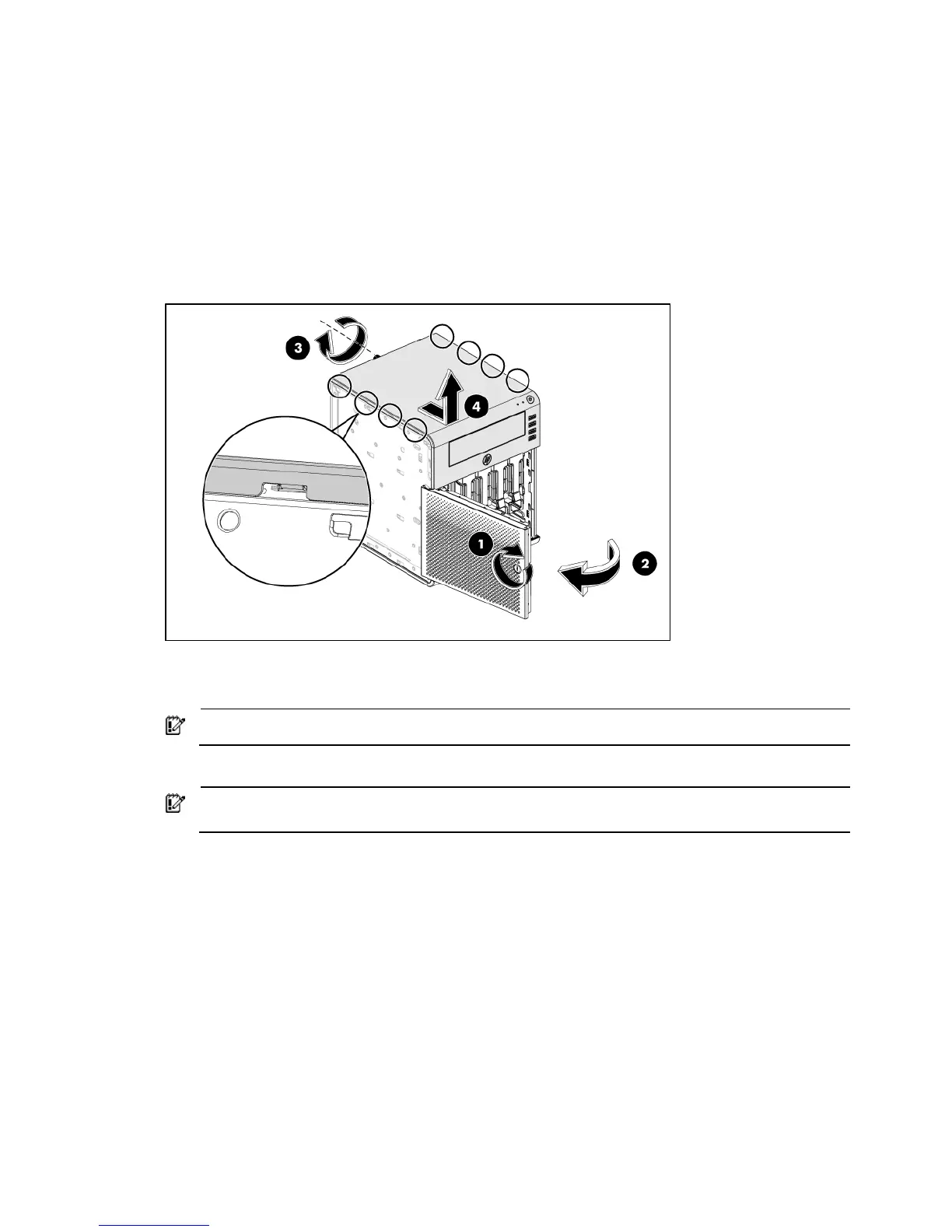
1. Use the HP ProLiant MicroServer’s key to unlock the panel door (1).
2. Open the panel door of the server and remove any components or cables that prevent access to
the slot (2).
3. Loosen the back screw which locks the top panel on the chassis (3).
4. Slide the top panel forward and then lift to remove it from the chassis (4).
5. Disconnect the power cables:
• Disconnect the SATA ODD power cable and ODD cable.
IMPORTANT: Slide the ODD out of chassis before disconnecting the 4 hard drive power cables
• Disconnect the 4 hard drive power cables.
IMPORTANT: Pull out the system tray by following the procedure step 3, 4, 5 described in the
“Remove the system board” section.
• Disconnect the power cable from the system tray.













 To Next Page