Operations 33
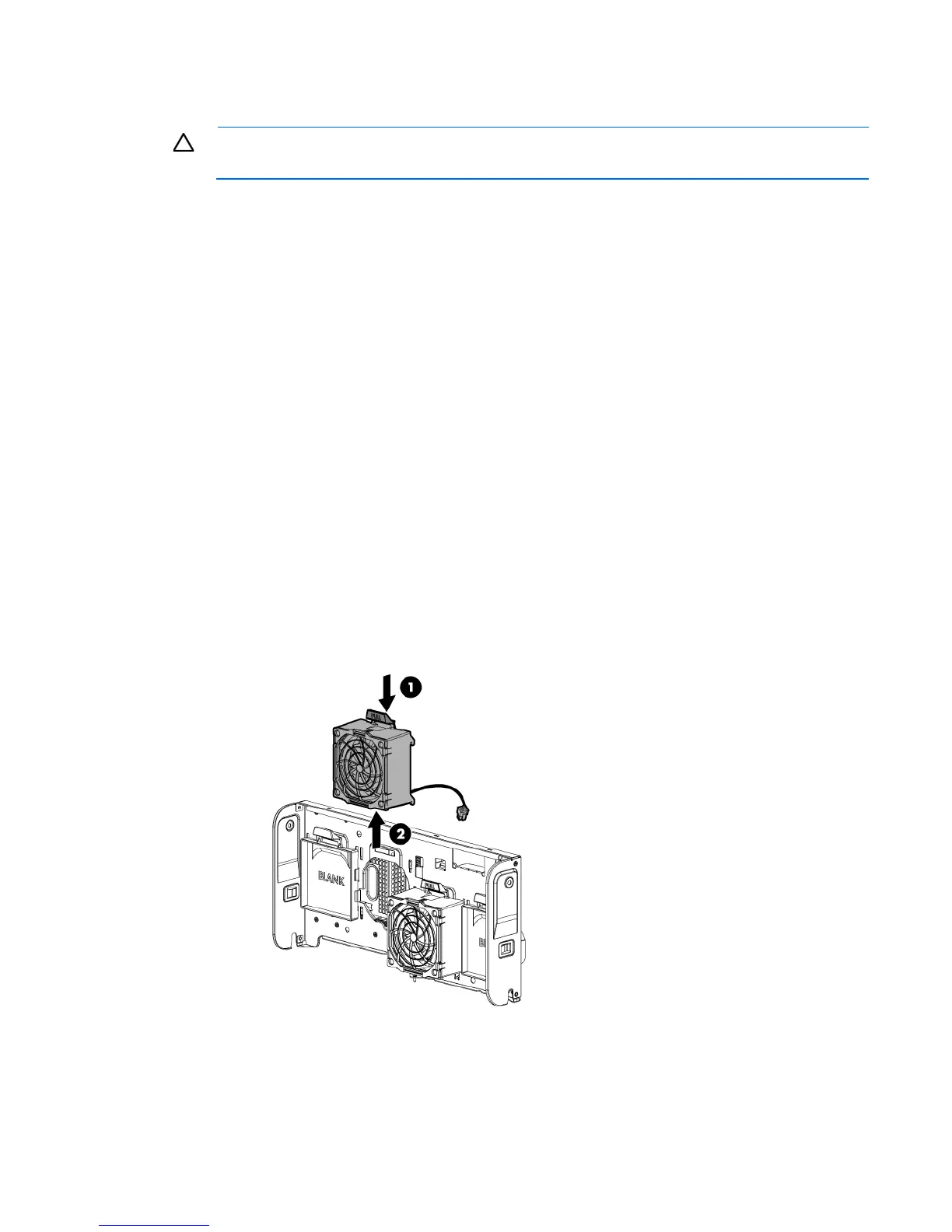
Remove a fan
CAUTION: To prevent improper cooling and thermal damage, do not operate the server unless
all bays are populated with either a component or a blank.
To remove the component:
1. Do one of the following:
o For tower models, open and remove the bezel ("Remove the tower bezel" on page 22).
o For rack models, if installed, remove the security bezel (on page 24).
2. Power down the server (on page 22).
3. Remove all power:
a. Disconnect each power cord from the power source.
b. Disconnect each power cord from the server.
4. Do one of the following:
o For tower models, place the server on a flat, level surface with the access panel facing up.
o For rack models, extend the server from the rack (on page 27).
5. Remove the access panel (on page 25).
6. If installed, remove the PCI air baffle (on page 28).
7. Remove any installed full-length PCI expansion cards ("Remove a full-length expansion board" on page
37).
8. Remove the system air baffle (on page 30).
9. Remove the fan cage (on page 31).
10. Remove the fan.
Remove the FBWC capacitor pack





 To Next Page