Rear components
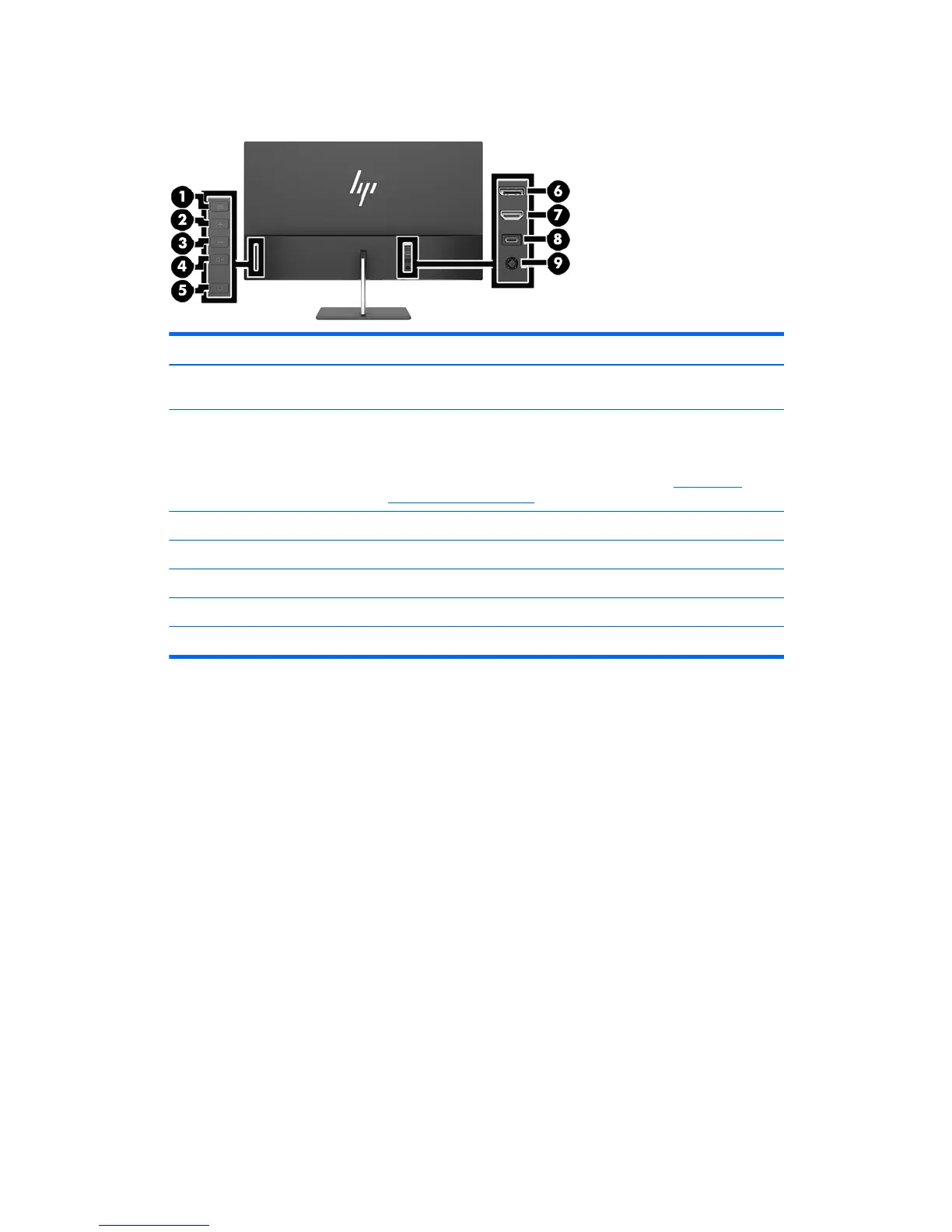
Component Function
1 Menu button Press to open the OSD menu, select a menu item from the OSD, or close the
OSD menu.
2–4 Function buttons Use these buttons to navigate through the OSD menu based on the
indicators above the buttons that are activated while the OSD menu is open.
NOTE: You can recongure the Function buttons in the OSD menu to
quickly select the most commonly used operations. See Assigning the
Function buttons on page 15 for more information.
5 Power button Press the button to turn the monitor on or o.
6 DisplayPort Connects the DisplayPort cable from the source device to the monitor.
7 HDMI port Connects the HDMI cable from the source device to the monitor.
8 USB Type-C port Connects the USB Type-C cable from the source device to the monitor.
9 Power connector Connects an AC adapter.
Product features and components 3


 To Next Page