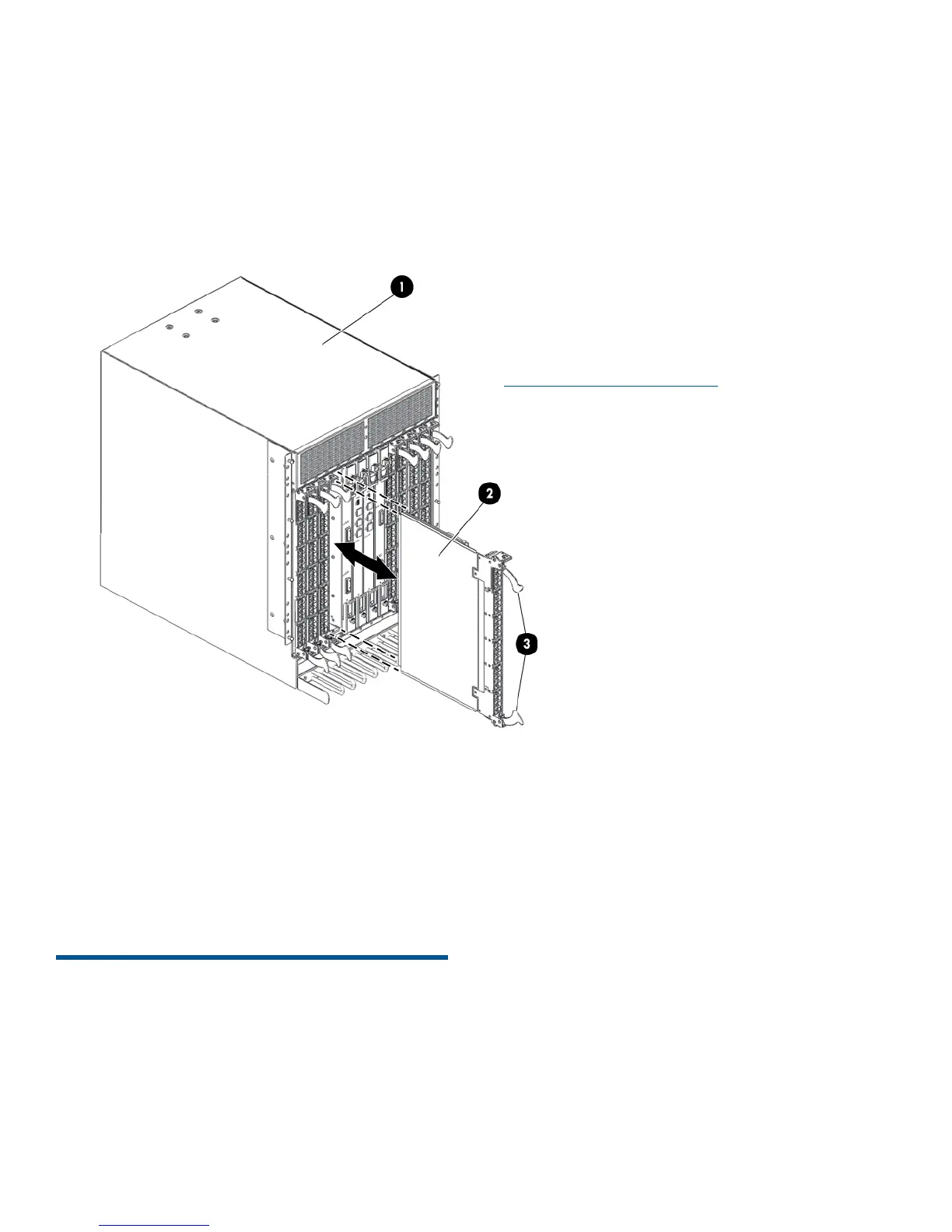
5. For blades with ejectors:
a. Open the ejectors.
b. Align the flat side of the blade inside the
upper and lower rail guides in the slot.
c. Slide the blade into the slot until it is firmly
seated (Figure 20 (page 13)).
d. Close the ejectors.
Figure 20 Removing and replacing a blade with
ejectors only (FC4-48 shown)
2. FC4-481. SAN Backbone Director
chassis
3. Ejectors
6. Verify that the blade power LED is displaying a
steady green light and that the blade is firmly
seated.
7. Install the transceivers and cables.
For more information
This document provides initial setup and configuration
procedures only. For comprehensive configuration
procedures (including those for mixed-blade
configurations), see the following:
• HP B-series SN8000B 8-Slot SAN Backbone
Director Switch Hardware Reference Guide
• HP HP B-series SN8000B 4-Slot SAN Director
Switch Hardware Reference Guide
• HP StorageWorks DC and DC04 SAN Director
Switch Hardware Reference Guide
• iSCSI Gateway Service Administrator Guide
• Brocade Fabric OS Administrator's Guide
Supporting Fabric OS 7.0.x
For the latest documentation and firmware releases,
see:
http://www.hp.com/go/san
Page 13













 To Previous Page