Ultrium 960, Ultrium 448, Ultrium 460, Ultrium 230, DLT VS80, SDLT 320 47
4 Diagnostics and troubleshooting
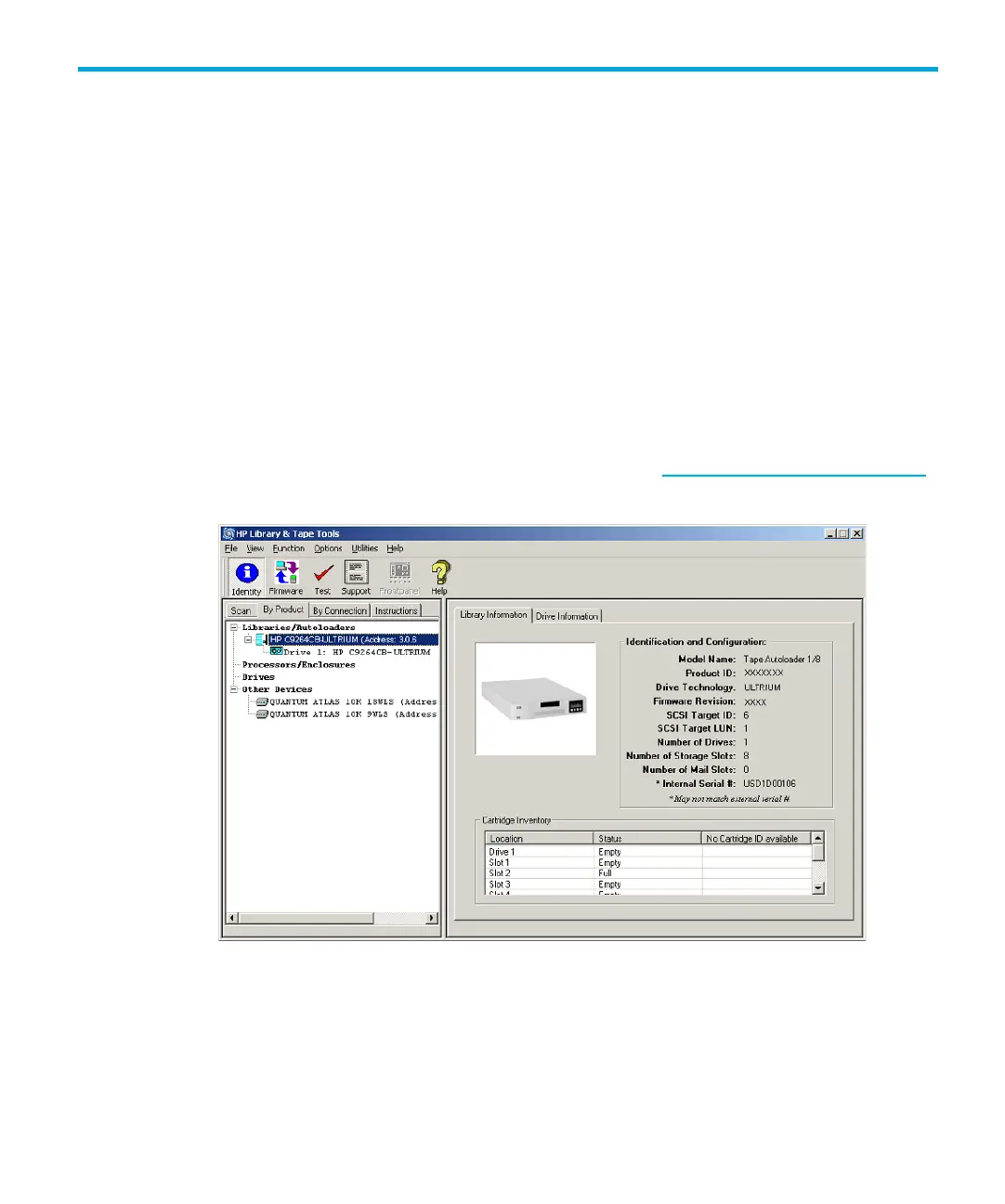
Using HP Library & Tape Tools to diagnose problems
With HP Library & Tape Tools installed on the host server
• Identify all SCSI devices connected to your system
• View detailed configuration, identification, inventory, and drive information for the autoloader
• Easily update autoloader and drive firmware
• Run advanced diagnostic tests, including connectivity, read/write, media validation, and testing
the functionality of the autoloader
• View autoloader and drive error logs
• Generate a detailed support file that can be e-mailed or faxed to your support representative for
analysis
The HP Library & Tape Tools diagnostic provides an intuitive graphical user interface with integrated
context-sensitive help. It can be downloaded free of charge from www.hp.com/support/TapeTools
.
Figure 17 HP Library & Tape Tool interface



 To Next Page