Hardware Setup14
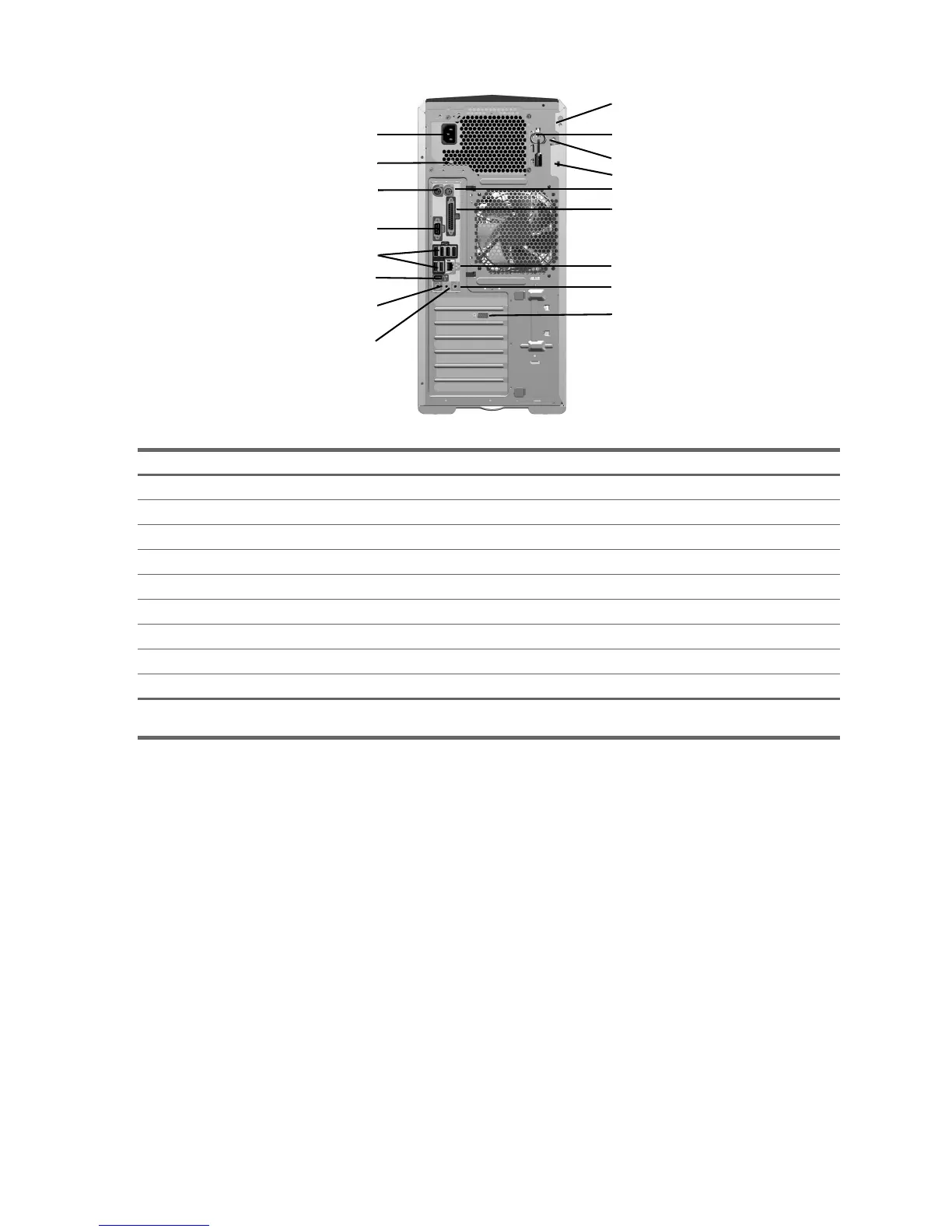
2.3.3 HP xw8200 Workstation Rear Panel Components
Table 2-6 HP xw8200 Workstation Rear Panel Components
Item Description Item Description
1 Power Cord Connector 10 Access Panel Key
2 Built In Self Test (BIST) (green LED) 11 Padlock Loop
3 Keyboard Connector 12 Cable Lock Slot
4 Serial Connector (teal) 13 Mouse Connector (green)
5 USB 2.0 Ports (6) 14 Parallel Connector (burgundy)
6 IEEE 1394 Connector 15 RJ-45 Network Connector
7 Microphone Connector (pink) 16 Audio Line-In Connector (light blue)
8 Audio Line-Out Connector (lime) 17 Graphics Adapter
9 Universal Chassis Clamp Opening
NOTE: The rear panel connectors are labeled with industry-standard icons and colors to assist you in connecting your peripheral
devices.
5
6
4
1
3
7
8
12
10
11
13
14
15
16
9
17
2


 To Next Page
 Loading...