Need help?
Do you have a question about the HPM Slimline Digital Timer D817SLIM and is the answer not in the manual?
Details on how to set the current time and day on the timer display.
Guidance on navigating to view or set up to 16 switching programs.
Covers activating AUTO mode and understanding ON, AUTO ON, OFF, AUTO OFF overrides.
Explains the Random Feature to vary ON/OFF times by 4-32 minutes.
Instructions for setting a delayed ON or OFF switching event.
Steps to reset all programs or delete individual timer settings.
Addresses common issues like incorrect timing, random function interference, and compatibility.
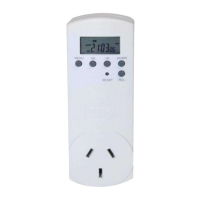
This document describes the HPM Digital Timer, Cat. No. D817SLIM, a 7-day digital timer designed for controlling electrical devices with precision and flexibility.
The HPM Digital Timer is a programmable device that allows users to automate the switching ON and OFF of connected electrical appliances. It supports up to 16 distinct programs, each of which can be configured to repeat daily, weekly, daily during the working week, daily on weekends, or in various other day combinations. This extensive programmability provides users with significant control over their devices' operating schedules.
Beyond basic scheduling, the timer includes a "Random Feature" and a "Countdown Mode." The Random Feature introduces a variable delay to the preset ON and OFF times, ranging from 4 to 32 minutes. This functionality is particularly useful for creating an impression of occupancy when users are away, as it makes the switching pattern unpredictable. The Countdown Mode, on the other hand, functions like a kitchen timer, allowing users to set a delayed ON or OFF switch after a specified duration, rather than triggering an alarm.
The timer is equipped with an internal rechargeable battery. This battery serves as a backup, preserving all programmed settings in the event of a power failure. When the timer is new or has been unused for an extended period, the battery may require recharging. Users are advised to plug the timer into a power outlet for a few hours or overnight to ensure the battery is fully charged before setting up the timer.
Operating the HPM Digital Timer involves three primary steps: setting the clock, configuring switching programs, and activating the "AUTO" mode. The timer offers three distinct modes, accessible by pressing the "MENU" button:
Clock Mode: In this mode, the timer displays the current time and day. Setting the clock involves holding the "OK" button until the day of the week flashes, then using the "UP" button to select the correct day, followed by pressing "OK." The hours and minutes are set similarly. Within Clock Mode, there are also options for immediate override:
Program Mode: This mode allows users to view and set the 16 available program settings. To set an "ON" program time, users press "MENU" until "1on" flashes. Pressing "OK" makes the days of the week flash, allowing selection of specific days or combinations (e.g., all days, single days, Monday-Wednesday-Friday, or Saturday-Sunday). After selecting the days, users set the hours and minutes for the "ON" time, confirming each step with "OK." The "1on" indicator will flash again. Pressing "UP" changes it to "1off," allowing users to set the corresponding "OFF" time using the same procedure. To set additional programs (up to 16), users press "UP" to cycle to "2on," "3on," and so on, repeating the setting steps for each program.
Countdown Mode: This mode enables users to set a specific duration after which the timer will either turn a device ON or OFF. To access this mode, users press "MENU" twice. The display will show "CTD" above the seconds. Before setting the countdown time, users choose whether the timer should switch ON or OFF after the elapsed time. The display initially shows "0:00:00," with the hour position flashing. Users adjust the hours (0-99) using the "UP" and "DOWN" buttons, then press "OK" to move to minutes (0-59), and again for seconds (0-59). Once confirmed, the timer begins counting down, and "CTD" flashes. After two minutes, the display returns to Clock Mode. Countdown Mode takes precedence over programmed settings and the Random Feature. To cancel a countdown, users navigate back to the Countdown Mode display and press "RCL."
To ensure the timer operates automatically according to the set programs, the word "AUTO" must be displayed in Clock Mode. Users can scroll through various power options (ON, OFF, AUTO ON, AUTO OFF) using the "UP" button in Clock Mode.
The HPM Digital Timer includes features for managing and troubleshooting programs:
Deleting Programs:
Troubleshooting:
The internal rechargeable battery is designed to maintain settings during power outages, reducing the need for frequent re-programming. Initial charging or recharging after extended disuse is a simple process of plugging the unit into a power outlet.
For safety, HPM recommends unplugging the timer from the wall and using the device's OFF switch when performing maintenance tasks, such as replacing a light globe. This emphasizes a safe practice beyond the timer's internal OFF setting.
 General
| Type | Digital Timer |
|---|---|
| Model | D817SLIM |
| Brand | HPM |
| Design | Slimline |
| Voltage Rating | 240V |
| Current Rating | 10A |
| Display | LCD |
| Battery Backup | Yes |
| Mounting | Plug-in |
| Operating Voltage | 230-240V AC |

 To Next Page