3.3. STORAGE
In order to guarantee precise measurements, after a long storage period, in extreme
environmental conditions, wait for the instrument to return to normal conditions (see § 7.3)
4. DESCRIPTION OF THE REMOTE UNIT SOLAR-02
4.1. DESCRIPTION OF CONTROLS
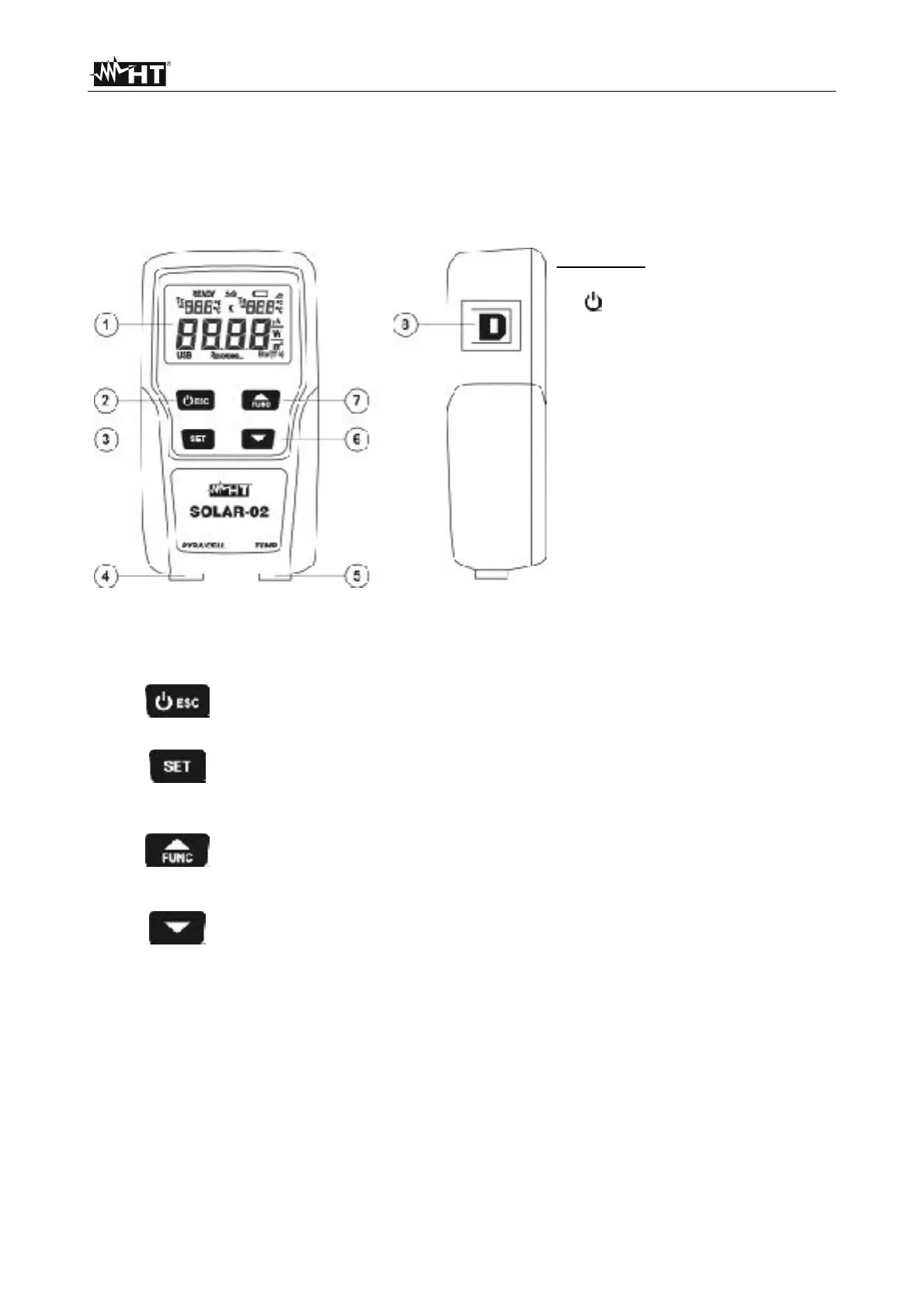
Fig. 1: Description of the remote unit SOLAR-02
4.2. DESCRIPTION OF FUNCTION KEYS
CAPTION:
1. LCD display
2. /ESC key
3. SET key
4. PYRA/CELL input
5. TEMP input
6. arrow key
7. FUNC/ key
8. USB port for connection to
master instrument M-USB
This key has a double function of turning ON/OFF the unit and of
returning to the previous screen (ESC)
The SET key allows a rapid selection of the sensitivity of the
solarimeter/reference solar cell in use
This key has a double function of increasing (), which can be
used when programming, and of passing from the display of the
environmental temperature Te to the display of the tilting angle
(FUNC).
The key is used when programming the unit to set the parameter
values,


 To Next Page