Transferring content from an Android phone
On your old Android
™
phone, download the HTC Transfer Tool and use it to transfer
your content to your new HTC phone. The types of locally stored content on your old
phone that the tool can transfer include contacts, messages, calendar events, web
bookmarks, music, photos, and videos. Some settings can also be transferred.
§ You need Android version 2.3 or later to use the HTC Transfer Tool on your old
phone.
§ If your old phone has Android version 2.2 or an earlier version, you need to use
Bluetooth
®
transfer. For details, see Transferring content from your old phone
through Bluetooth on page 19.
1. Do one of the following:
§ If you're setting up your new HTC phone for the first time, choose to
transfer content, and then select Transfer from old phone on the Set up
phone screen.
§ Go to Settings, and then tap Transfer content.
2. Choose whether to transfer from an old HTC phone or other Android phone.
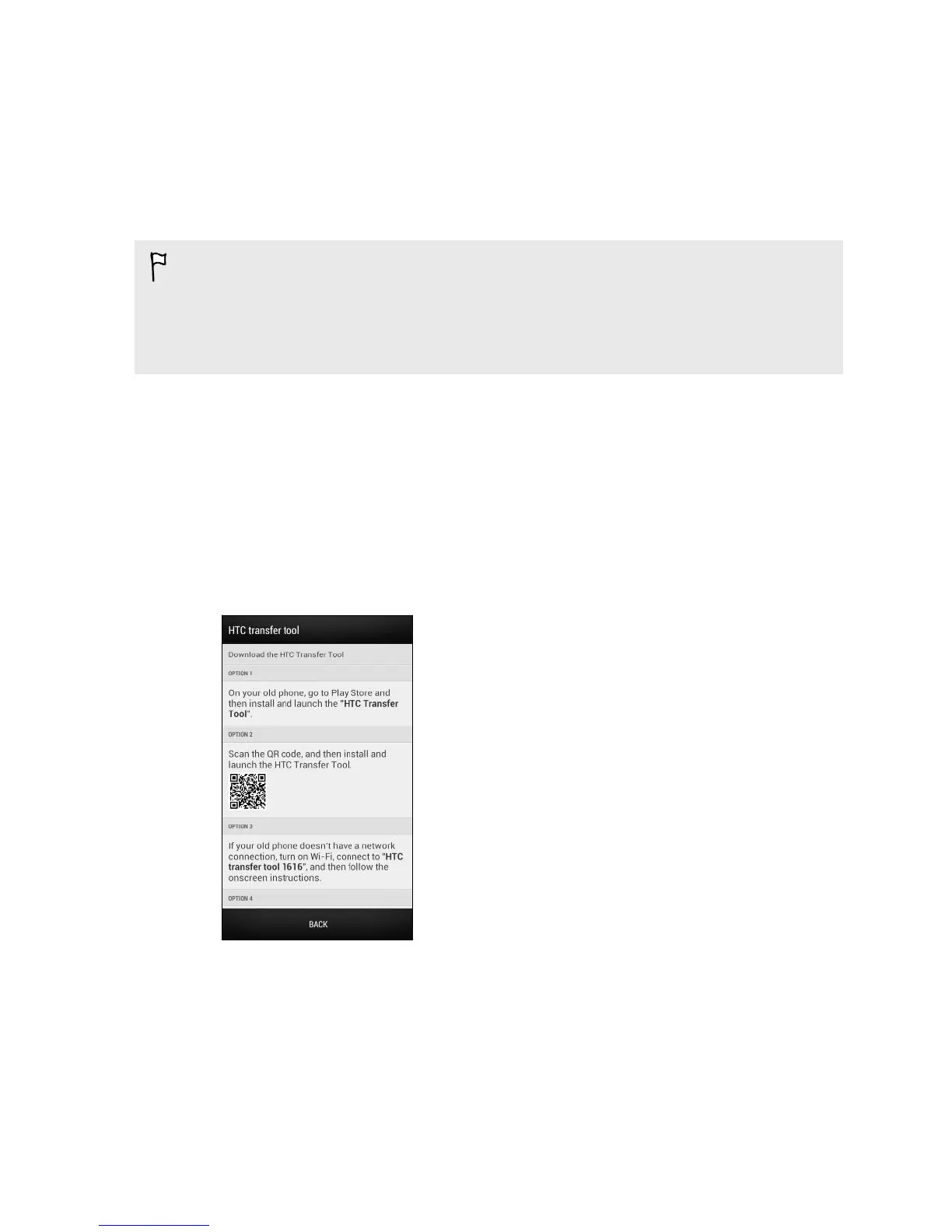
3. Follow the suggestions shown on your new phone to download and install the
HTC Transfer Tool to your old phone.
4. Follow the instructions on the two phones to connect them. When you see a PIN
on your old phone, make sure the same PIN also appears on your new phone
before you continue.
5. On your old phone, choose the types of content you want to transfer, and then
tap Start.
6. Wait for the transfer to finish.
17 Setting up your phone



 To Next Page