22
8. Update mode
Update mode sets the desired time frames for phone to perform the auto provisioning
process.
Below is the introduction of the 3 updating modes in detail:
Power On
Repeatedly
SIP NOTIFY Message
Power On
Power On mode is set as default. The phone will perform auto provisioning process when
it is power on.
Repeatedly
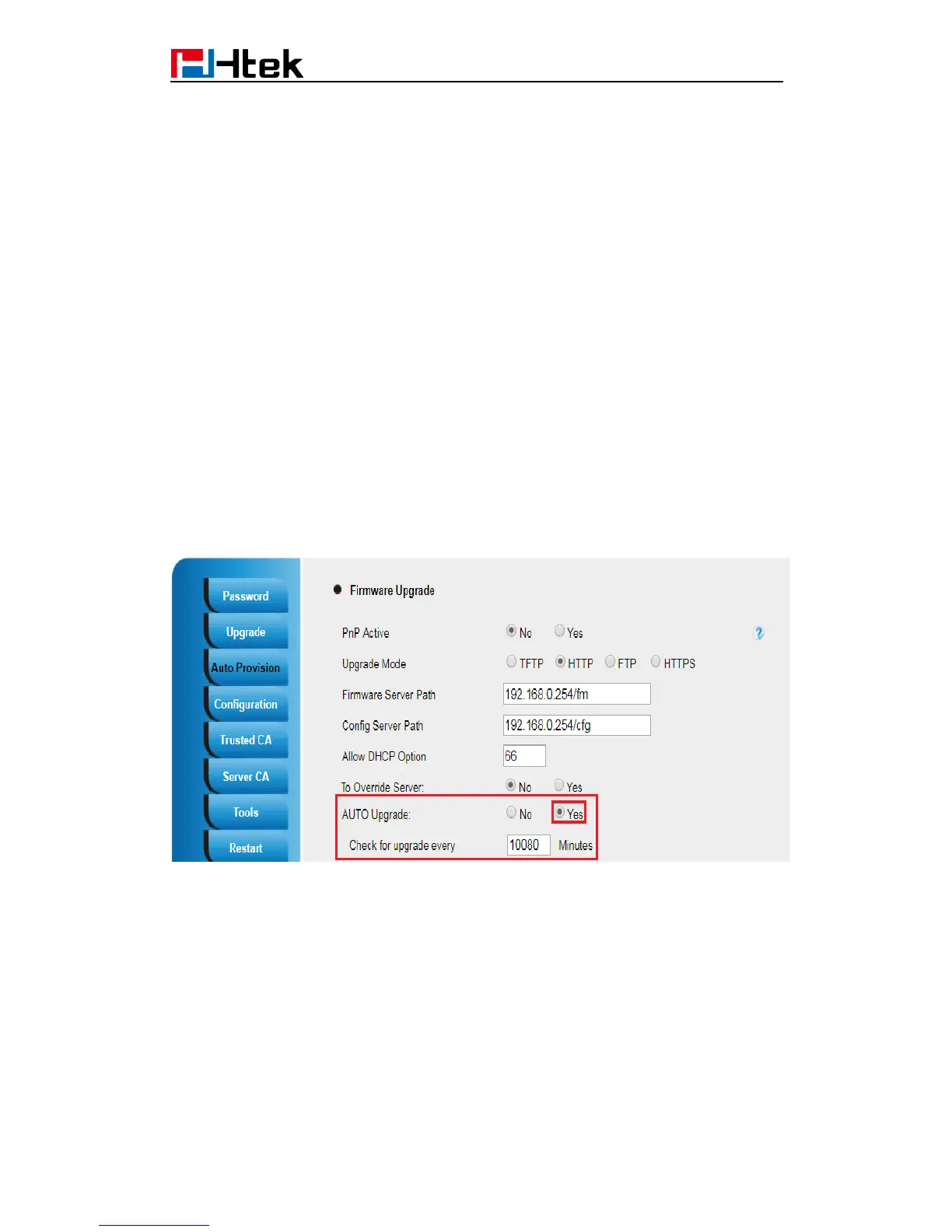
The phone performs auto provisioning process at a regular interval. You can configure the
interval for the Repeatedly mode. The default interval is 10080 minutes.
To activate the Repeatedly mode via web user interface:
1.Click the Management->Auto Provision:
2.AUTO Upgrade set Yes:
3.Click the “SaveSet” button to save the change.
SIP NOTIFY Message
The phone will perform auto provisioning process when receiving a SIP NOTIFY message
which contains the header “Event: check-sync”. If the header of the SIP NOTIFY message
contains an additional string “reboot=true”, the phone will reboot immediately and then
perform the auto provisioning process. For this update mode, it requires the server
supports.
Below picture shows the message flow:



 To Next Page