Server:
HTTP Server: 192.168.0.106
HTTPS Server: 192.168.0.106
FTP Server: 192.168.0.106
TFTP Server: 192.168.0.106
Tool: HtekPT-1.1.1beta.exe
18.1 Generate the configuration file for Htek IP Phones
HPT can batch generate cfg files in a Keyword-replace manner.
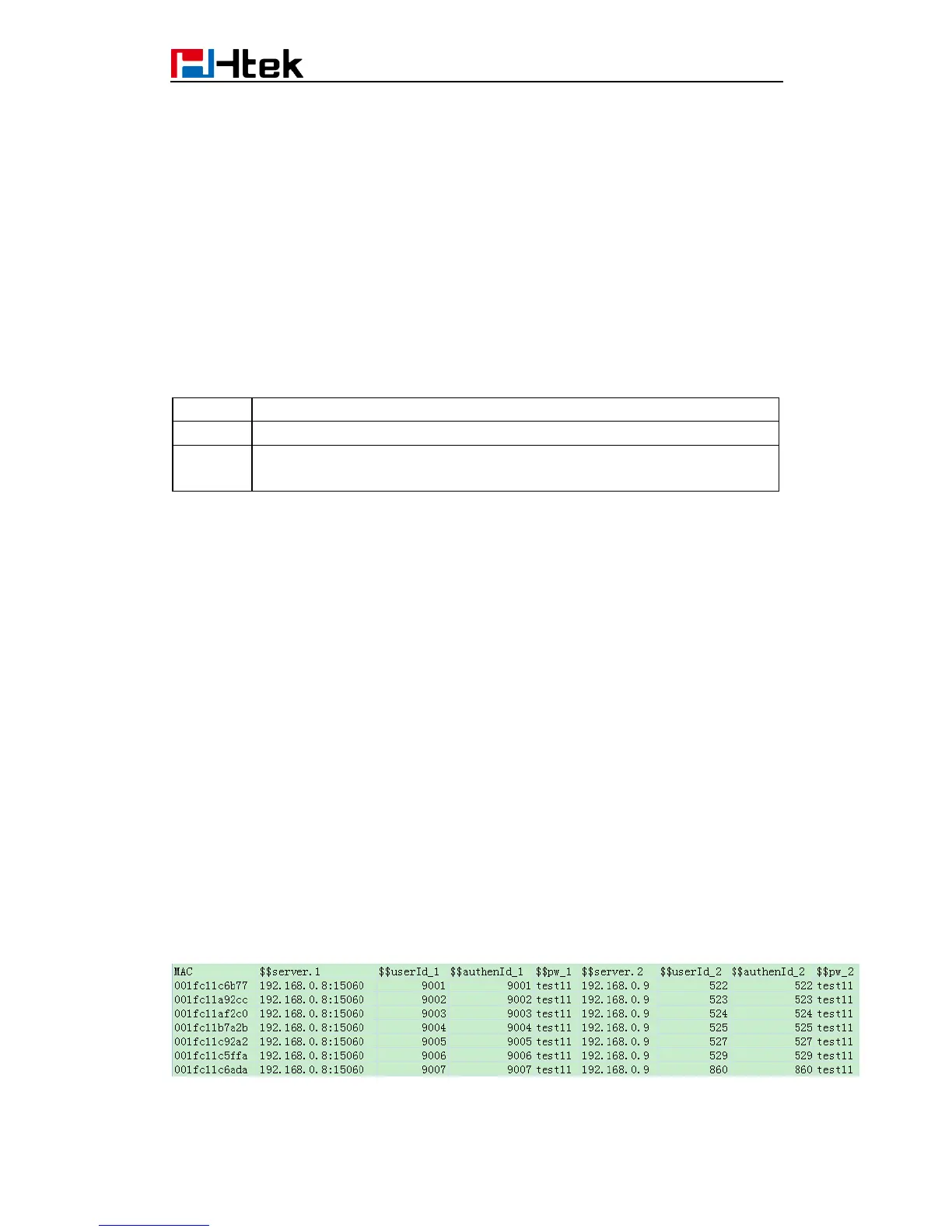
In MAC mode, the first column must be "MAC" column, where only MAC addresses
allowed in the form like "001fc1aabbcc" (lowercase).
“Keyword-replace” means to replace the item content (P value) by the exact keyword . To
do this, the item to be replaced need to set its content (P value) to a unique string, such
as "$$userId_1". If the CSV file contained a column whose head is just “$$userId_1”, then
all cfg files generated will substitute “$$userId_1” with the string in the cell of the column
(specific row is determined by the MAC column).
Step 1. Prepare a CSV File (Sample path: \samples\MacModeSample.csv. Two rows
at least needed. )
Define the Keyword you want to write into the CFG file. Such as:
MAC: MAC address of the phone



 To Next Page