EasyManua.ls Logo

Htek UC601 - Page 81

Htek UC601
279 pages
Print Icon
To Next Page IconTo Next Page
To Previous Page IconTo Previous Page
Loading...
78
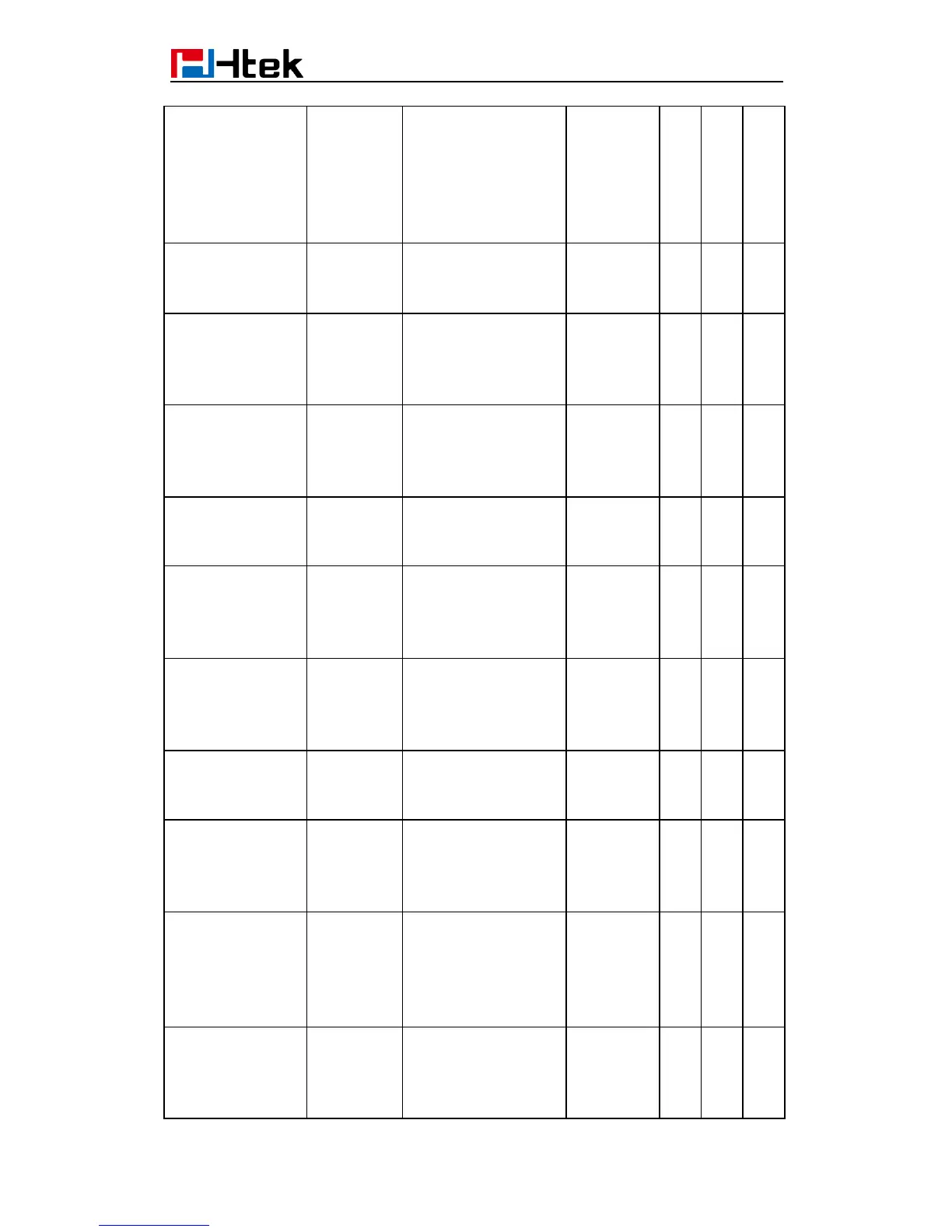
To Voice Mail
disables the IP phone
to subscribe the
message waiting
indicator to the voice
mail number for
account X)
Account(1)->
Advanced -> Send
Anonymous
Number:
0, 1
Send Anonymous,0 –
no,1 – yes
P65
√
√
√
Account(1)->
Advanced ->
Anonymous Call
Rejection
Number:
0, 1
Anonymous Call
Rejection.0 - no, 1 -
yes
P129
√
√
√
Account(1)->
Advanced ->
Check SIP User
ID
Number:
0, 1,2
Check SIP User ID.0
– Don’t Check, 1 –
Always Check, 2 -
Automatic
P258
√
√
√
Account(1)->
Advanced -> Auto
Answer
Number:
0, 1
Auto Answer.0 - no, 1
- yes
P90
√
√
√
Account(1)->
Advanced -> Allow
Auto Answer By
Call-Info
Number:
0, 1
Allow Auto Answer
By Call-Info.0 - no, 1 -
yes
P298
√
√
√
Account(1)->
Advanced -> Turn
off Speaker on
remote disconnect
Number:
0, 1
Turn off Speaker on
remote disconnect.0 -
no, 1 - yes
P299
√
√
√
Account(1)->
Advanced ->
Session Expiration
Number
Session
Expiration(default is
180 seconds)
P260
√
√
√
Account(1)->
Advanced ->
Min-SE
Number
Min-Session-Expirati
on(default and
minimum is 90
seconds)
P261
√
√
√
Account(1)->
Advanced ->
Caller Request
Timer
Number
Caller Request Timer
(Request for timer
when making
outbound calls) 0 -
No, 1 - Yes
P262
√
√
√
Account(1)->
Advanced
->Callee Request
Timer
Number:
0, 1
Callee Request Timer
(when caller supports
timer but did not
request one) 0 - No, 1
P263
√
√
√