
 Need help?
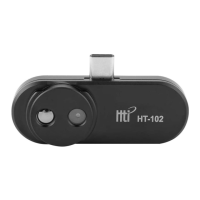
Do you have a question about the HTI HT-102 and is the answer not in the manual?
Download and install the 'Thermal Viewer' software from the provided URL or by scanning the QR code.
Connect the thermal imager to your phone's USB Type-C port to launch the software automatically.
View the temperature of the central area of the infrared image displayed on the screen.
Measure the temperature of any specific point on the object by tapping it on the screen.
Switch between infrared, visible light, or blended image views using the dedicated button.
Interchange the left and right sides of the displayed image by clicking the mirroring button.
Configure the temperature display unit to Celsius or Fahrenheit via the settings menu.
Select color palettes, such as RGB Colors or Grayscale, for the thermal image display.
Enable or disable the face detection feature through the application settings.
Capture still images of the thermal view by pressing the photo button; images are saved automatically.
Record video clips of the thermal imaging session and save them to the phone.
Access the preview interface to view captured photos and recorded videos.
Details on temperature range, accuracy, resolution, and working band of the thermal imager.
Information on viewing angles, image/video resolutions, formats, frame rate, and focal length.
 General
| Brand | HTI |
|---|---|
| Model | HT-102 |
| Category | Cell Phone Accessories |
| Language | English |

 To Next Page