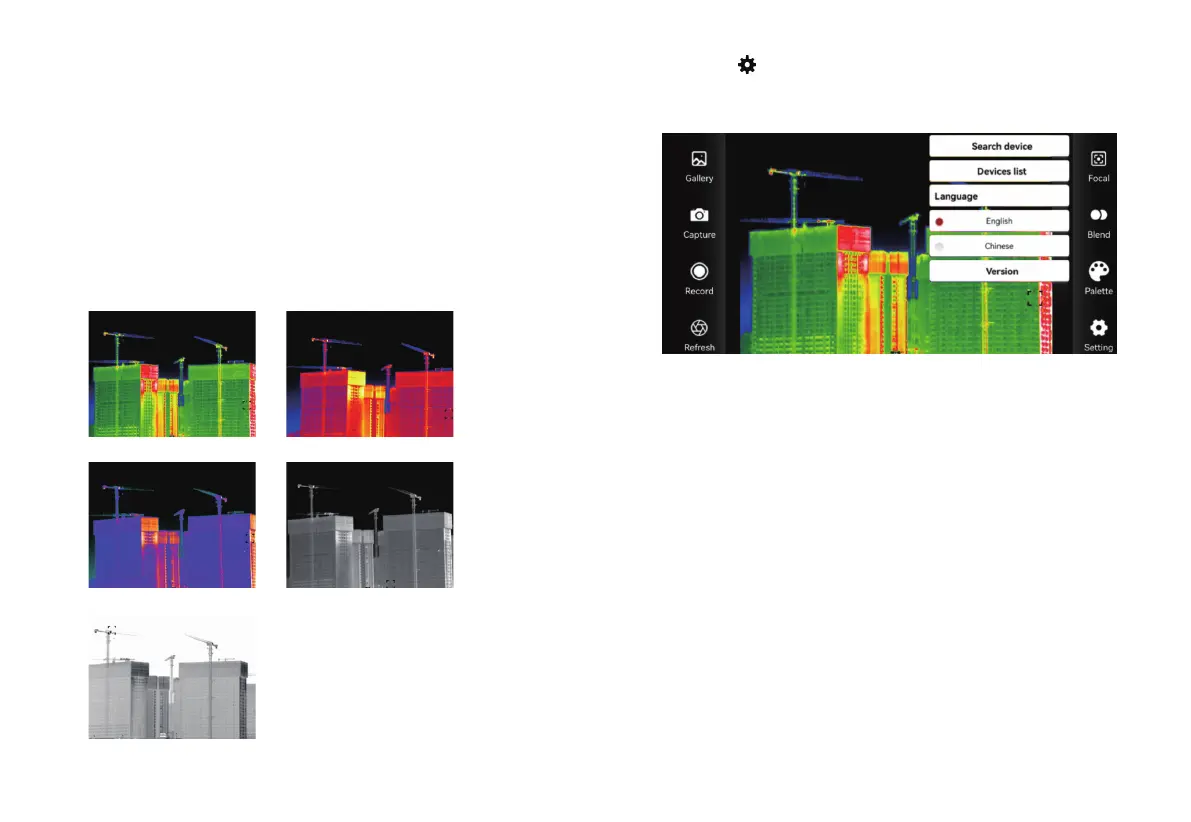
Click the “ ” setting icon to search for devices, view the device
list, switch between Chinese and English languages, as shown in
the figure below.
The palette work best with high thermal contrast and provide
additional color contrast between high and low temperatures.
Suitable selection of color palette displays the details of the target
objective better. Rainbow, iron oxide red and cold color palettes
focus on display of color. Such color palettes are very suitable for
high heat contrast and are used to improve the color contrast
between high temperature and low temperature. But the black &
white and white & black color palettes provide even linear color.
The following are the image effects of the same object and five
color palettes.
Search device: Search for the current device and connect
automatically.
Device list: Enter the device list, click Search, when multiple devices
are found, select the device to be connected in the list.
Version Information: View version information.
Select the connection mode: enter the device list and click Settings,
you can choose AP (hotspot) mode or STA (station) mode (the
default AP mode of the device);
After selecting the mode, enter the name and password below,and
click OK.
20 21
Click the “ ” setting icon to search for devices, view the device
Note: When using the default hotspot for the first time, just connect
to the default hotspot without entering a password. If you need to
set a password, you can select AP mode in the settings and set a
password.
Rainbow Iron Red
Cool Color
Black Hot
White Hot


 To Previous Page