6 7
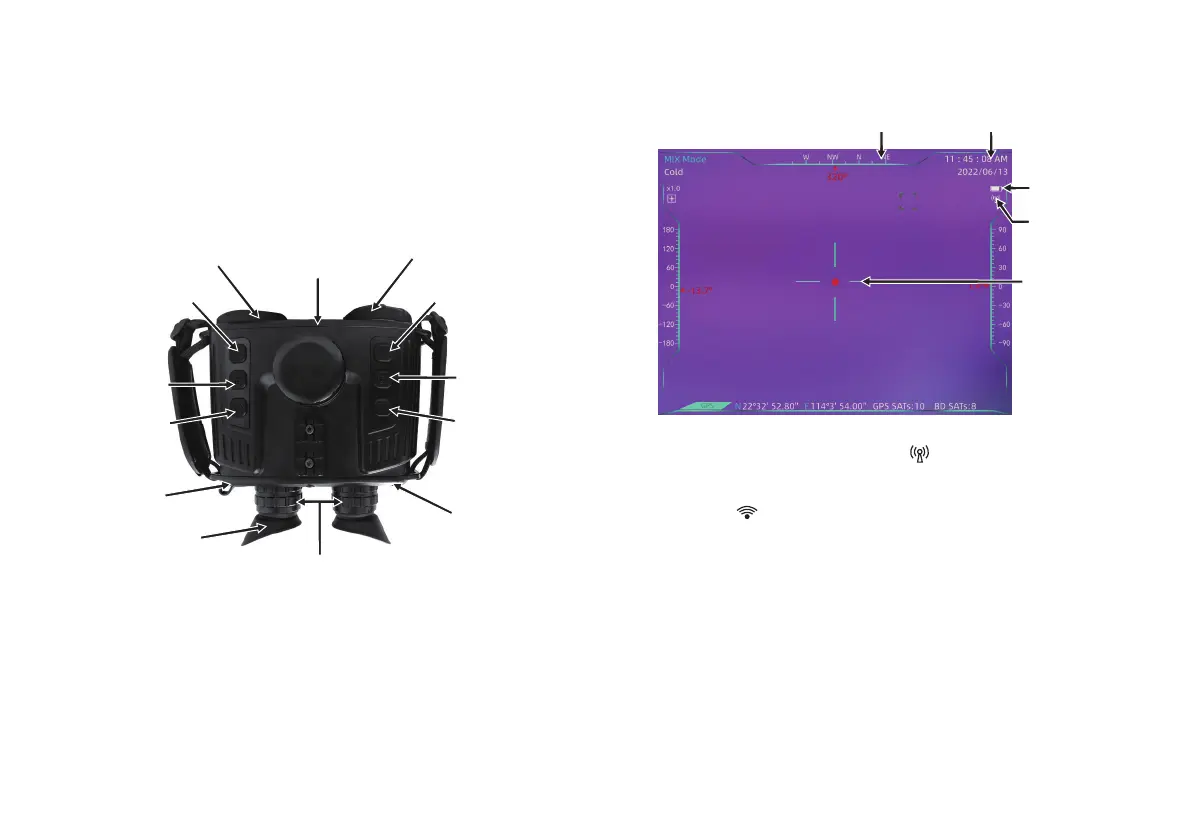
Infrared thermal imaging sensor
(open the protective cover)
1. Instruction to Structure
2. Display Description
Battery cap
Low light camera
TimeOrientation guide
Battery power
Connect AP
mode
Center point
cursor
Standby connection mode: When the “ ” icon is displayed, it means the
device is connected to AP (hotspot) mode (the device defaults to AP mode);
when the “ ” icon is displayed, it means the device is connected to STA
(station) mode;
When the icon is flashing, Indicates that the mode is being switched.
Note: Mode switching needs to be operated on the APP.
Digital amplification
Menu/
Mode switching
Palette switching
Aviation jack
Eyepiece eye mask
Eyepiece focusing ring
Focusing +
Shooting/
Confirm
Focusing -
Power switch
In visual structures of the product, they mainly consist of CMOS,
infrared thermal imaging, battery compartments, buttons, eyepieces,
GPS modules and WIFI modules.
Product Description


 To Next Page