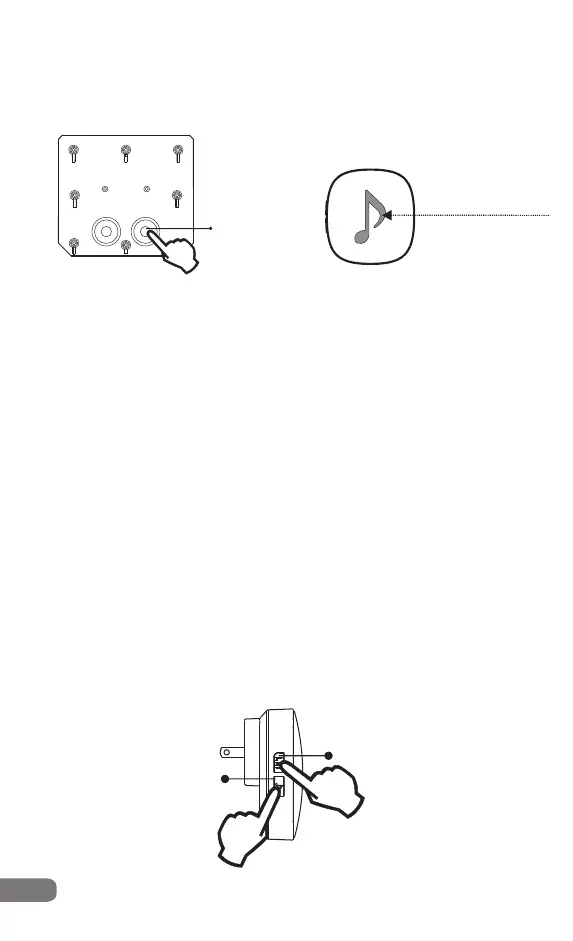
Step 3
Note:please make the sensor close to the alarm receiver
Activate the sensor.
Step 4
has been added to the receiver already.
Activate the sensor again to confirm the sensor
Step 5
total 35 melodies optional.
(2)How to delete the sensors of the receiver
Press”Melody”button to choose the melody for this sensor.
Step 1
Plug the receiver into a outlet
Step 2
Press and hold both the “Volume” button and “Melody”
button for 10 seconds and release the
buttons when you heard a long beep prompt;
Note: all the sensors will be deleted by this operation.
(a ring tone prompt and the indicator
light flashing quickly means the sensor
has been added to the wireless alarm
receiver successfully)
flashing quickly
Volume
Melody
(the indicator light flashing
3 times means the sensor
was activated properly)
9
ON/OFF
( twice)press



 To Next Page