90 91
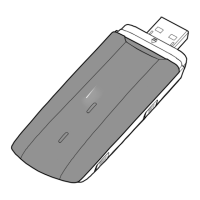
Huawei E3276s modem
Specifications
Connection: 2G / 3G / 4G
Receive data: 4G – up to150 Mbps,
3G – up to 42 Mbps 2G – up to 296 kbps
Send data: 4G – up to 50 Mbps,
3G – up to 5,76 Mbps 2G – up to 296 kbps
The speed is affected by a variety of factors:
Your chosen subscription, the coverage where you are,
where the modem is located in the room, etc.
Operating system
Supported with latest service packs installed:
Windows XP (SP3) / Windows Vista (SP1/SP2)
/ Windows 7
Mac OS X 10.6, 10,7
Recommended computer specifications
For PC: Pentium Dual Core or better for best
performance
For Mac: Only Intel-based CPUs. Dual Core or better
is recommended. Your computer must meet the
recommended specifications for each operating
system as well as USB 2.0.
Safety instructions
•DonotremoveyourSIMcardwhileitisbeingused,
as this may damage the card.
•Donotexposeyourmodemtoextremelyhighorlow
temperatures, water or humidity.
•Donotattempttodismantleyourmodem.Only
qualified staff have permission to perform maintenance.
•Donotuseyourmodemclosetostrongelectricalor
magnetic fields, such as a microwave oven, or inside
metal constructions, as this may affect signal reception.
•Donotexposethemodemtowetconditionsoruseit
immediately after a sudden change in temperature, as
this can cause condensation inside the modem.
•Donotusethemodeminplaceswheremobileunits
are forbidden, such as on board an aircraft or in certain
hospitals.
•Ifpossible,avoidtouchingtheinnerantennasurface,
as this can affect performance.
UK


 To Next Page
 Loading...