Indicator Position Charger Indicator Status Charging Status
Blinking red (blinking three
times per second)
Faulty
Battery Blinking green slowly
(blinking once per second)
Charging in progress
Steady green Fully charged
Steady red Standby
Blinking red (blinking three
times per second)
Faulty
5.2 Status Icons
This section describes the status icons of an EP820.
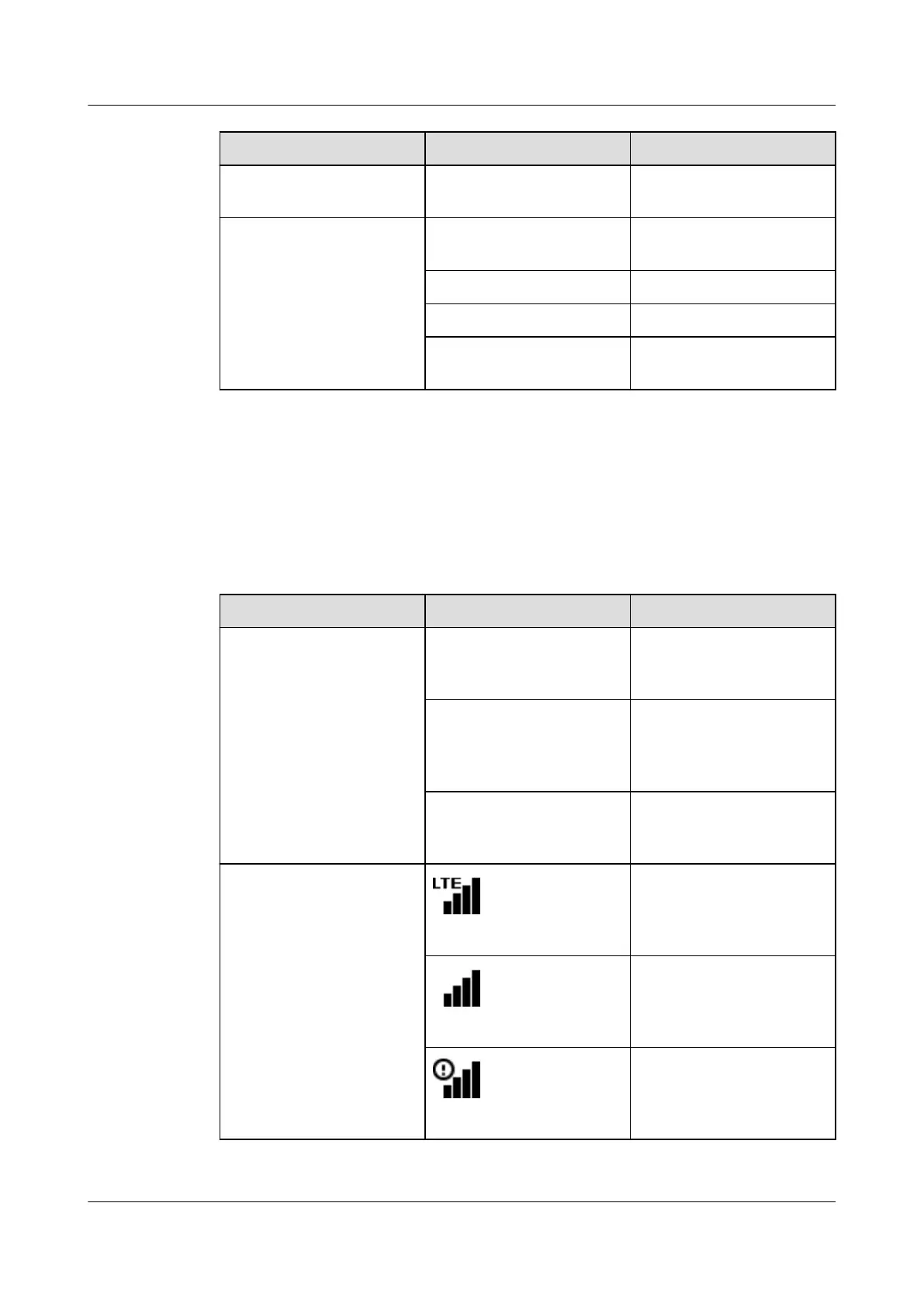
Table 5-3 describes the status icons on an EP820 and their meanings.
Table 5-3 EP820 status icons
Category
Icon Description
Network mode TMO The phone is in trunked
mode and trunking services
are available.
Public Network The phone is in public
network mode and public
network services are
available.
DMO The phone is in direct mode
and DMO services are
available.
Signal icons The phone is connected to
the network and is in the
network service area. Data
services are available.
The phone is connected to
the network and is in the
network service area. Data
services are unavailable.
Single site mode. Data
services are unavailable and
some voice services are
adversely affected.
EP820
User Guide
5 Operation and Maintenance
Issue 05 (2016-06-20) Huawei Proprietary and Confidential
Copyright © Huawei Technologies Co., Ltd.
22









 To Next Page