3
2Installation
Note
Before installing or removing the battery,
antenna, or SIM/USIM card, you need to swich
off the FWT
and disconnect the FWT from the
power adapter
.
Installing the Battery
Note
• When the ambient temperature exceeds the
temparature allowed for charging, the system
will stop charging the battery.
• When the power adapter is in use, the FWT
will automatically ch
arge the battery and stop
charging when the battery is fully charged.
• Remove the battery if the FWT is left unused
for a long period.
• Make sure that the battery has been charged
for more than 8 hours before it supplies
power for the FWT at the first time. The
charging time depends on the environmental
temperature and battery life.
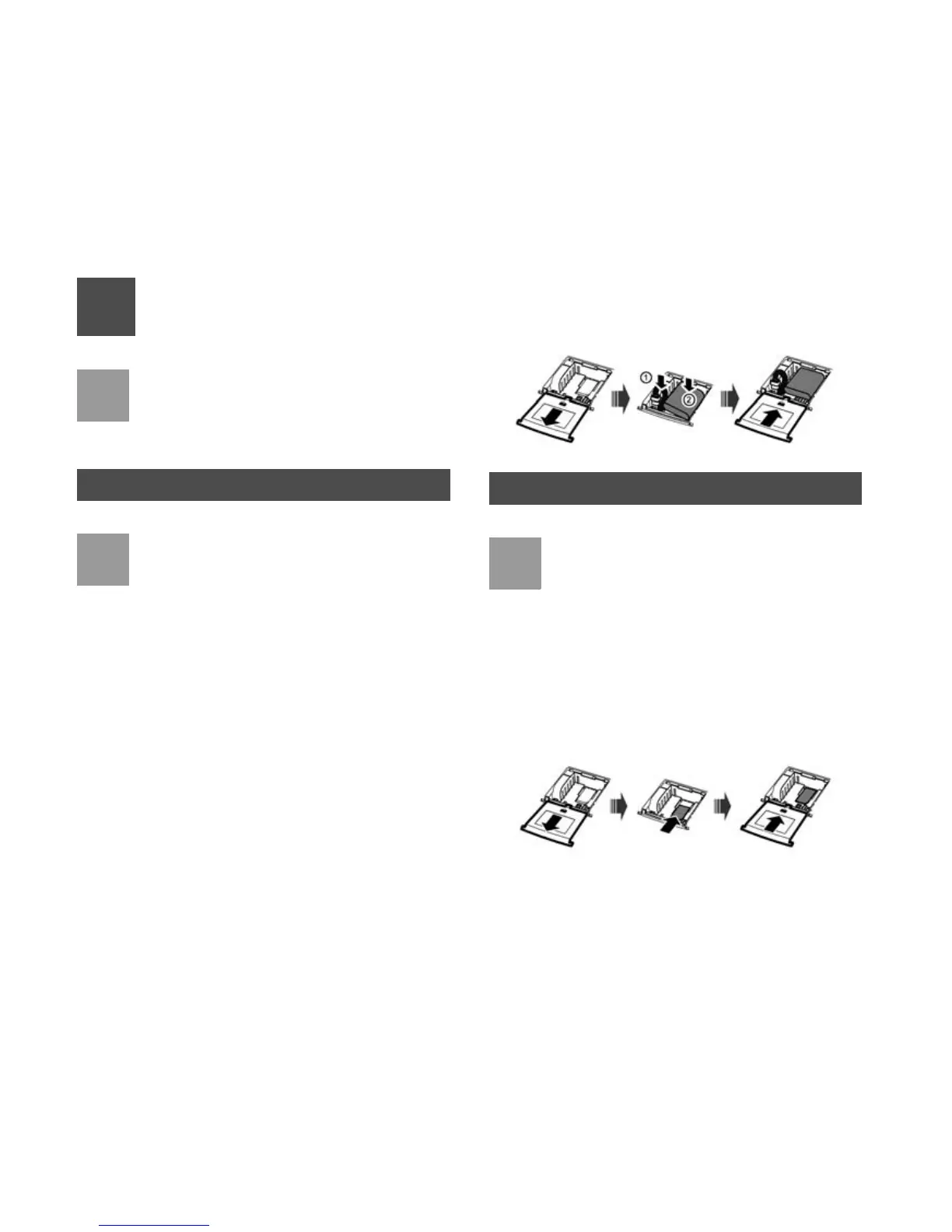
Insert the connection cable of the battery into the bat-
tery port (make sure the battery is correctly inserted),
and then seat the battery in the battery container.
Installing the SIM/USIM Card
Note
• Consult the local agent to determine whether
to install the
SIM/USIM card or not.
•The SIM/USIM card and contact point are vul-
nerable to damage such as scarring or bend-
ing, so you need to insert or remove it with
care.
Insert the card into the card slot. Put the side with a
corner cutting backwards and the side with a golden
contact downwards
. Make sure the card is completely
inserted into the slot.












 To Next Page