EasyManua.ls Logo

Huawei NetCol500-A080 - Page 31

Huawei NetCol500-A080
47 pages
Print Icon
To Next Page IconTo Next Page
To Previous Page IconTo Previous Page
Loading...
30
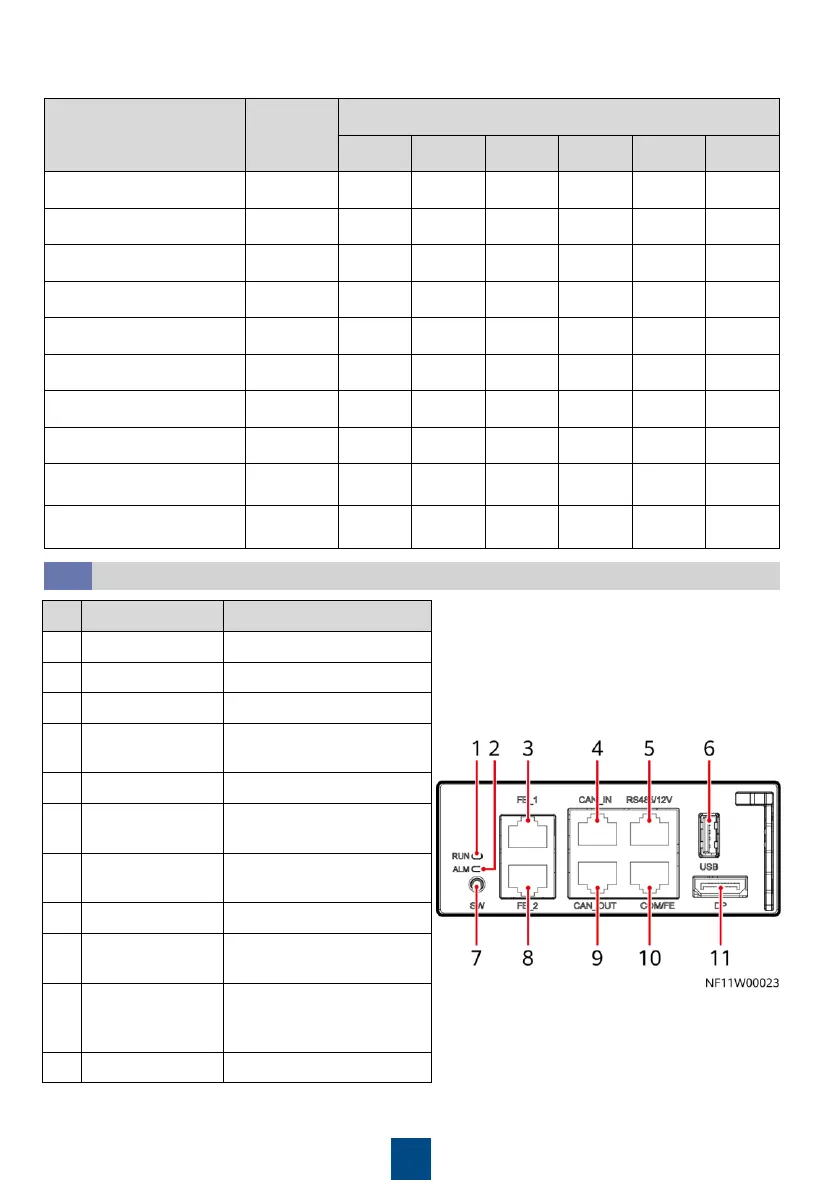
Name Address
DIP Switch ID
1 2 3 4 5 6
Cold aisle 1 temp/humid 11 ON ON OFF ON OFF OFF
Cold aisle 2 temp/humid 12 OFF OFF ON ON OFF OFF
Cold aisle 3 temp/humid 13 ON OFF ON ON OFF OFF
Cold aisle 4 temp/humid 14 OFF ON ON ON OFF OFF
Cold aisle 5 temp/humid 15 ON ON ON ON OFF OFF
Hot aisle 1 temp/humid 21 ON OFF ON OFF ON OFF
Hot aisle 2 temp/humid 22 OFF ON ON OFF ON OFF
Hot aisle 3 temp/humid 23 ON ON ON OFF ON OFF
Hot aisle 4 temp/humid
24
OFF OFF OFF ON ON OFF
Hot aisle 5 temp/humid
25
ON OFF OFF ON ON OFF
2. Set the DIP switches on the T/H sensors.
(Optional) Connecting Teamwork and Monitoring Network Cables
8.9

No.
Name
Description
1
Running indicator
-
2
Alarm indicator
-
3
FE_1 port
FE teamwork control
4
CAN_IN port
CAN teamwork and RS485
monitoring cascading
5
RS485/12V port
Connecting to T/H sensors
6
USB port
Connecting to a WiFi
module or USB flash drive
7
SW button
Button for restoring
factory settings
8
FE_2 port
FE teamwork control
9
CAN_OUT port
CAN teamwork and RS485
monitoring cascading
10
COM/FE port
Connecting to a
monitoring
communications cable
11
DP port
Connecting to the display

Related product manuals