EasyManua.ls Logo

Huawei NetCol500-A080 - Page 32

Huawei NetCol500-A080
47 pages
Print Icon
To Next Page IconTo Next Page
To Previous Page IconTo Previous Page
Loading...
31
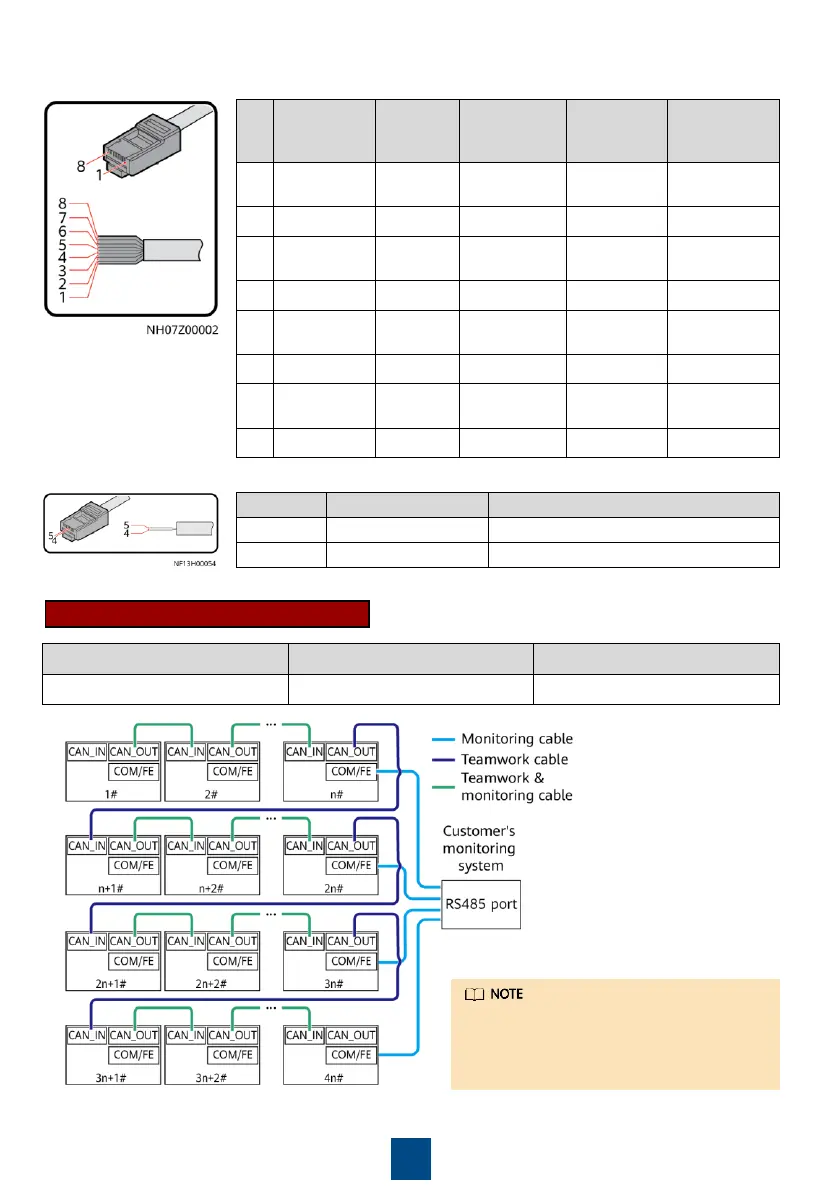
1. Prepare network cables.
Pin
Color
FE_1 and
FE_2
CAN_IN and
CAN_OUT
RS485/12V
Port
COM/FE Port
(FE
Monitoring)
1
White
-and-
orange
FE TX+
RS485 T+ (+)
RS485 HT+
FE TX+
2
Orange
FE TX
RS485 T
(
)
RS485 HT
FE TX
3
White
-and-
green
FE RX+
-
12V
FE RX+
4
Blue
-
RS485 R+
RS485 HT+
RS485+
5
White
-and-
blue
-
RS485 R
RS485 HT
RS485
6
Green
FE RX
-
-
FE RX
7
White
-and-
brown
-
CANH
-
-
8
Brown
-
CANL
GND
-
Pin
Color
COM/FE Port (RS485 Monitoring)
4
Blue
RS485+
5
White
-and-blue
RS485
Connect the COM/FE port on the main
control module of the last smart cooling
product in each group to the RS485 port
on the host.
CAN Teamwork + RS485 Monitoring
2. Connect teamwork and monitoring communications cables.
Networking
Teamwork
Monitoring
Protocol
CAN
Modbus
-RTU

Related product manuals