4
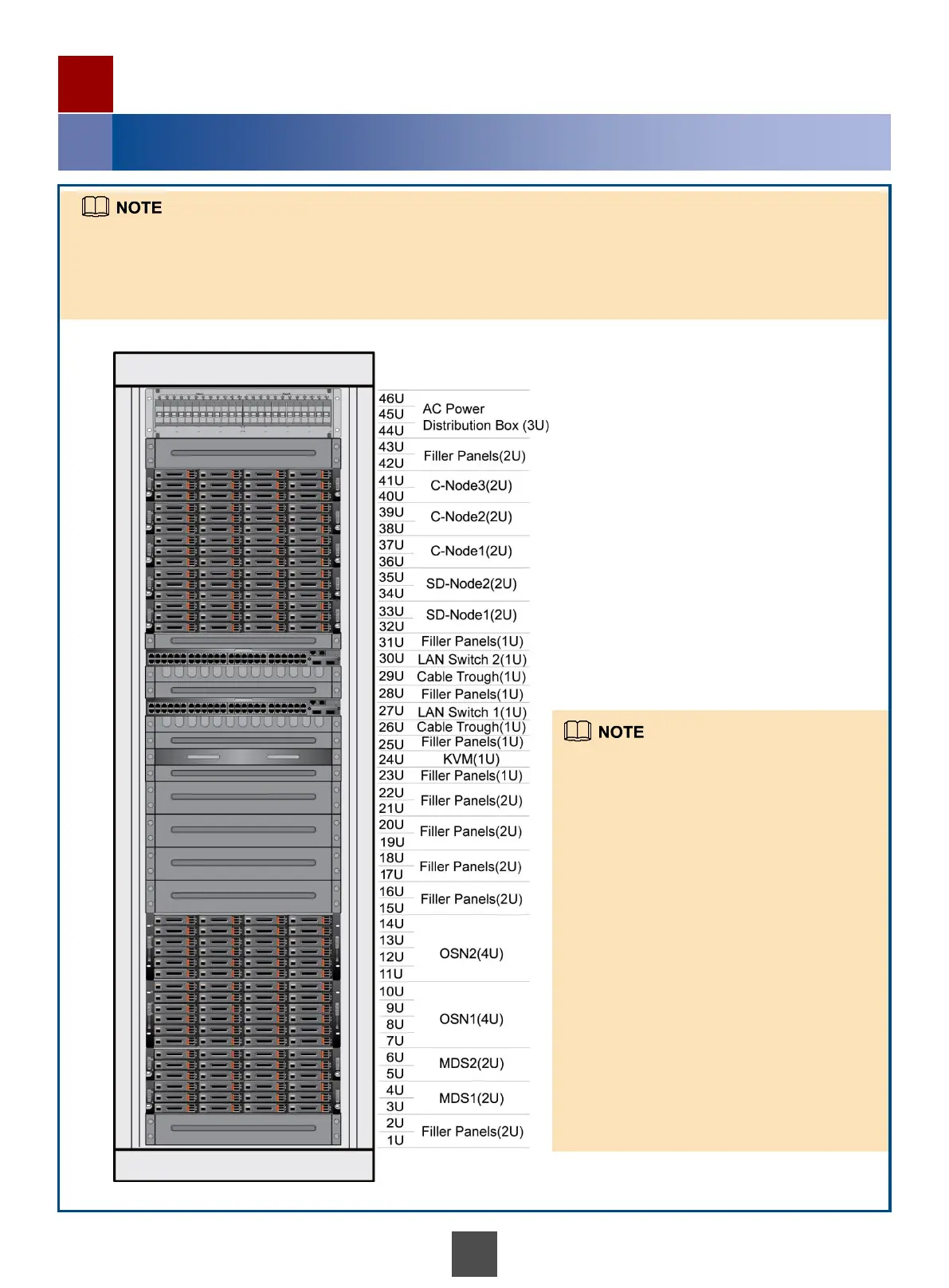
Determining Positions of Devices in the Cabinet
1
Installing Hardware Devices of the CSE
Install the devices of the CSE according to the
specific installation environment. The following
describes the general installation plan:
Each cabinet requires two switches and one
KVM device.
You are advised to install the back-end
storage devices in the storage space of 3 U to 22
U.
You are advised to install devices except the
back-end storage devices in the storage space of
32 U to 41 U.
SD-Nodes must be installed below C-Nodes.
If the number of C-Nodes exceeds three or the
number of OSN nodes exceeds three, an
expansion cabinet is required.
If an expansion cabinet is used, install the
back-end storage devices in the storage space of
1 U to 22 U, and C-Nodes in the positions of 32
U to 41 U. Devices in the expansion cabinets
must be parallel to the devices of the same type
in the system cabinet.
The CSE uses a cloud storage system (CSS) as the back-end storage. This section uses the CSS as an example to
explain how to install a CSE system.
This section uses the configuration of three C-Nodes in the CSE as an example. The CSE includes two SD-Nodes,
three C-Nodes, two switches, one KVM device, and the back-end storage (CSS with two MDS nodes and two OSN
nodes).



 To Next Page