Installation Reference
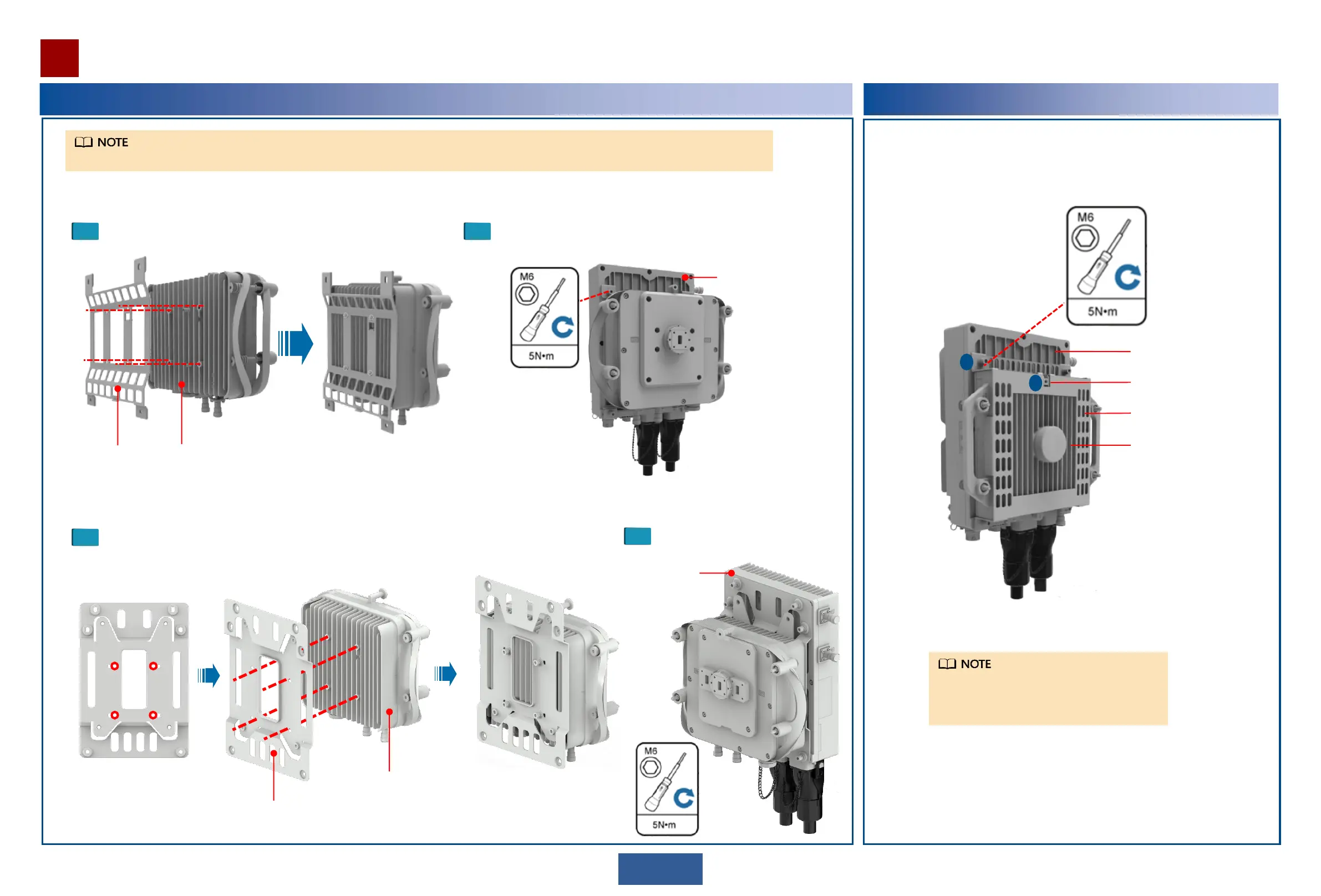
Optional: Installing an OAU 2F on an XMC-5D ODU
1
12
Joining kit
Installing the joining kit on an XMC ODU.
XMC-5D ODU
2
Install the joining kit with the XMC ODU to an OAU 2F.
Optional: Installing an OAU 2F on an XMC-3/3H ODU
a. Attach the XMC-3/3H ODU hook to the hook hole of the joining kit.
b. Install the joining kit to the XMC-3/3H ODU.
b
a
XMC-3/3H ODU
OAU 2F
Joining kit
Hook
The procedures for installing the XMC-3/3H ODU
operating in different frequency bands are the
same. In this example, the 23 GHz XMC-3/3H
ODU is used.
When installing the OAU 2F to the XMC-5D ODU, two types of splices are available.
The procedure for installing splicing unit 1 is as follows:
The procedure for installing splicing unit 2 is as follows:
1
Installing the joining kit on an XMC ODU.
2
Install the joining kit with the XMC
ODU to an OAU 2F.
Joining kit
XMC-5D ODU
OAU 2F
OAU 2F


 To Next Page