Installation Reference
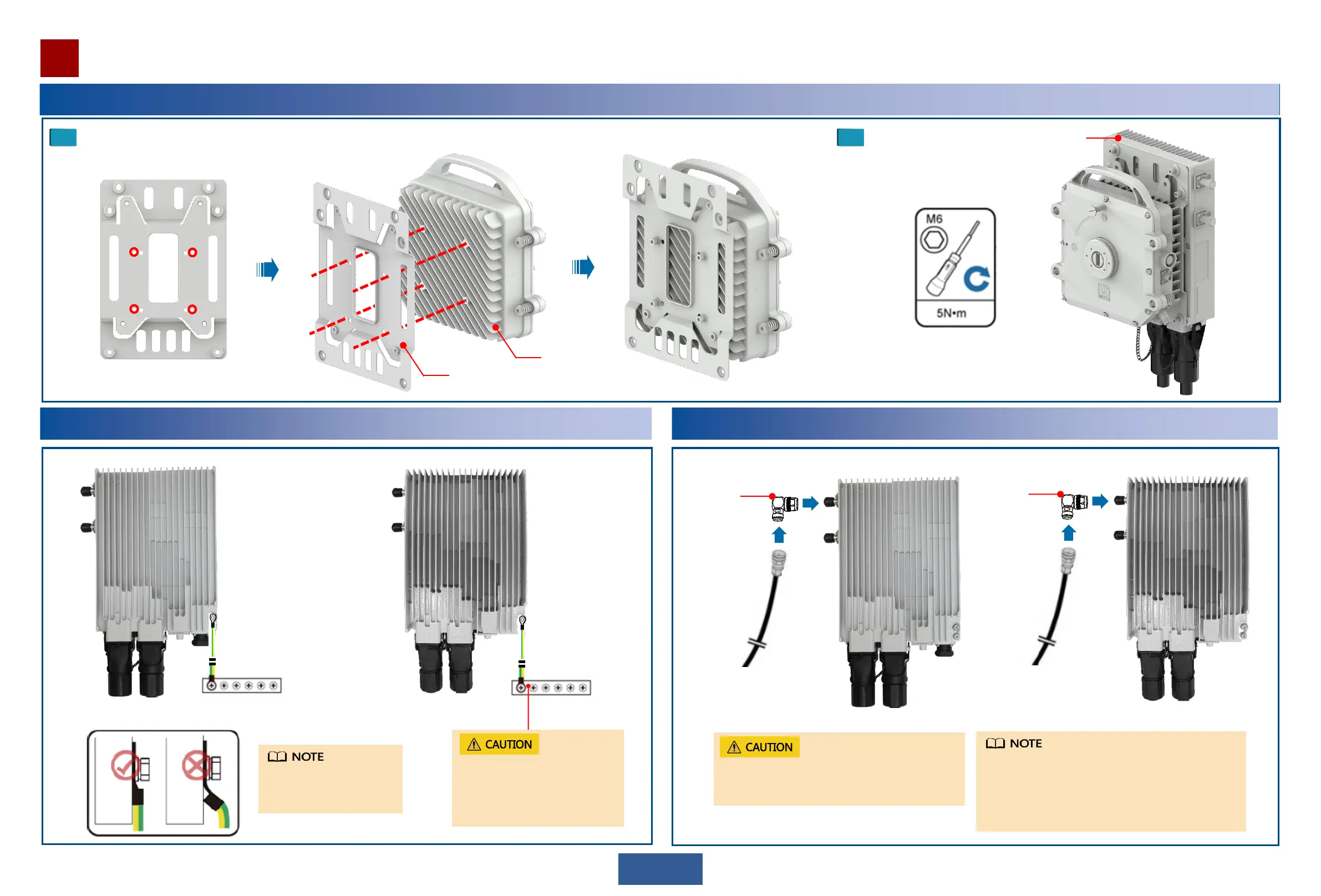
Optional: Installing an OAU 2F on an XMC-2H ODU (11GHz)
1
13
Installing the joining kit on an XMC ODU.
2
Install the joining kit with the
XMC ODU to an OAU 2F.
Installing a Ground Cable for the OAU 2F
To the ground bar
Pay attention to the installation directions of OT terminals.
Installing an IF Cable
Install the ground cable on
the device side under the
tower.
Do not remove or insert the IF cable connector on
the OAU 2F during power-on. Otherwise, personal
injury may occur.
First connect the IF cable and then power on the
device. It is recommended that the conversion
bracket be used for installing IF cables according to
the actual requirements.
For details about how to prepare and route IF cables,
see RTN XMC ODU Quick Installation Guide.
To the ground bar
Remove the antirust paint and
other coating from the ground point.
After the connection is completed,
take anti-rust and waterproof
measures.
Joining kit
XMC-2H ODU
(11GHz)
OAU 2F
To the XMC ODU
To the XMC ODU
Conversion
bracket
Conversion
bracket


 To Next Page