35
1
Checking Cabinet Installation
Checking the Installation
2
Checking Installation Environment
No. What to Check For
1 No fingerprints or other smears exist on the surface of the equipment cabinet.
2 No excessive adhesive tapes or cable ties exist on the cables.
3 No tapes, cable ties, wastepaper, or packing bags are left around the equipment cabinet.
4 All the items around the equipment are neat, clean, and intact.
No. What to Check For
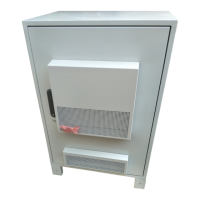
1 The layout of the cabinet complies with the engineering designs.
2 The base is installed securely.
3 The deviation of the cabinet is less than 3 mm horizontally and not more than 3 mm vertically.
4 All the bolts are tightened, especially those for electrical connections. The flat washers and spring
washers are installed completely and properly.
5 The cabinet is neat and clean.
6 The cabinet meets the dustfree requirement.
7 The paint on the surface of the cabinet is intact.
8 The door and lock of the cabinet are proper.
9 All labels, tags, and nameplates are correct, legible, and complete.







 To Next Page