Screen
5
1
Introduction
• Set the standby mode of your phone. The desktop
displays shortcut function icons, which is applicable
to business. You can also select a simple standby
mode.
• Set the shortcut icons displayed in the standby
screen.
• Set the shortcut functions corresponding to the right
selection key in the standby screen.
Menu Screen
In the main menu screen, choose Options > Desired
item.
• Arrange the shortcut icons of the function menus.
• Move the shortcut icons of the function menus on
the main menu: scroll to the desired position, and
then press the scroll key.
• Move the shortcut icon of a function menu to
another function menu.
In the function menu screen, choose Options >
Desired item. Then you can perform the operations
related to the current function menu.
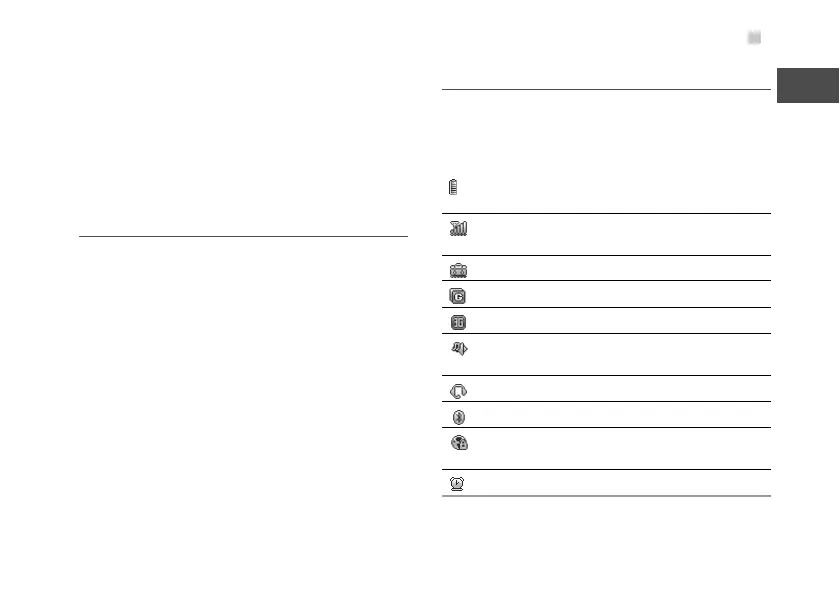
Display Indicators
Your phone displays various indicators. The following
table shows the common indicators that may be dis
-
played in the indicator and profile display area.
The more bars the indicator displays, the
higher the battery level is.
The more bars the indicator displays, the
stronger the signal is.
The roaming service is in use.
The phone is in the GSM network.
The phone is in the WCDMA network.
The normal profile is enabled. The indicator
varies according to different profiles.
The headset is in use.
Bluetooth is enabled.
A PC is connected to the Internet through your
mobile phone.
The alarm clock is set.



 To Next Page