SIM Card
2
SIM Card
The SIM card and its golden contact can be
easily damaged by a scratch or bend. Carry,
insert, or remove the SIM card with caution.
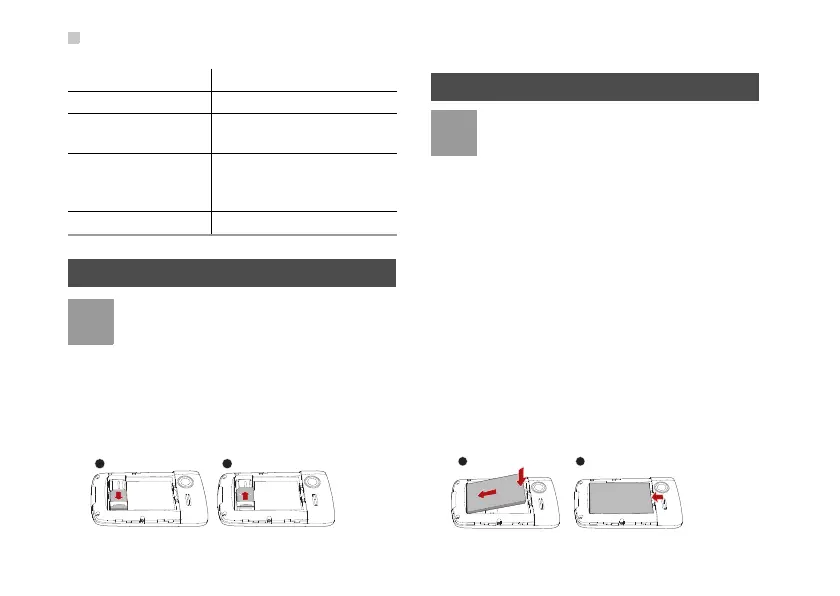
Before inserting or removing the SIM card, discon-
nect the charger, switch off the phone, and remove
the battery. Insert or remove the SIM card according
to the following figure.
Battery
• If the battery is used for the first time, charge
the battery for more than 12 hours.
• If the battery has not been used for a
prolonged period, charge the battery before
usage.
• The battery is easy to wear out. When the
standby time is noticeably shorter than nor
-
mal after charging, replace the battery.
• The recharging time varies with the
temperature and the aging degree of the
battery.
• When the battery level is low, your phone
generates low battery alarms at a certain
interval and displays prompts. When the bat
-
tery level is too low to support your phone,
the phone is automatically switched off.
Before inserting or removing the battery, disconnect
the charger
, and switch off your phone. Insert or
remove the battery according to the following figure.
1 Earpiece 2 Secondary camera
3 Volume key 4 Screen
5 Power/data cable
connector
6 Headset connector
7 Microphone 8 Battery case cover (You
can install or remove the
cover by sliding it.)
9
Main camera
10
Speaker



 To Next Page