27
voltage is present, check for voltage across the contactor coil. If voltage is present at the
contactor coil, replace the magnetic contactor. If no voltage is present, verify that the
heater is wired according to the proper wiring schematic for the unit.
P65SS PROBE TROUBLESHOOTING
1. Unplug and reseat the P65SS probe wire in the jack on the T1000 control board. Note
that the error message “ Err, No, Prb” will be displayed and the reset button must be
pressed to clear the message.
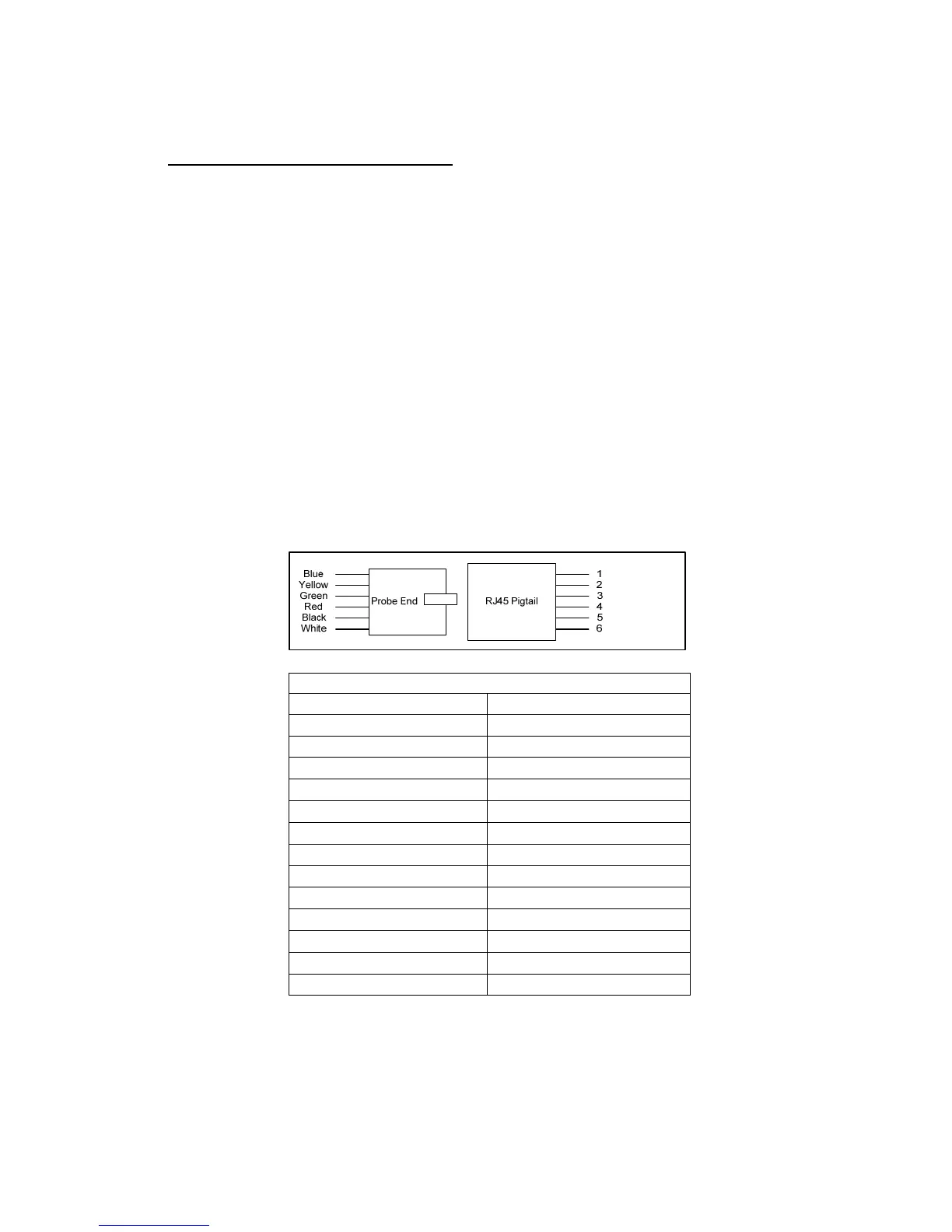
2. If problem persists, unplug the P65SS probe from the control board and plug into the
RJ45 pigtail (not supplied).
3. If the problem is with temperature control or high limit:
a. Change the configuration to ‘dSt’ to display the actual water temperature.
b. Check the temperature of the water with a thermometer and compare that with the
temperature on the display. If the two temperatures coincide, replace the T1000
control board. If the two temperatures do not coincide, continue to the next step.
c. Unplug the P65SS probe from the control board and plug into the RJ45 pigtail (not
supplied). Check the resistance value (ohms) between the blue wire of the pigtail
(#1) and the red wire of the pigtail (#4). Compare the resistance value measure
with the chart below at the measured temperature of the water. If the two values
coincide, replace the T1000 control board. If the two values do not coincide,
replace the P65SS sensor
4. If the problem is with low water:
a. Verify that low water is set to OFF in the configuration menu.
Thermistor Resistance vs. Temperature
Water Temperature Resistance (±3%)
70°F
11883Ω
80°F
9299Ω
90°F
7334Ω
100°F
5828Ω
110°F
4664Ω
120°F
3758Ω
130°F
3048Ω
140°F
2488Ω
150°F
2043Ω
160°F
1687Ω
170°F
1400Ω
180°F
1169Ω
190°F
980Ω


 To Next Page