28
SECTION V – SERVICING AND REPLACEMENT OF PARTS
WARNING / CAUTION
Before servicing or replacing any part, make sure to turn the power supply to the unit OFF.
HEATING ELEMENT
1. Disconnect power from unit.
2. Shut off incoming water supply.
3. Attach hose to drain connection.
4. Lift manual release lever on relief valve to let air into system or break union on
outgoing water line.
5. Drain water from tank.
6. Disconnect the wires from the heating element terminals.
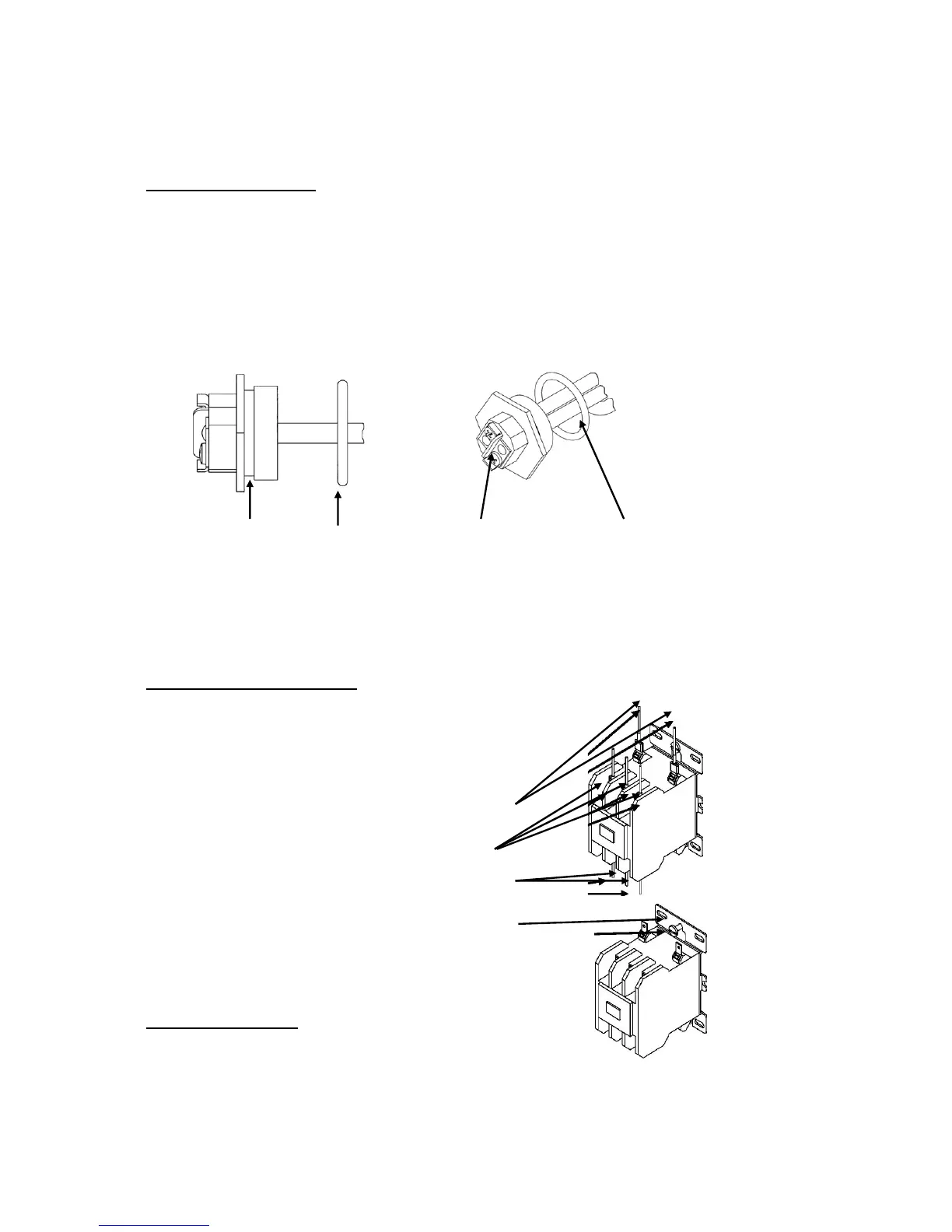
7. Unscrew element with a 1-7/8” 6-point socket with no bevel.
O-Ring Groove O-Ring Terminal Connections #220 Viton O-Ring
8. Install new #220 Viton o-ring gasket and install new heating element. NOTE: Hubbell
recommends lubricating the o-ring with Parker O-Lube prior to installation.
9. Rewire element according to the wiring diagram as shown in the Section II.
10. Fill tank and check around element for any leaks.
MAGNETIC CONTACTOR
1. Disconnect power from unit.
2. Disconnect line and load wires to contactor.
3. Disconnect the control circuit wires.
Control Wires
Line Wires
Load Wires
Mounting Screws
4. Loosen holding screws and remove contactor.
5. Replace with new contactor using reverse procedure.
CONTROL BOARD
1. Disconnect power from unit.
2. Disconnect display cable, probe cable (J3) and probe
ground (J7), leak detection wire (J2), ground wire (J8), and terminal block (J5) from
the control board. NOTE: The terminal block (J5) is removable from the control
board. Grasp the terminal block on the ends and pull straight away from the board.


 To Next Page