Chapter 3 • Pointing the antenna by using the DAPT3
1039429-0001 Revision D
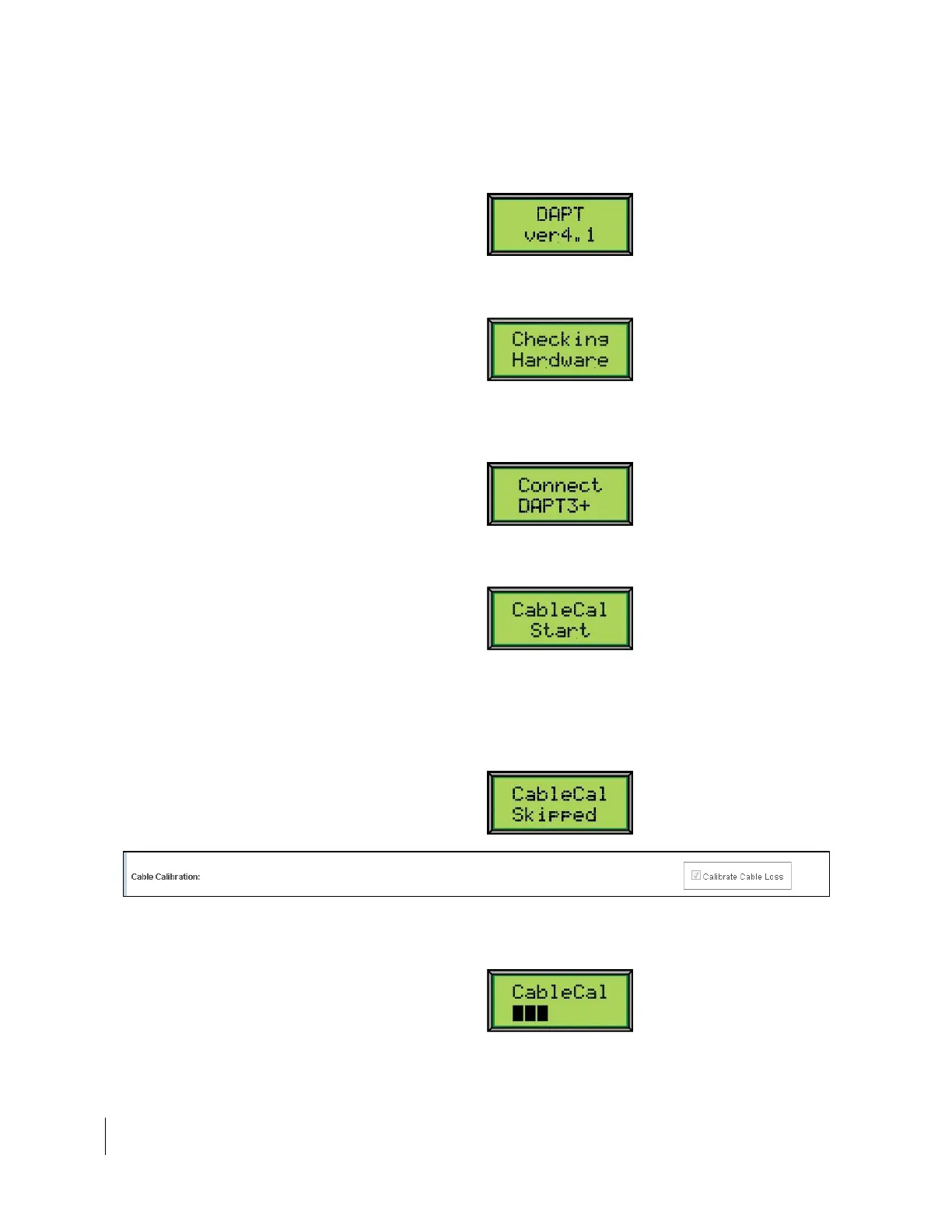
3. When you press the Advance (3) button, the DAPT3 briefly displays the
current software version, as shown below.
Note: You may see a different release number.
4. After a few seconds, the checking hardware message appears briefly while the
hardware connection is checked.
5. If the display shows Connect DAPT3+, this means that you have the wrong
DAPT connected and need to connect the yellow DAPT3. If you have the
correct DAPT, you will not see this message.
6. This message will display momentarily while the DAPT is measuring the
cable loss.
7. If this is the first time calibrating, you will not see this CableCal Skipped
message. Go to step 9.
8. If the calibration has been done previously, this will display. If you would like
to calibrate the cable loss again, go to the Input Params screen on your
computer and check the Calibrate Cable Loss checkbox, as seen in Figure 17.
Figure 17: Calibrate Cable Loss
9. This screen will display throughout the progress of calibration.



 To Next Page