EasyManua.ls Logo

Hughes Jupiter - User Manual

Default Icon
47 pages
Print Icon
To Next Page IconTo Next Page
Loading...
Antenna Pointing Guide
1039429-0001
Revision D
October 28, 2015
11717 Exploration Lane, Germantown, MD 20876
Phone (301) 428-5500 Fax (301) 428-1868/2830

Questions and Answers

  • W
    Whitney GuerreroAug 19, 2025
    What to do if I have a low SQF indication on my Hughes Jupiter?
    • W
      William SimpsonSep 12, 2025
      A low SQF indication on your Hughes Antenna suggests that incorrect installation parameters were entered. This might mean the modem is installed in the wrong downlink cell. To fix this, go to Modify Installation Parameters under Advanced Configuration and Statistics and use the Installation Reference Sheet to make the necessary corrections.
  • M
    martinbarnesAug 21, 2025
    Why does the SQF on my Hughes Jupiter not go higher than 1?
    • M
      Mrs. Sharon MartinezAug 21, 2025
      If the SQF on your Hughes Antenna doesn't go higher than 1, there could be several reasons: * The circular polarization setting is incorrect. * The installation parameters are incorrect. * There's no Rx cable connected between the DAPT2 and LNB, or the cable is faulty. To resolve this: * Set the polarization to LHCP or RHCP as indicated on the Terminal Pointing Info screen (Setting for ODU Polarization). * Go to Modify Installation Parameters under Advanced Configuration and Statistics and use the Installation Reference Sheet to make the appropriate corrections. * Connect or replace the Rx cable between the DAPT2 and LNB.
  • S
    Samantha AndersonAug 23, 2025
    How to fix a permanent COMM Startup message on my Hughes Antenna?
    • A
      anne83Aug 23, 2025
      A permanent COMM Startup message on your Hughes Antenna indicates that the satellite modem is not in pointing mode or the Advance button was pressed before submitting the installation parameters. At the LUI, verify that the satellite modem is in pointing mode. If it is not, repeat steps 4–10 of Entering installation parameters. If the DAPT2 doesn't display the SQF reading (SQFsqf) after a few seconds, press Advance.
  • T
    Tracy Morgan PhDAug 26, 2025
    What to do if my Hughes Antenna shows a 'Beacon Lost' message?
    • P
      Philip SmithAug 26, 2025
      The 'Beacon Lost' message on your Hughes Antenna means the satellite modem has detected a loss of beacon lock. This may occur if there is any object blocking the feedhorn. Ensure that the loss duration is under 10 seconds to prevent the satellite modem from going back to the Pointing state.
  • B
    Brett WilliamsAug 27, 2025
    What does a permanent 'Switch IFL Cable' message mean on my Hughes Antenna, and how do I fix it?
    • A
      Amy PhamAug 27, 2025
      A permanent 'Switch IFL Cable' message on your Hughes Antenna means the Satellite modem Cable is connected to the LNB side of the DAPT2. Reconnect the cables to the DAPT2 in accordance with the connector labels on the DAPT2 rear panel.
  • R
    robertgarciaAug 29, 2025
    How do I resolve a permanent 'Logging VoltMeas' message on my Hughes Antenna?
    • J
      Jessica CombsAug 30, 2025
      A permanent 'Logging VoltMeas' message on your Hughes Antenna indicates that the cables on the DAPT2 are not connected properly. Reconnect the cables to the DAPT2 in accordance with the connector labels on the DAPT2 rear panel.
  • B
    Brian GuerreroSep 1, 2025
    What does 'Tx Pol Left (or Right)' mean on my Hughes Jupiter and how do I resolve it?
    • A
      Alex SheaSep 1, 2025
      During cell selection, 'Tx Pol Left (or Right)' on your Hughes Antenna means that the closest working cell is in an adjacent UL cell that requires flipping the polarizer on the ODU. Adjust the polarizer to the proper setting, then press Advance to proceed to the next phase.
  • D
    David OdomSep 3, 2025
    What does 'Find Sys Failed' mean on my Hughes Jupiter Antenna and how can I fix it?
    • C
      Charlotte RuizSep 3, 2025
      'Find Sys Failed' on your Hughes Antenna is an error message indicating that cell selection has failed. As the satellite modem cannot move forward with this error, reboot the satellite modem.
  • M
    Michelle KimSep 5, 2025
    What should I do if my Hughes Jupiter Antenna displays 'Find Sys Status X'?
    • M
      Melissa GomezSep 5, 2025
      If the Hughes Antenna satellite modem enters the 'Find Sys Status X' phase before pointing was completed, use the Back button to return to Point mode.
  • M
    Melvin VillanuevaSep 7, 2025
    What to do if SQF does not go higher than 31 on Hughes Antenna?
    • A
      Aaron SmithSep 7, 2025
      If the SQF reading on your Hughes Antenna doesn't exceed 31, there are a few potential causes: * The circular polarization setting might be incorrect. Ensure you set the polarization to LHCP or RHCP, as indicated on the Terminal Pointing Info screen. * The installation parameters could be incorrect. Navigate to Modify Installation Parameters under Advanced Configuration and Statistics and use the Installation Reference Sheet to correct them. * There might be no RX cable connected between the DAPT2 and LNB, or the cable is faulty. Connect or replace the RX cable between the DAPT2 and LNB.

Summary

Understanding safety alert messages

Messages concerning personal injury

Explains DANGER, WARNING, CAUTION signals for personal injury hazards.

Safety symbols

The generic safety alert symbol

Describes the generic symbol used with DANGER, WARNING, CAUTION signals.

Pointing tools and user interfaces

Onsite Accelerated Service Installation System (OASIS)

Describes the OASIS app for guided installation and its advantages.

DiSEqC Antenna Pointing Tool (DAPT2 or DAPT3)

DAPT2

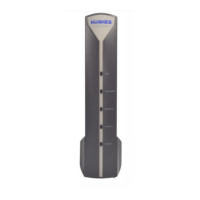
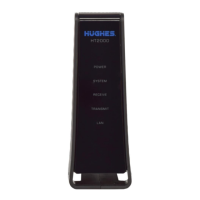
Describes the DAPT2 tool, its appearance, and function.

DAPT3

Describes the DAPT3 tool, its appearance, and function.

Entering installation parameters with a smart device

Pointing

Entering installation parameters with a wired laptop

Registration

Troubleshooting

Cable Calibration

Point and activate terminal with wireless device

Hughes Jupiter Specifications

General IconGeneral
BrandHughes
ModelJupiter
CategoryAntenna
LanguageEnglish

Related product manuals