Chapter 4 • Pointing the antenna by using a wireless device
1039429-0001 Revision D
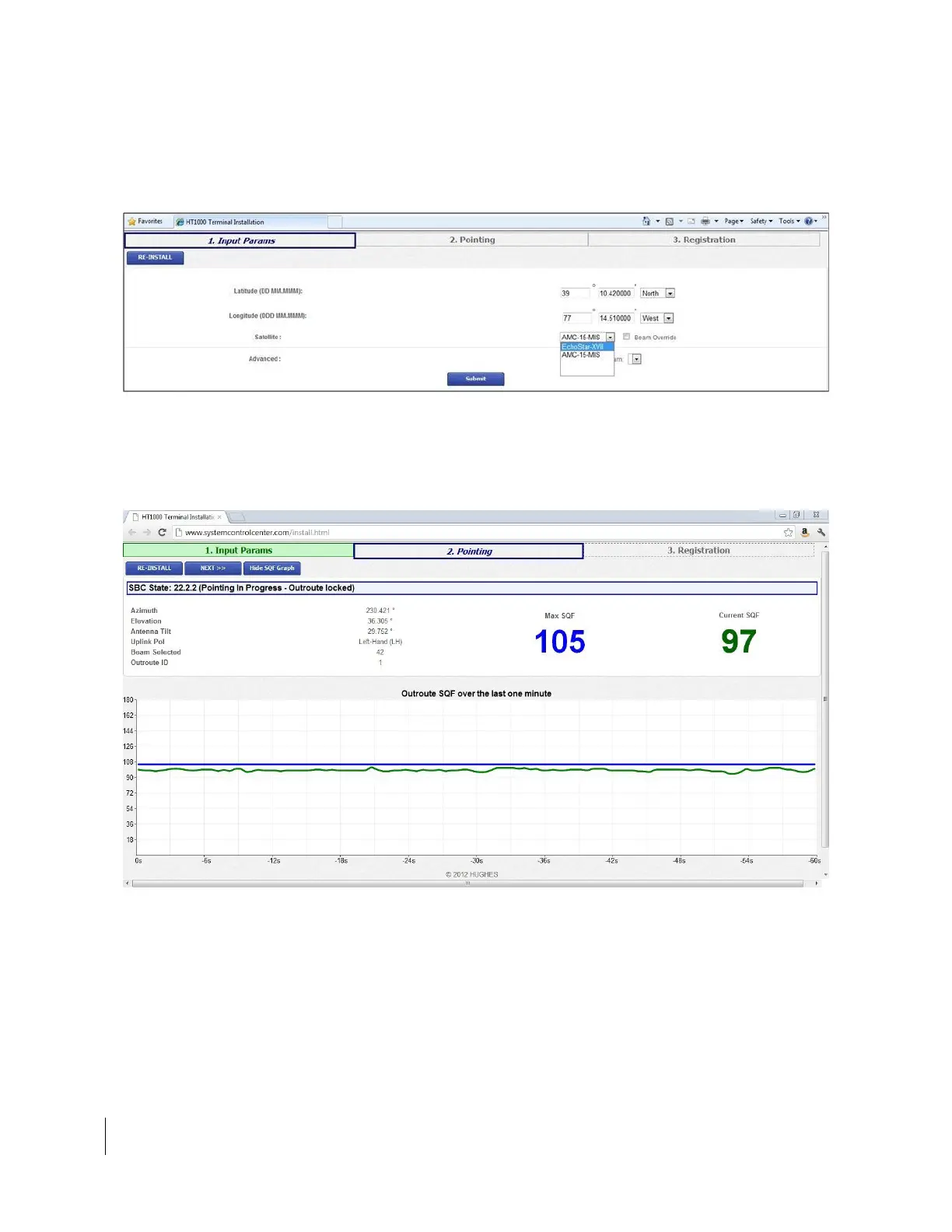
8. The Input Params screen will be shown (Figure 25). Enter latitude, longitude,
select EchoStar-XVII, and click Submit.
Note: Lat/Long must be determined with an onsite GPS device. Do not use
any map-generated GPS location.
Figure 25: Input Params tab
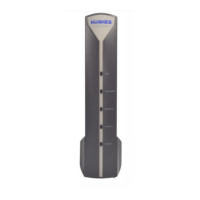
9. On the Pointing tab (Figure 26), note the azimuth, elevation, and antenna tilt.
Confirm the uplink polarization (Uplink Pol) settings.
The screen shows the Max SQF on left and the Current SQF on right.
Figure 26: Pointing tab
10. Wait for the SQF reading to settle on a value; then use the appropriate size
wrench for the antenna to adjust the antenna azimuth and elevation. Adjust
until you achieve the highest possible SQF value as shown in Error! Reference
source not found. on page Error! Bookmark not defined..



 To Next Page