EasyManua.ls Logo

Hulkman Alpha 85S - User Manual

Hulkman Alpha 85S
2 pages
Print Icon
To Next Page IconTo Next Page
Loading...
STEPS TO JUMP START YOUR VEHICLE
USER GUIDE
Model: Alpha 85S
3 steps to fix your problem:
1. Check the clamps connection and the product’s battery is above 20%.
2. Press the Power Button and Flashlight Button simultaneously for 2-3 seconds.
3. The screen will shows “READY”, and go back to start engine ignition.
Warrning: When using the Force Start Function, auto-detection and safety features will be disabled.
1.Insert the jumper cable
into the jump starter and
connect the clamps to the
car battery.
2.‘’READY’’ sign shows on
the screen.
3.Start your car engine.
If the screen doesn’t display anything when you have correctly connected the clamps to your car,
you can use the Force Start Function to enter boost mode.
Why the screen shows nothing when you try to start your car ?
ABOUT THE FORCE START FUNCTION:
 Reason Solution
’+’and ‘’-’’ poles of battery
clips reversed.
Reverse the clips and ensure the correct connection.
Press the Power Button and Flashlight Button simultaneously
for 2-3s to start force output. (Force Start Function)
Please store it back to where the temperature is
between : -40°F-113°F.
Please charge the device at room temperature.
The safe mode will be off automatically after 10 minutes
waiting. (Please do not turn off the product during the
process)
The voltage of the car battery
is between 2-8V.
The product’s operating
temperature is too high. (≥113°F)
Charge the device at extremely
low or high temperature.
Jump start the battery more than
5 times within 10 minutes, the
product will automatically enter
the safe mode.

Question and Answer IconNeed help?

Do you have a question about the Hulkman Alpha 85S and is the answer not in the manual?

Summary

Jump Start Your Vehicle

Force Start Function

Error Code Troubleshooting

Reverse Polarity Error

Error code for reversed battery clips, requiring clips to be reversed.

Low Battery Voltage Error

Error code for car battery voltage between 2-8V, requiring force start function.

Operating Temperature Error

Error code for high operating temperature or charging in extreme temperatures.

Safe Mode Activation

Error code when jump starting battery too frequently, entering safe mode.

USB-A Output Port Usage

12 V DC Output Port Usage

LED Flashlight Operation

Pre-Heat Technology Explained

Contact Information

Overview

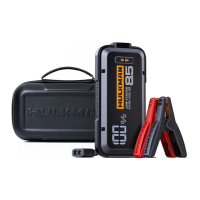
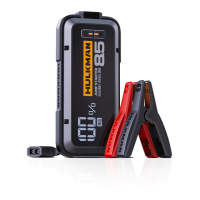
The HULKMAN Alpha 85S is a versatile jump starter and portable power bank designed to provide reliable power for various automotive and electronic needs.

Function Description

Jump Starting a Vehicle: The primary function of the Alpha 85S is to jump start vehicles. To do this, connect the jumper cable to the jump starter and then connect the clamps to the car battery. The device will display "READY" on its screen, indicating it's prepared to start the car engine.

Force Start Function: In situations where the screen doesn't display anything after correctly connecting the clamps to the car battery, the Force Start Function can be used to enter boost mode. This function is activated by simultaneously pressing the Power Button and Flashlight Button for 2-3 seconds. The screen will then show "READY," allowing the user to proceed with engine ignition. It's crucial to note that when using the Force Start Function, auto-detection and safety features are disabled. Before using this function, users should ensure the clamps are correctly connected and the product's battery is above 20%.

USB-A Output Port: The device includes a USB-A output port, allowing it to function as a portable power bank for charging electronic devices. To use this feature, simply plug the charging cable into the USB-A output port and press the Power Button.

12V DC Output Port (Max 15V/10A): The Alpha 85S also features a 12V DC output port, which can power 12V DC appliances. To use this, plug the 12V cigarette lighter socket adapter into the 12V DC output port, connect the 12V DC appliance to the adapter, and then press the Power Button.

LED Flashlight: A built-in LED flashlight provides illumination in various modes. To activate the flashlight, hold the Flashlight Button for 1-2 seconds. Brief presses of the button will cycle through different light modes: 50% Lumen Light, 100% Lumen Light, White Strobe Light, White SOS Light, and Red Strobe Light.

Pre-Heat Tech: The device incorporates Pre-Heat Tech, which automatically activates when the detected temperature is below the ideal operating temperature. An icon will be displayed on the screen during preheating. Once preheating is complete, the screen will show "READY," indicating the device is prepared to jump start the car engine. This feature ensures optimal performance in cold conditions.

Important Technical Specifications

  • Model: Alpha 85S
  • 12V DC Output: Max 15V/10A
  • Operating Temperature Range (Recommended for storage): -40°F to 113°F
  • Battery Voltage for Jump Start: Designed for car batteries between 2-8V.

Usage Features

  • Clear Screen Indicators: The device uses a screen to display status messages like "READY" and error codes, making it easy for users to understand its operational state.
  • Intuitive Button Controls: Simple button presses are used for activating functions such as power output, flashlight modes, and the force start function.
  • Safety Features (Standard Mode): In standard jump-starting mode, the device includes auto-detection and safety features to prevent misuse, such as indicating reversed battery clips.
  • Error Code System: The Alpha 85S provides specific error codes to help users diagnose and resolve issues:
    • Error Code (Reversed Clips): Indicates that the "+" and "-" poles of the battery clips are reversed.
    • Error Code (Low Voltage): Indicates that the car battery voltage is between 2-8V. In this case, the Force Start Function can be used.
    • Error Code (High Temperature/Charging Issues): Indicates that the product's operating temperature is too high (≥113°F) or that the device is being charged at an extremely low or high temperature.
    • Error Code (Safe Mode): Activates if the battery is jump-started more than 5 times within 10 minutes, putting the product into a safe mode.

Maintenance Features

  • Error Resolution Guidance: The manual provides clear solutions for each error code, guiding users on how to rectify problems.
    • Reversed Clips: Reverse the clips and ensure correct connection.
    • Low Voltage: Use the Force Start Function by simultaneously pressing the Power Button and Flashlight Button for 2-3 seconds.
    • High Temperature/Charging Issues: Store the device within the recommended temperature range (-40°F to 113°F) or charge it at room temperature.
    • Safe Mode: The device will automatically exit safe mode after 10 minutes. Users are advised not to turn off the product during this process.
  • Battery Level Check: Before using the Force Start Function, users are instructed to check that the product's battery is above 20%, ensuring sufficient power for the operation.
  • Temperature Management: The Pre-Heat Tech and temperature-related error codes highlight the importance of operating and storing the device within specific temperature ranges to maintain its longevity and performance.

The HULKMAN Alpha 85S is a robust and user-friendly device designed for emergency vehicle starting and portable power needs, with features that enhance safety and usability across various conditions.

Hulkman Alpha 85S Specifications

General IconGeneral
BrandHulkman
ModelAlpha 85S
CategoryRemote Starter
LanguageEnglish

Related product manuals