5
Inside Float is a unique spring–powered counter–balance mechanism. When properly calibrated for the weight of the
desktop and its contents you will be able to raise and lower the work-surface with ease. Once fully assembled:
1. Squeeze the Release Paddle
2. Raise and lower the work-surface a few times
3. Make adjustments to the counter–balance tension as needed:
lift , increase the tension.
lower , decrease the tension.
Increasing counter–balance tension
When you add components to the desktop, you may discover it takes more
effort to lift. If this is the case follow these steps to increase the tension:
1. Squeeze the Release Paddle and raise the work-surface to its full height.
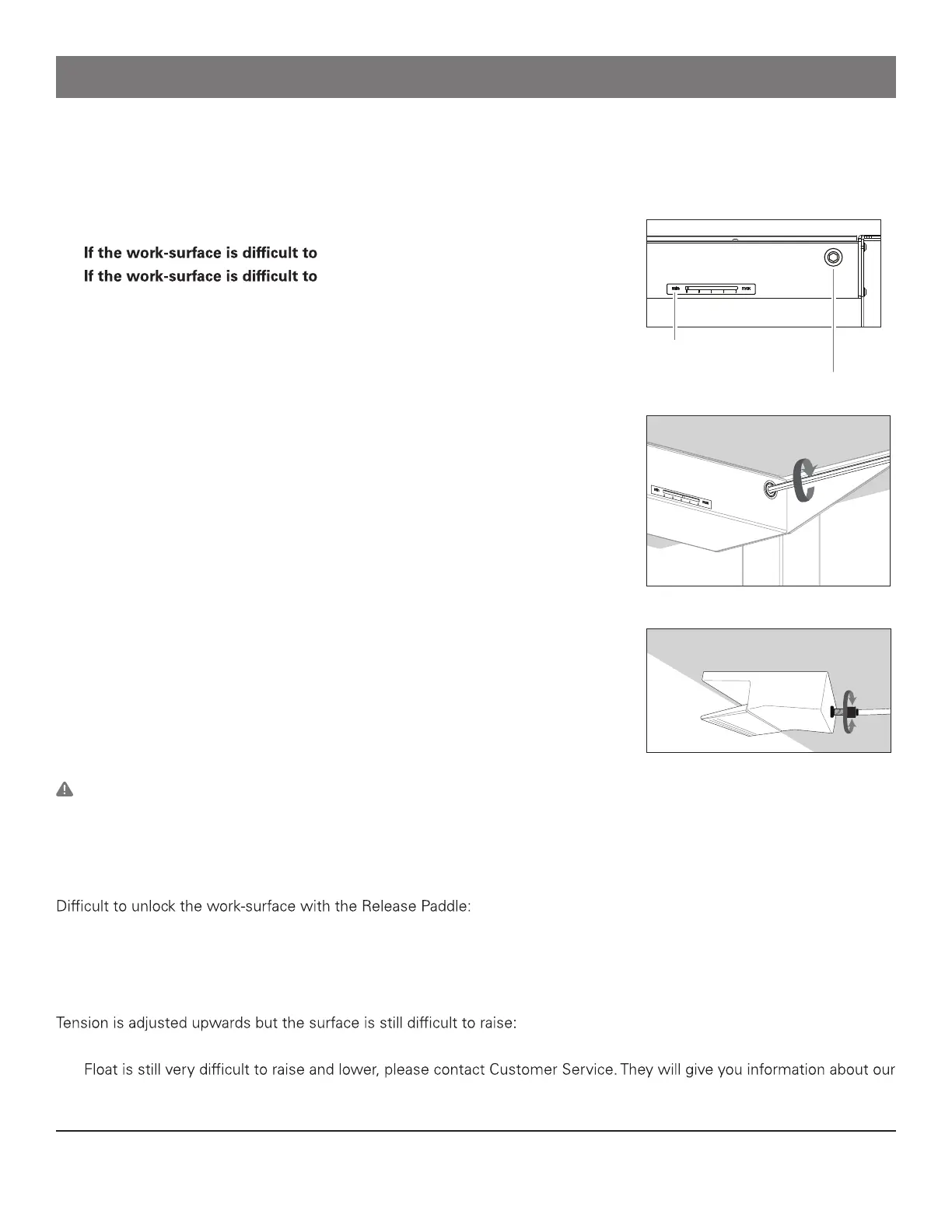
2. Insert the hex drive end of the Tension Adjuster Handle into the Tension
Adjustment Screw. If you have a Mounted Tension Adjuster Handle, unfold
the handle.
3. Rotate your Tension Adjuster Handle slowly in a clockwise direction. (Fig. P)
4. Pay attention to the red needle in the Indicator Window as it moves towards
the max marking.
5. After a few rotations, squeeze the Release Paddle, raise and lower the table
a few times.
6. Determine if further adjustment is necessary.
Decreasing counter–balance tension
If you remove weight from the desktop you may discover the table raises quick -
ly when you squeeze the Release Paddle, or that it requires effort to lower. If
this is the case follow the same adjustment procedure described above, howev -
er, turn the Tension Adjustment Screw counter–clockwise.
Warning: Float will support a maximum weight of 130 lbs. (60 kg), including
the work-surface. Please contact Customer Service for information about our Float Heavy Duty kit which will increase
capacity to 160 lbs. (70 kg)
Troubleshooting Float
• Try gently pushing down, or pulling up on the work-surface as you squeeze the Release Paddle.
• Check the barrel adjuster where the cable exits the back of the Release Paddle (Fig. R) If the cable is too loose the
Release paddle will not function properly when squeezed. Turn the barrel adjuster counter–clockwise until there is
between ¾” (20 mm) and ½” (12 mm) of metal thread exposed.
• If your Float is adjusted so that the Indicator Window is showing the needle at the 3/4 position or higher, and the
Float Heavy Duty kit which can be installed to increase the weight capacity from 130 lbs. (60 kg) to 160 lbs. (70 kg).
Using and calibrating Float
For our terms and conditions please go to https:///www.humanscale.com/about/legal-information/terms-conditions.cfm humanscale.com
GT-NPD-IM-8643-001-R02
Tension Indicator window
Tension Adjustment screw
Fig. N - front view of crossbeam
Fig. P
Fig. R - back of release paddle


 To Previous Page
 Loading...