9
M2/M8 MONITOR ARM
Adjust Base Clamp for Correct Work Surface Depth
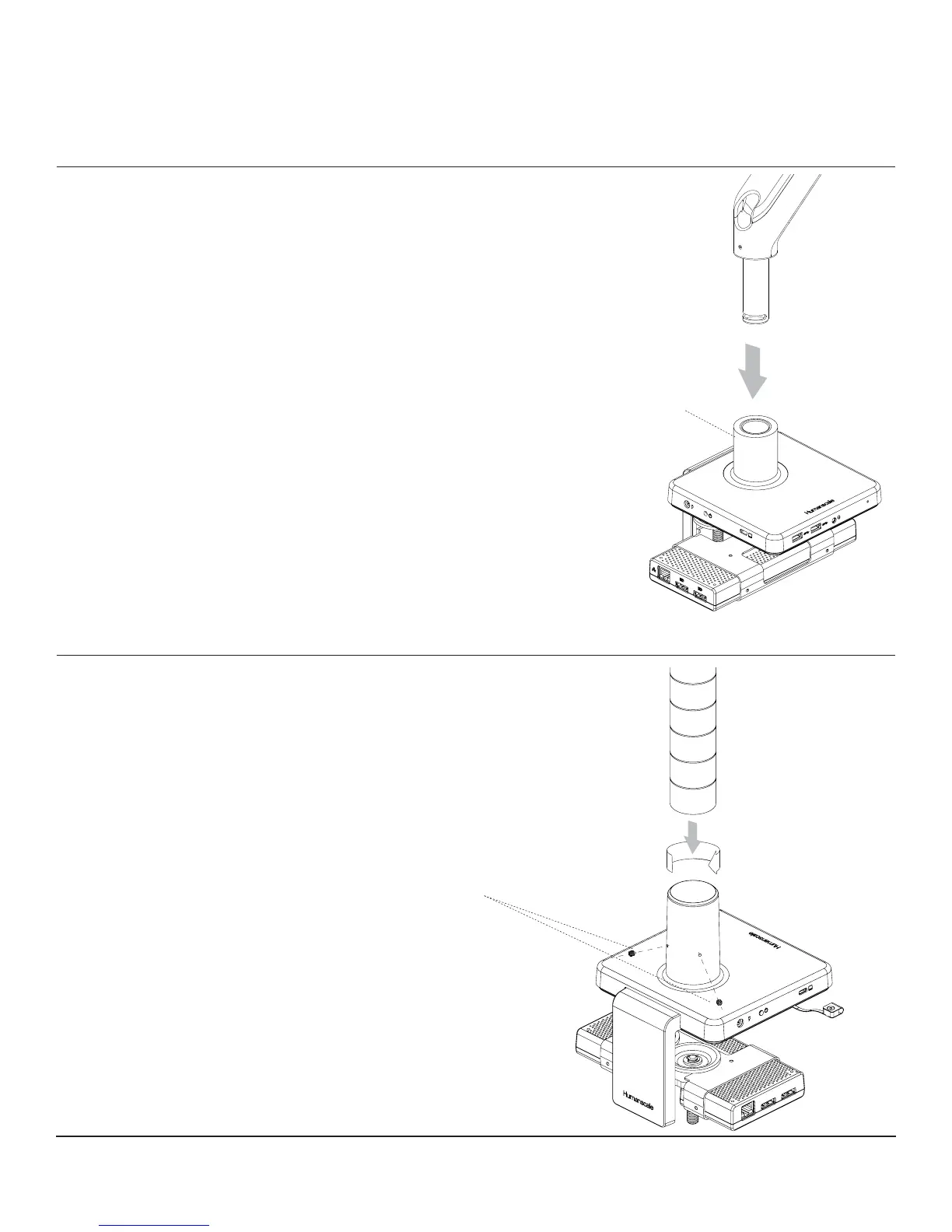
• Remove set screw (g. J) from Base using hex key
• Insert Monitor Arm into the Base stem (g. K) with its slot facing the rear
• Reinsert the set screw and tighten until it seats
and the 180º stop* is engaged
(*arm won't be able to swivel past the rear desk edge)
• Proceed to the "Attach VESA Bracket to Monitor" step
in the main M8 instruction guide
J
K
M/FLEX MONITOR ARM
Adjust Base Clamp for Correct Work Surface Depth
• Back out the two set screws installed in stem (g. L)
• Insert M/Flex post (g. M) into Base and twist onto internal bolt until fully seated
• Tighten both set screws evenly (g. L) to secure post using hex key
L
M
ATTACHING A MONITOR ARM TO M/CONNECT 2


 To Next Page