6
Assembly Instructions
Installing M/Connect Onto Edge of Table
Clamp Mount
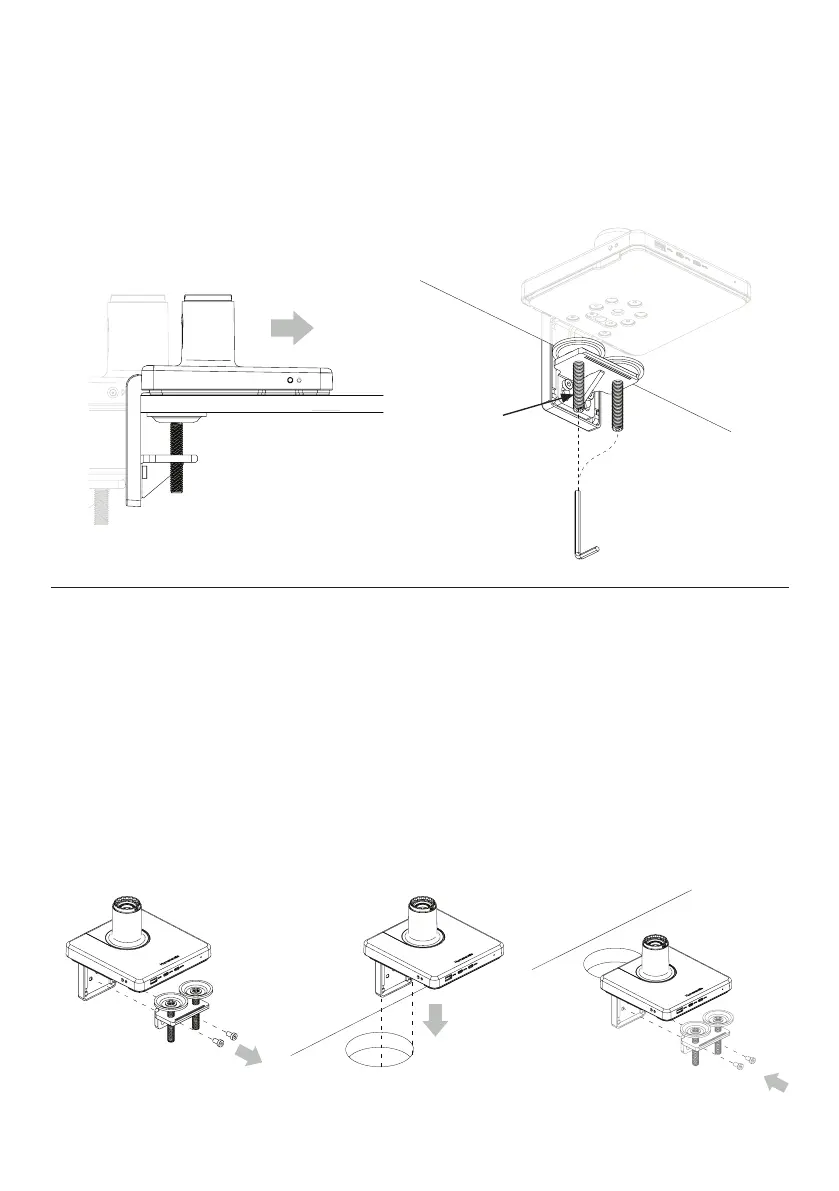
A - For installation on open edge of work surface:
1
Slide Mount against work surface edge. ①
2
Fully tighten Clamp screws(A) with 4mm hex key. ②
A
①
②
B - For installation on work surface positioned against a wall or through a grommet hole:
NOTE: Grommet holes must be at least 3” wide
1
Remove the two screws using hex key and detach the clamp foot bracket from the L bracket. ③
2
Place the L bracket through the desk gap or the grommet hole and slide it towards the front as far as possible. ④
3
Underneath the work surface, reattach the clamp foot bracket to the L bracket using the screws from step 1. ⑤
4
Fully tighten the clamp feet against the work surface.
③ ④ ⑤



 To Next Page