7
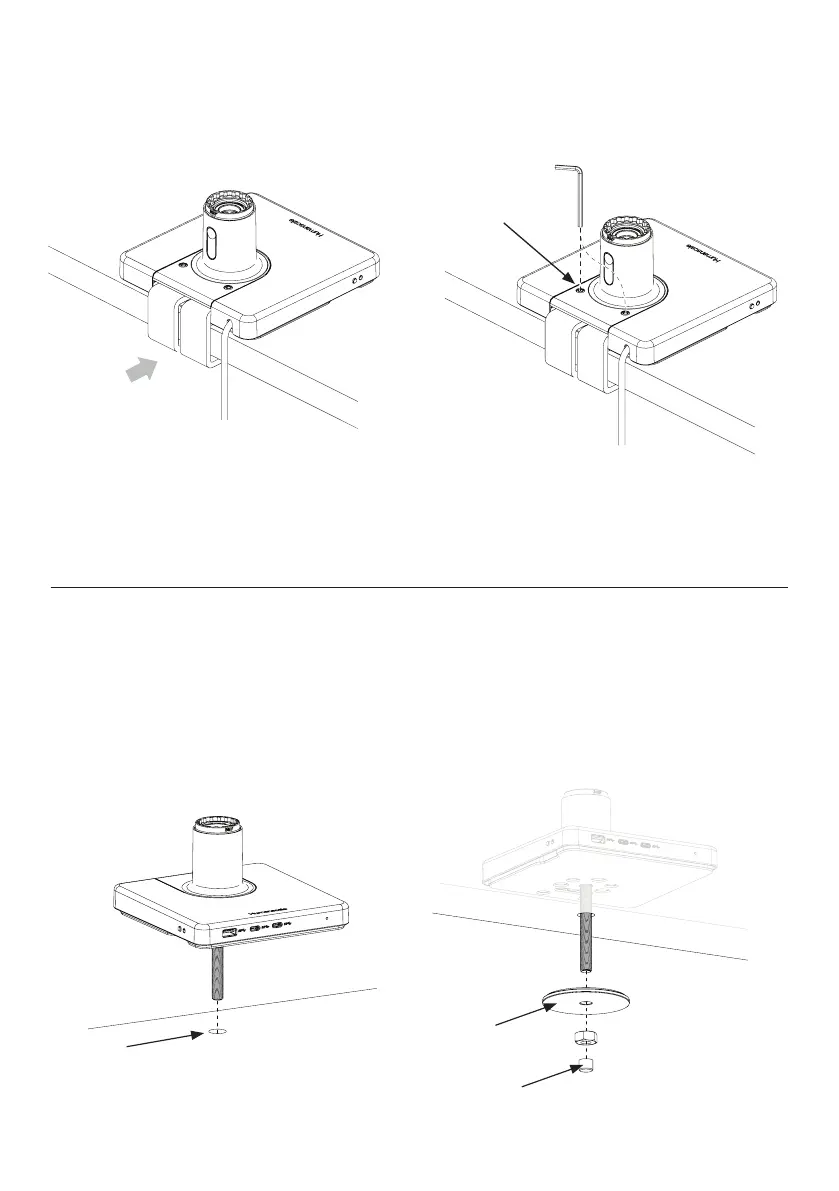
Bolt-Through Mount
1
Drill 1/2” hole in desired location
NOTE: To ensure M/Connect makes full contact with desk, locate hole at least 2” away from back edge of desk.
2
Lower M/Connect onto desk aligning bolt with hole. ③
3
Slide the Bolt-Through Plate (C) over the bolt and tighten the nut ④
4
Place the protective cap (D) over the bottom of the bolt. ④
Sliding Desk Mount
1
Slide unit with loosely mounted bracket against work surface edge. ①
2
Tighten both set screws (B) evenly into bracket to a snug fit. ②
B
①
②
½ inch hole
C
④
③
D



 To Next Page