8
E E
Attaching a Monitor Arm to M/Connect
CAUTION: Maximum weightload of M/Connect is as follows:
M2.1: 15.5 lbs. - M8.1: 28 lbs. - M10: 40 lbs. - M/Flex: 60 lbs. total
M10 is not to be used on M/Flex when mounted to M/Power
DO NOT exceed maximum weight limits.
When used in conjunction with M/Connect, M/Flex Post must be
limited to 24 inches.
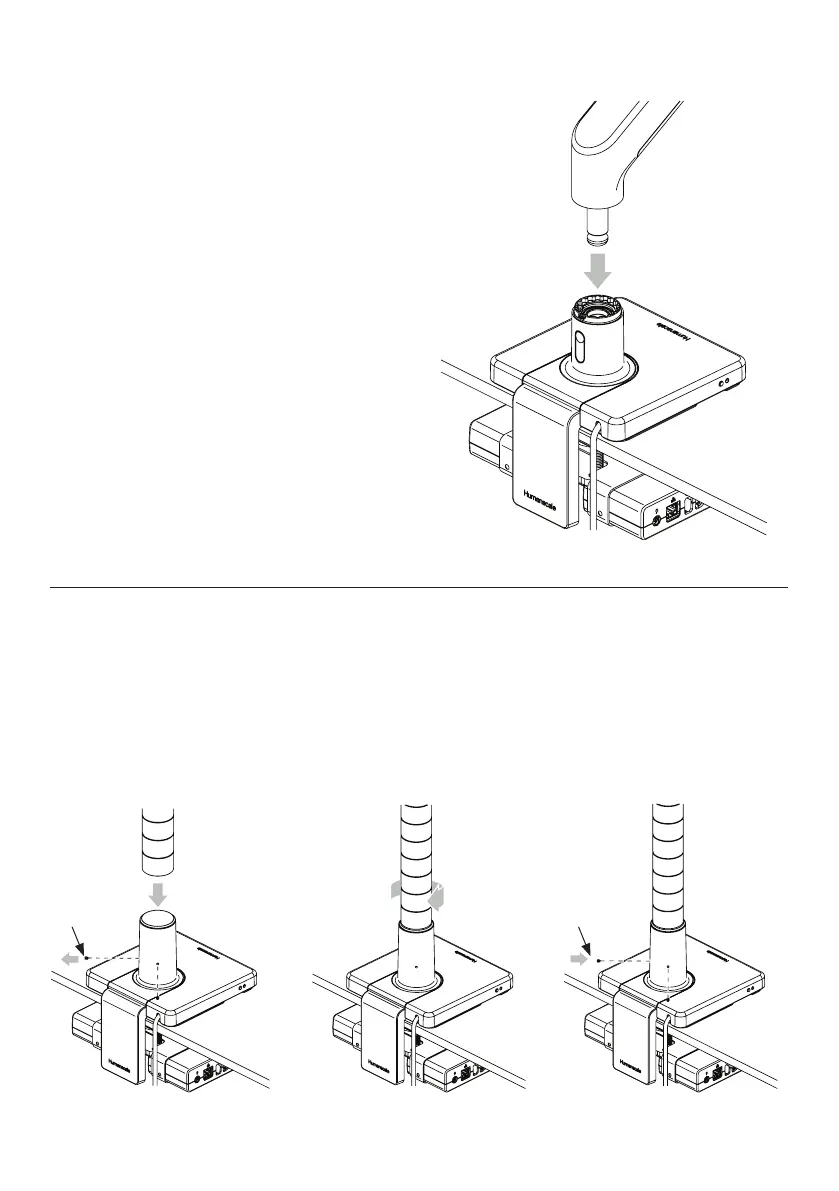
M2.1/M8.1/M10 Monitor Arm
1
Refer to monitor arm instructions to setup Smart Stop Ring.
2
Insert Monitor Arm into the base stem until it clicks into
place. ①
3
Refer to monitor arm instructions to continue installation.
M/Flex Post
1
Loosen the two set screws (E) in M/Flex stem. ②
2
Insert the M/Flex post into the base stem and twist clockwise onto internal
bolt until fully seated. ③
3
Tighten both set screws evenly to secure post. ④
4
Refer to monitor arm instructions to continue installation.
④
①
② ③



 To Next Page