M|Connect Troubleshooting Guide
Humanscale: M|Connect Troubleshooting Guide – Revision 4, March 7, 2018
12
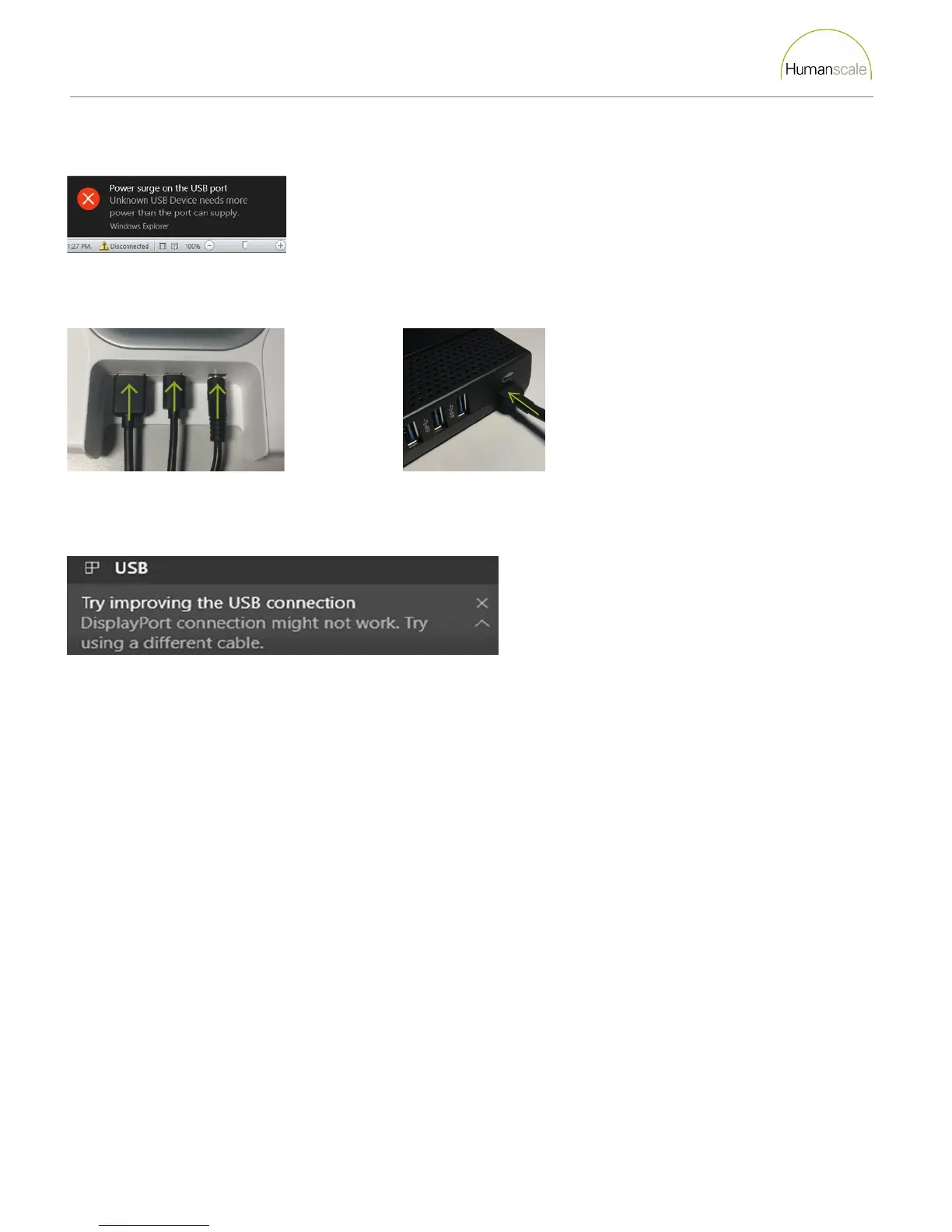
Warning About USB Power Surge
Question 1: Are the bridge cables loose or pinched?
1. Loose cable connectors or pinched bridge cables can cause this error message. Check that the connections are secure and
that the cables are not pinched by any of the parts of the clamp.
2. After encountering this error message the user must click the reset button before the computer can connect to another
dock.
M/Connect 1 M/Connect 2
Warning About DisplayPort Over USB
The M/Connect is not a device that utilizes video Alt Modes. This message can be ignored.
There Is No Video On The External Display(s).
Check the video connection cables.
Power cycle the M|Connect.
The Video On The External Display(s) Is Distorted.
Check the video connection cables.
Check the resolution settings.
The Audio Jack Is Not Functioning.
Ensure that the Humanscale Audio is available and set to default.
USB Ports On The M|Connect Are Not Functioning.
Disconnect and reconnect the M|Connect.
Power cycle the M|Connect.
Update the USB 3.0 Host Controller driver to the latest version.



 To Next Page