4
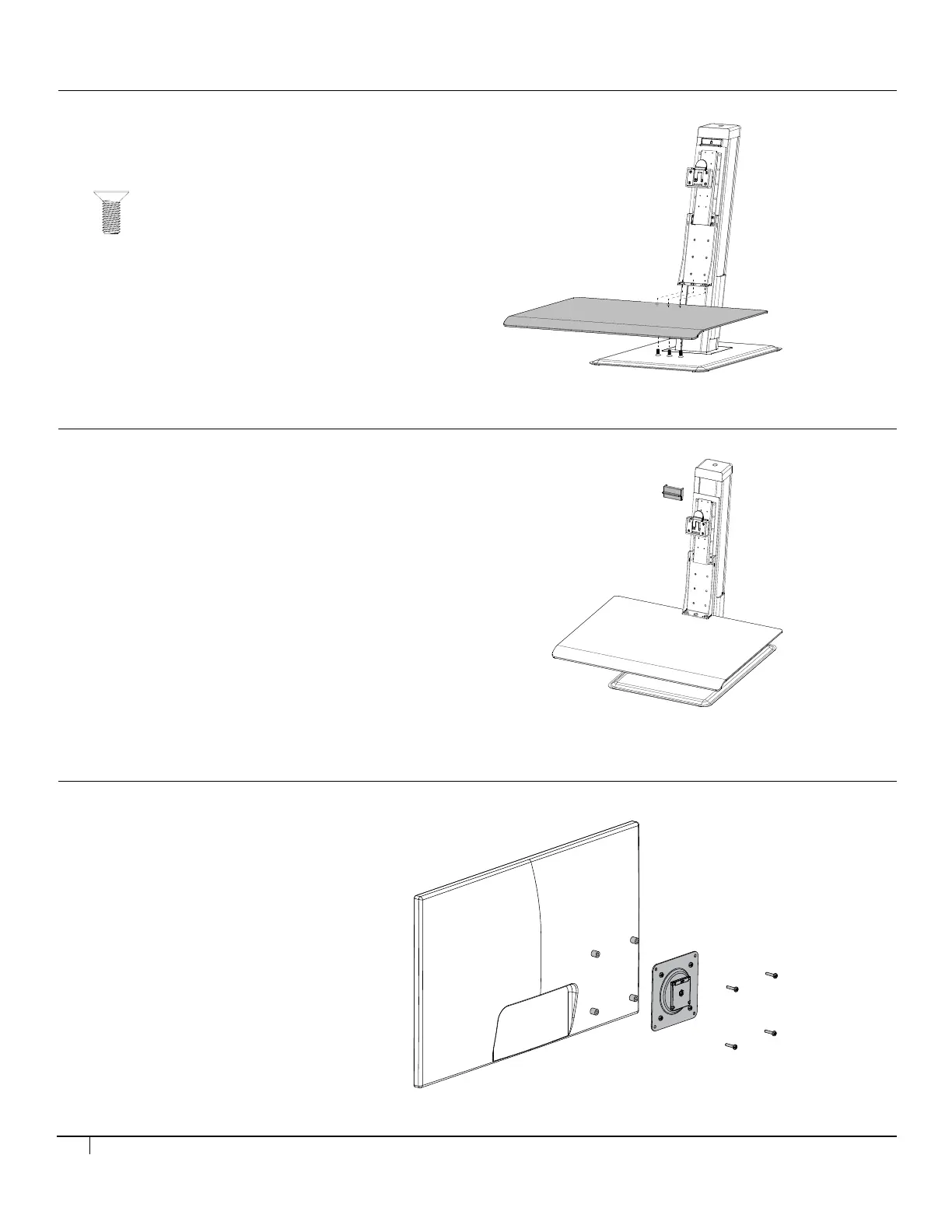
Step 4
Push the keyboard platform lower to remove the lock piece and discard it.
Step 3
Place the keyboard platform under the bracket and secure it with 3 screws
with the 6mm ball point hex key.
X 3
Step 4
Push the keyboard platform lower to remove the lock piece and discard it.
Step 3
Slide the keyboard platform onto the bracket and secure it with 3 screws.
STEP 3
• Place the keyboard platform under the bracket and secure
it with 3 screws using the 6 mm ball point hex key.
STEP 4
• Push the keyboard platform lower to remove the lock piece and discard it.
STEP 5
• Attach the Vesa plate onto the monitor(s).
Step 5
Install the Vesa plate onto the monitor(s).
Step 6 (for single monitor)
Attach the monitor to the unit.
Step 4
Push the keyboard platform lower to remove the lock piece and discard it.
Step 3
Place the keyboard platform under the bracket and secure it with 3 screws
with the 6mm ball point hex key.
X 3


 To Next Page