Electro-hydraulic system (option)
92
Operation: chassis
4
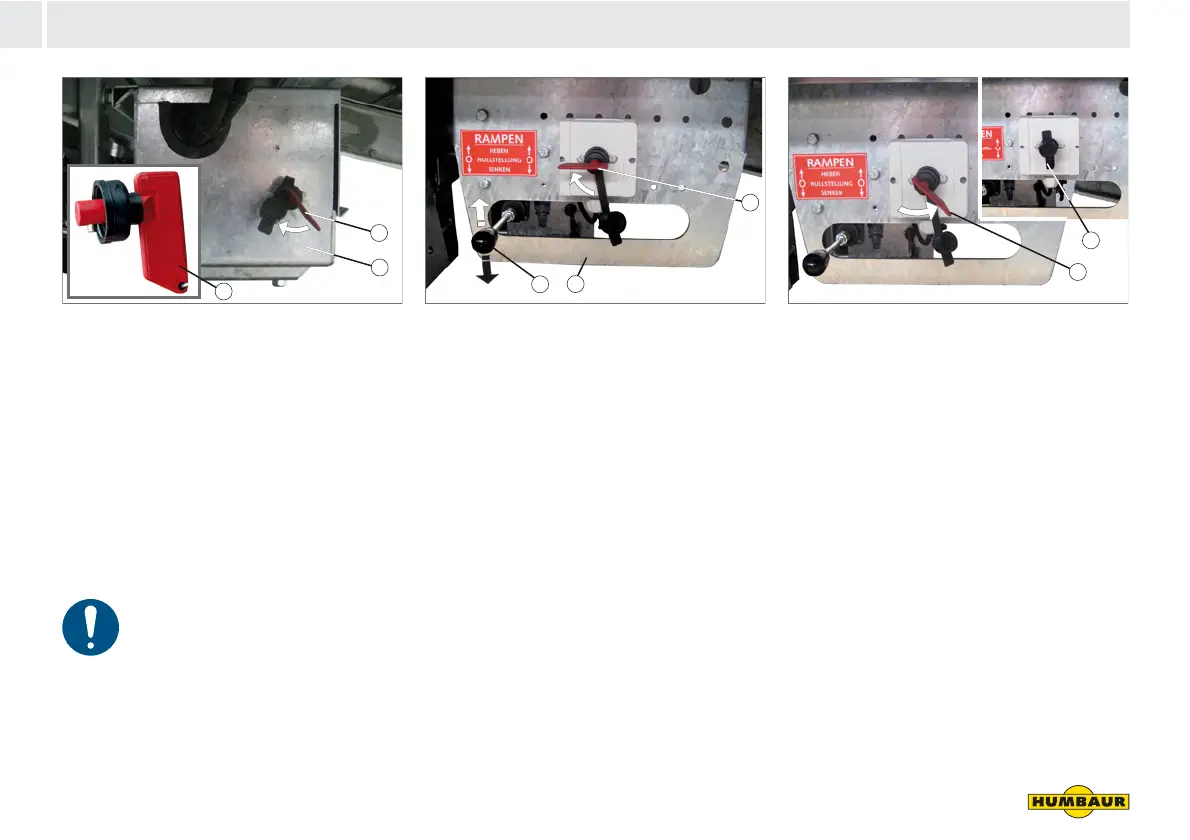
Fig. 37 Electro-hydraulic unit activated
1 Main power switch
2 Electro-hydraulic unit box
3 Socket key
Activating
Insert the socket key (Fig. 37/3).
Turn the main power switch (Fig. 37/1)
to ON.
Deactivating
The power must be interrupted
during extended breaks or
periods of non-use.
Turn the main power switch to OFF
and remove the socket key.
Attach the protective cap.
Fig. 38 Operating point
1 Main power switch (ON)
2 Operating point
3 Operating lever for drive-up ramps
Operating point activation
Insert the socket key and turn the
power switch (Fig. 38/1) to ON.
Actuate the operating lever (Fig. 38/3)
for drive-up ramps - see section
entitled Body starting on page 165.
Fig. 39 Operating point
1 Main power switch (OFF)
2 Cap
Operating point deactivation
Turn the power switch (Fig. 39/1) to
OFF.
Remove the socket key.
Attach the protective cap (Fig. 39/2).
Keep the socket key in a safe place.
1
2
3
1
3
2
2
1



 To Next Page