23 Control Head Setup
HELIX Series
1. Main Menu: Press the MENU key twice.
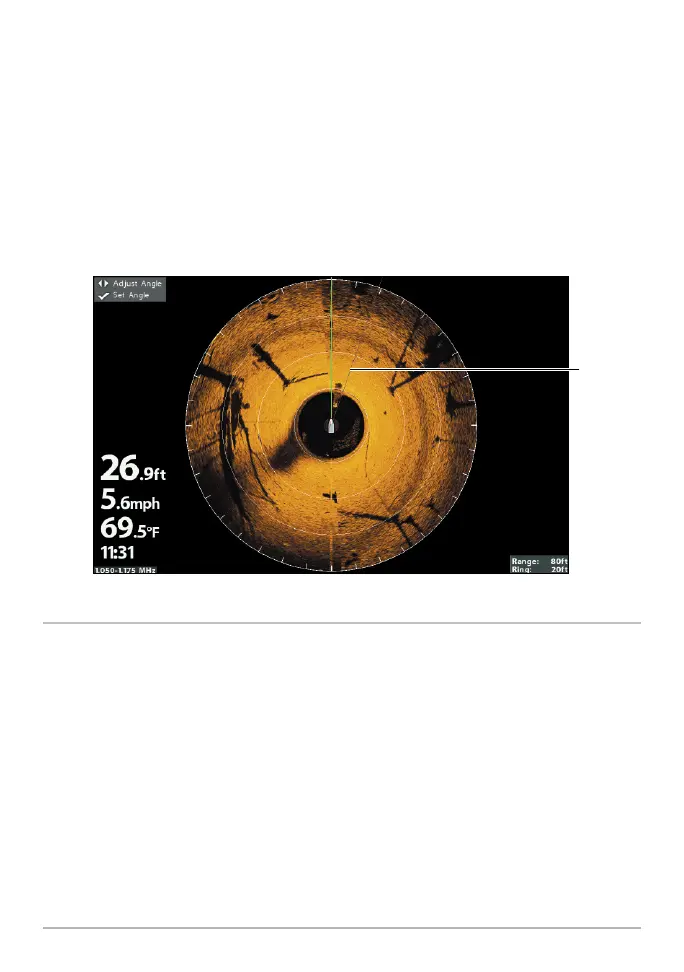
2. Select the Accessories tab > MEGA 360 Settings > 360 Heading Offset.
3. Press the RIGHT or LEFT Cursor keys to change the angle (gray line), and
press the CHECK/INFO key to confirm your setting. The zero point on the
display is represented by a green line.
MEGA 360 Imaging Heading Offset (HELIX)
360 heading
offset angle
5. Set up the Network
After you have confirmed all connections, the MEGA 360 Imaging transducer is
ready to use on the water. Proceed to your MEGA 360 Operations Manual to set
up the depth source, temperature source, and additional sonar sources.











 To Next Page