EasyManua.ls Logo

Hunter GPS-DTR 25000 - User Manual

Hunter GPS-DTR 25000
3 pages
Print Icon
To Next Page IconTo Next Page
Loading...
DOG TRAINING COLLAR WITH GPS TRACKER
MODELS: GPS-DTR 25000-25002-25003 (GPS and Training Function)
GPS 25000-25002-25003 (No Training Function)
PRODUCT INCLUDES:
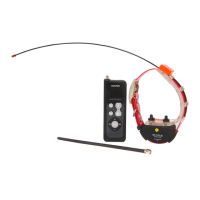
Collar, USB Charger, USB Cable, Adapter
Remote Control and antenna, long/short probes if trainer
PREPARING THE GPS-TRAINING COLLAR FOR FIRST USE
Charge the collar for 7-8 hours. The battery has a standby time of 20 hours when fully charged. Connect the
small USB adapter to the USB cable, and then the cable to the USB charger. Then connect the charger to the
collar as shown on the picture below. Lift the orange plastic protective cover and connect the charger. Now
switch on the collar. To switch it on, hold for 1 second the back side of the remote control at the USB output
(where the built-in magnet is), at the point where the collar indicator led is. Then remove the remote control.
The red indicator led of the collar will continuously light showing that the device is charging. In order to
complete a full charge you need to switch off the collar with the remote control magnet.
After 7-8 hours of charging, remove the charger. To switch off the collar, hold for 4 seconds the remote
control part (where the built-in magnet is) at the point where the collar indicator led is.
Question and Answer IconNeed help?

Do you have a question about the Hunter GPS-DTR 25000 and is the answer not in the manual?

Summary

Preparing the GPS-Training Collar for First Use

Charging and Initial Setup

Details charging the collar for 7-8 hours and switching it on using the remote magnet.

Pairing and Use the GPS-Training Collar

Collar Pairing Procedure

Instructions for re-pairing the collar with the remote control, including sync steps and indicators.

Command Transmission and Level Adjustment

Explains sending commands and adjusting shock levels from 1 to 8 via the remote.

Tips for Using the GPS-Training Collar

Collar Fit and Probe Contact

Guidance on collar placement, ensuring probe contact for effective stimulus delivery.

Determining Optimal Stimulation Level

Steps to find the correct shock level for the dog, starting from level 1.

Maintenance and Storage Advice

Recommendations for charging frequency, storage, and preparation before use.

GPS Tracker Functionality

Mobile App Synchronization

Steps to connect the remote to a mobile device via Bluetooth and use the companion app.

GPS Data Interval Configuration

How to select the time interval for receiving GPS location data through the app.

Warranty Information

Overview

This document describes a GPS dog training collar, available in models GPS-DTR 25000-25002-25003 (with GPS and training functions) and GPS 25000-25002-25003 (with GPS function only). The device is designed for hunting dogs and is suitable for use in harsh conditions, including rain and dense vegetation. It is lightweight and durable, accommodating both small and large dogs.

Function Description:

The primary function of this device is to provide GPS tracking and, in specific models, training capabilities for dogs. The GPS function allows users to track their dog's position on a map via a mobile application. The training function includes shock and sound commands, which can be adjusted in intensity.

GPS Tracking:

The collar features a built-in GPS antenna, while the remote control incorporates a Bluetooth module. The remote control communicates with a mobile phone or tablet running Android 4.4 or later with Bluetooth version 4 or 5. To use the GPS tracking feature:

  1. Download and install the dedicated app on your mobile device.
  2. Turn on the remote control.
  3. Launch the application.
  4. Select "Start Scan" and tap the Bluetooth icon to connect to the remote control.
  5. Once connected, a dog's head icon will appear on the map within the app, indicating the dog's position. For accurate tracking, the collar must be outdoors and facing the sky.
  6. Tapping the dog's head icon on the app displays the distance between the user and the collar. The GPS information packet time interval can be configured within the app, with options ranging from 2 seconds (for "10") to 60 seconds (for "2"). Other selectable intervals include 30 seconds ("3"), 20 seconds ("4"), and 15 seconds ("5").

Training Function (for GPS-DTR models):

The training function allows users to send shock and sound commands to the collar via the remote control.

  • Shock Command: The intensity of the shock can be adjusted from level 1 (lowest) to level 8 (highest) using the number buttons on the remote control.
  • Sound Command: A distinct sound can be emitted from the collar.
  • Combined Command: The remote control also supports a combined sound and shock command. Each time a command (audio, push button, or audio + shock) is sent, the remote control screen flashes, confirming transmission to the collar.

Important Technical Specifications:

  • Battery Life: The collar battery has a standby time of 20 hours when fully charged. The remote control battery life is not explicitly stated but requires 4-5 hours of charging.
  • Range: The device has a maximum range of 25 km for tracking and command transmission.
  • Compatibility: The mobile application is compatible with Android 4.4 or later and Bluetooth version 4 or 5.
  • Multi-Collar Control: The remote control can manage up to 9 collars.
  • Shock Levels: 8 adjustable shock levels (1-8), with 1 being the lowest and 8 the highest.

Usage Features:

First Use and Charging:

  • Collar Charging: Before first use, charge the collar for 7-8 hours. Connect the small USB adapter to the USB cable, then to the USB charger, and finally to the collar. Lift the orange plastic protective cover on the collar to access the charging port.
  • Collar Power On/Off: To switch on the collar, hold the back of the remote control (where the built-in magnet is) at the collar's indicator LED for 1 second. To switch off, hold for 4 seconds at the same point.
  • Remote Control Charging: Charge the remote control for 4-5 hours by connecting the charger to its USB connector on the top.

Pairing (if needed):

The collar and remote control are pre-paired. If re-pairing is required:

  1. Switch on the remote control and then the collar. The collar's red indicator LED will flash.
  2. Press the "screen light" button on the remote control for 4-5 seconds; the speaker icon on the screen will flash, indicating tuning mode.
  3. Hold the back of the remote control (magnet side) at the collar's indicator LED for 10 seconds.
  4. Remove the remote control. If you hear three consecutive beeps from the collar, press the "shock command" button for 2 seconds. A single beep confirms successful synchronization.
  5. Repeat for additional collars if necessary.
  6. Press the "audio command" button to exit tuning mode and return to normal operation.

Collar Placement:

  • Position the collar on the bottom of the dog's neck, facing the ground.
  • Ensure the two probes make direct contact with the dog's skin to deliver the stimulus effectively.
  • The collar should be tight. If the dog has long fur, trim it slightly around the probe area.
  • Use short or long probes depending on the dog's fur length.

Finding the Right Power Level:

  • Start with level 1. If there's no reaction, increase to level 2, and so on, until the dog shows a reaction.
  • If level 8 (highest) produces no reaction, check the collar placement to ensure proper skin contact.

Maintenance Features:

  • Charging Frequency: It is recommended to charge the collar and remote control prior to each use. During periods of non-use, charge the devices once a month.
  • Storage: Store the devices in a dry place with temperatures below 40 degrees Celsius, always charged.
  • Warranty: The device comes with a 1-year warranty and offers quick service after the warranty expires. The warranty does not cover the built-in rechargeable batteries of the collar and remote control.

Hunter GPS-DTR 25000 Specifications

General IconGeneral
BrandHunter
ModelGPS-DTR 25000
CategoryPet Care Product
LanguageEnglish

Related product manuals