EN
4 – English
PROCEDURES
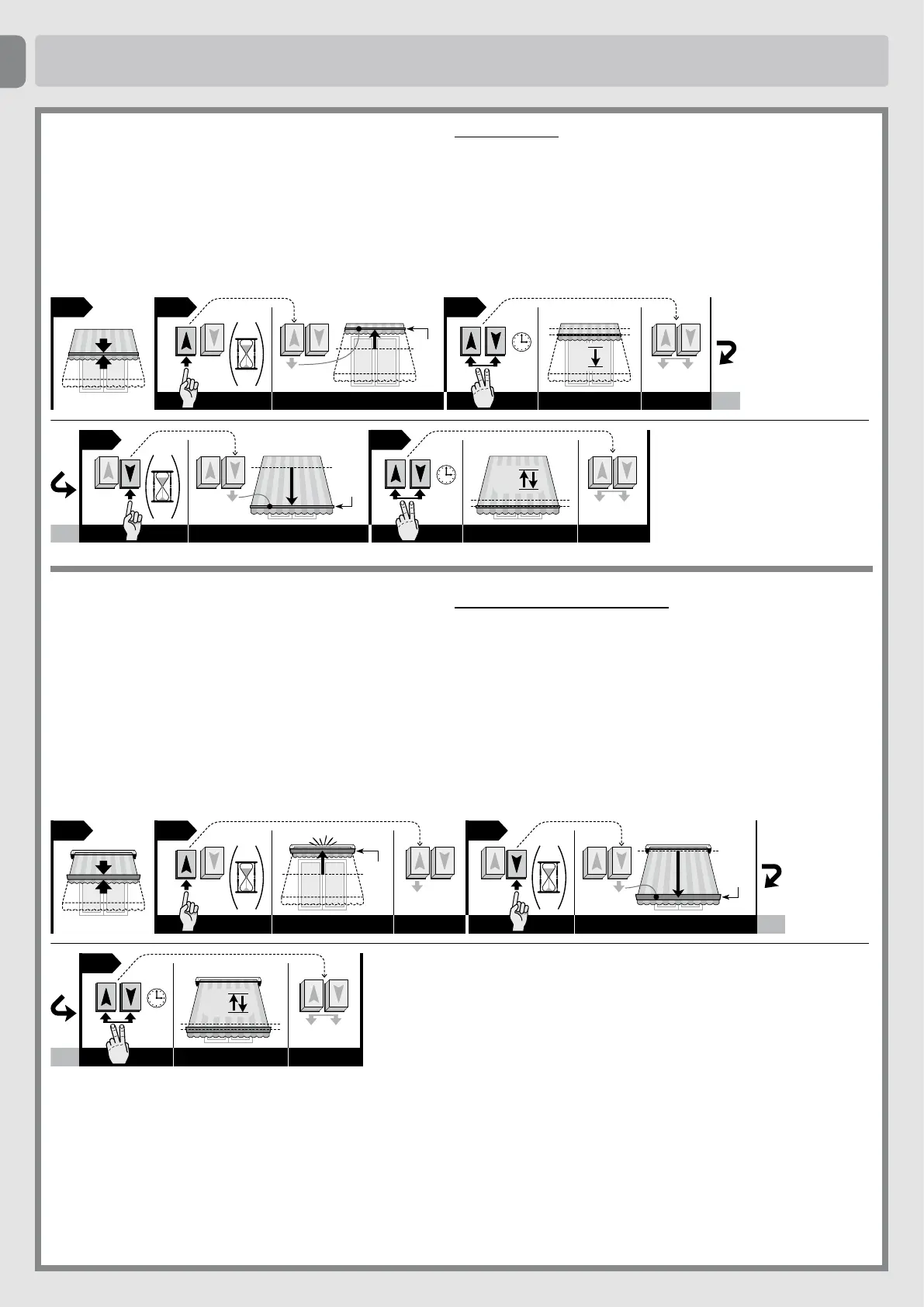
5.3 - Programming limit positions “0” and “1” MANUALLY
Caution! • This programming is recommended for awnings without casings. • The high limit switch (0) or the low limit switch (1) can be memorised at
the beginning according to your needs. • The RDC function cannot be enabled in these cases.
01. UsetheUp or Down button to move the awning to the point of mid-travel. Note - during movement, 2 brief interruptions indicate that no limit position is memo-
rised.
02. Press and hold the Up pushbutton until the awning moves to the required limit position, then release the button.
03. Press and hold the two Up and Down pushbuttons simultaneously until the motor has completed a short down movement, then release.
04. Press and hold the Down pushbutton until the awning moves to the required limit position, then release the button. Note - during movement, 1 brief interruption
indicates that only one limit position is memorised.
05. Press and hold the two Up and Down pushbuttons simultaneously until the awning has completed one short up and down movement, then re lease.
“0”
5
sec.
0201 03
05
5
sec.
1
“1”
04
THE
END
2
5.4 - Programming limit positions “0” and “1” SEMI-AUTOMATICALLY
Caution! • This programming mode is recommended for awnings with boxes. • Program rst position “0” followed by position “1”.
• (The “RDC” function remains enabled)
01. UsetheUp or Down button to move the awning to the point of mid-travel. Note - during movement, 2 brief interruptions indicate that no limit position is memo-
rised.
02. Press and hold the Up pushbutton until the aw ning stops on impact with limit switch “0”; then release the button.
03. Press and hold the Down pushbutton until the awning moves to the required limit position (“1”); then release the button.
04. Press and hold the two Up and Down pushbuttons simultaneously until the awning has completed one short up and down movement, then release.
02 03
01
“1”
5
sec.
04
THE
END
2
“0”
• (It disables the “RDC” function)
01. UsetheUp or Down button to move the awning to the point of mid-travel. Note - during movement, 2 brief interruptions indicate that no limit position is
memorised.
02. Press and hold Up and wait for the awning to stop on impact with the limit switch “0”(donotreleasethebutton!).
03. With the Up button still pressed, press and hold the Down button at the same time and wait for the awning to complete a short down movement; then release
the two buttons.
04. Press and hold the Down pushbutton until the awning moves to the required limit position (“1”); then release the button.
05. Press and hold the two Up and Down pushbuttons simultaneously until the awning has completed one short up and down movement, then release.



 To Next Page