EN
English – 5
“1”
04
02
01
05
5
sec.
03
THE
END
1
“0”
5
sec.
2
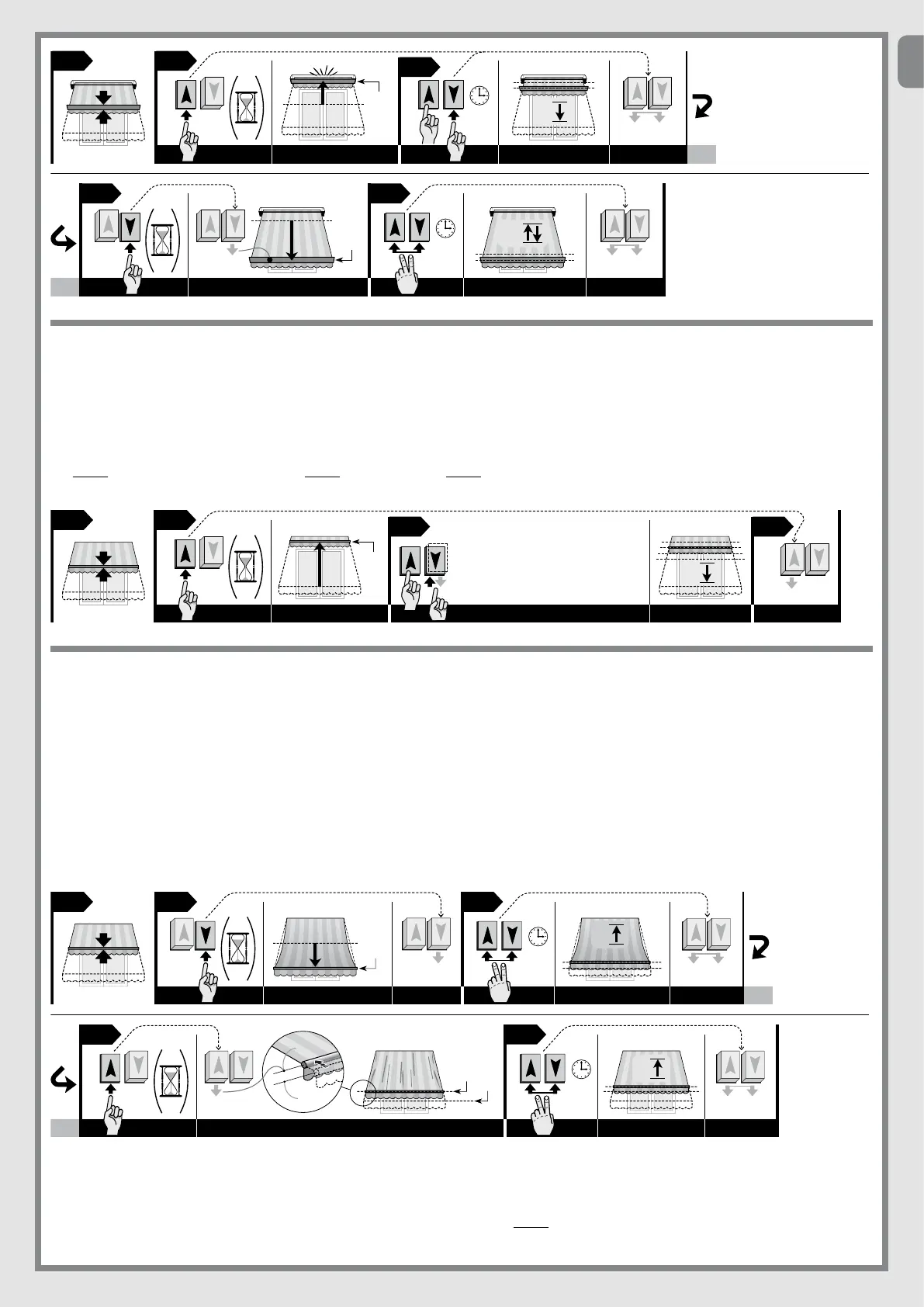
5.5 - Setting force on closure: “RDC” function
Caution! - The “RDC” function level can only be personalised after programming the limit position values “0” and “1”.
01. UsetheUp or Down button to move the awning to the point of mid-travel.
02. Press and hold the Up pushbutton until the aw ning reaches limit position “0” (do not release the button).
03. Then, with the Ascent button still pressed, press the Descent button the number of times as the level to be selected (press each time for 1 second, with a pause
of 1 second before pressing again). With the Up button still pressed, wait until the awning completes the same number of movements (in the down direction) as
the new level set. The levels available are:
level 1=maximumforce(factorysetting.)/level 2 = medium force / level 3 = minimum force
04. Then release the Up button.
x 1 = forza massima /
x 2 = forza media /
x 3 = forza minima /
04
0201
03
1/2 /3
THE
END
“0”
?
5.6 - Tensioning the fabric: “FRT” function (position “2”)
This function is used to tension the awning canvas when open. The function is activated by programming position “2”inEraStarT.
Duringuseoftheautomation,whentheawningopens,themotormovesitrsttoposition“1” and then immediately tensions the canvas by automatically activating a
short up movement to position “2”.
Caution! - The “FRT” function level can only be set after programming the limit position values “0” and “1”.
• To activate the “FRT” function
01. UsetheUp or Down button to move the awning to the point of mid-travel.
02. UsetheDown button to move the awning to position “1”.
03. Press and hold both the Up and Down buttons until the awning performs a short up movement and then release the buttons.
04. UsetheUp button to close the awning by a few centimetres, until the canvas can be seen to be adequately tensioned (this will be position “2”).
05. Press and hold both the Up and Down buttons until the awning performs a short up movement and then release the buttons.
04
THE
END
0201
“2”
(1)
03
5
sec.
5
sec.
05
1
1
“1”
• To deactivate the “FRT” function
01. UsetheUp or Down button to move the awning to the point of mid-travel.
02. Press and hold both the Up and Down buttons until the awning performs a short up movement and then release the buttons.
03. Press and hold the Down button to move the awning to limit position “1” and release at exactly the time at which the awning stops at this limit.
04. Press and hold both the Up and Down buttons until the awning performs a short up movement and then release the buttons.
Note – After cancelling position “2” the awning will move between the limit positions “0” and “1”.
x 1=maximumforce/
x 2 = medium force /
x 3 = medium force /



 To Next Page