Nantucket
™
, Pirouette
®
, and Silhouette
®
Window Shadings
Nantucket
™
, Pirouette
®
, and Silhouette
®
Window Shadings
Nantucket, Pirouette, and Silhouette
13
Roller, Screen, Pleated,
Solera
™
, and Vignette
®
Shades
This section includes additional operating information for the
following PowerRise
®
products:
■ Nantucket
™
window shadings
■ Pirouette
®
window shadings
■ Silhouette
®
window shadings
Radio Control Operation
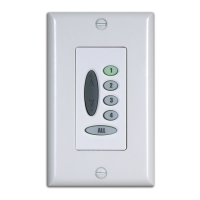
Press and release the assigned group button (or the ALL button to
select all groups) and press UP
to open the shadings or
DOWN
to close the shadings. To stop a moving shading, press
the group button again, then press the opposite
or button.
Opening Vanes
1. When the shading is in the fully closed position with the vanes
closed, press and release the assigned group button.
2. Press and release the DOWN
button. The shading remains
closed while the vanes open to allow more light.
Closing Vanes
1. When the shading is in the fully closed position with the vanes
open, press and release the assigned group button.
2. Press and release the UP
button. The shading remains
closed while the vanes close for increased privacy.
Adjusting Vanes
1. Press the assigned group button.
2. Press the UP
or DOWN button to start adjusting
thevanes.
3. Press the opposite
or button to stop the vanes in the
desired position.
Note: Vane alignment between shadings may not be exact.
Note: The Platinum
™
wireless wall switch will not operate
PowerRise systems set to Infrared Channel B.


 To Next Page